---
service: "Publicasta"
schema_version: "1.0"
article_id: 184
title: "Manufacturer Server vs Third-Party GPS Tracking Platform"
language: "en"
default_language: "en"
canonical_url: "https://publicasta.com/livegpstracks/manufacturer_server_vs_third_party_gps_tracking_platform?lang=en"
json_url: "https://publicasta.com/livegpstracks/manufacturer_server_vs_third_party_gps_tracking_platform.json?lang=en"
api_url: "https://publicasta.com/api/public/v1/channels/livegpstracks/articles/manufacturer_server_vs_third_party_gps_tracking_platform?lang=en"
channel_url: "https://publicasta.com/api/public/v1/channels/livegpstracks"
channel_articles: "https://publicasta.com/api/public/v1/channels/livegpstracks/articles"
search_url: "https://publicasta.com/api/public/v1/search"
documentation_url: "https://publicasta.com/api-docs#reading-publicasta"
openapi_url: "https://publicasta.com/api-docs/openapi.json"
published_at: "2026-07-24T10:30:02+00:00"
updated_at: "2026-07-24T10:30:02+00:00"
translations:
- language: "de"
html_url: "https://publicasta.com/livegpstracks/manufacturer_server_vs_third_party_gps_tracking_platform?lang=de"
markdown_url: "https://publicasta.com/livegpstracks/manufacturer_server_vs_third_party_gps_tracking_platform.md?lang=de"
json_url: "https://publicasta.com/livegpstracks/manufacturer_server_vs_third_party_gps_tracking_platform.json?lang=de"
- language: "en"
html_url: "https://publicasta.com/livegpstracks/manufacturer_server_vs_third_party_gps_tracking_platform?lang=en"
markdown_url: "https://publicasta.com/livegpstracks/manufacturer_server_vs_third_party_gps_tracking_platform.md?lang=en"
json_url: "https://publicasta.com/livegpstracks/manufacturer_server_vs_third_party_gps_tracking_platform.json?lang=en"
- language: "es"
html_url: "https://publicasta.com/livegpstracks/manufacturer_server_vs_third_party_gps_tracking_platform?lang=es"
markdown_url: "https://publicasta.com/livegpstracks/manufacturer_server_vs_third_party_gps_tracking_platform.md?lang=es"
json_url: "https://publicasta.com/livegpstracks/manufacturer_server_vs_third_party_gps_tracking_platform.json?lang=es"
- language: "fr"
html_url: "https://publicasta.com/livegpstracks/manufacturer_server_vs_third_party_gps_tracking_platform?lang=fr"
markdown_url: "https://publicasta.com/livegpstracks/manufacturer_server_vs_third_party_gps_tracking_platform.md?lang=fr"
json_url: "https://publicasta.com/livegpstracks/manufacturer_server_vs_third_party_gps_tracking_platform.json?lang=fr"
- language: "it"
html_url: "https://publicasta.com/livegpstracks/manufacturer_server_vs_third_party_gps_tracking_platform?lang=it"
markdown_url: "https://publicasta.com/livegpstracks/manufacturer_server_vs_third_party_gps_tracking_platform.md?lang=it"
json_url: "https://publicasta.com/livegpstracks/manufacturer_server_vs_third_party_gps_tracking_platform.json?lang=it"
---
# Manufacturer Server vs Third-Party GPS Tracking Platform
> Should you use your GPS tracker's default app or a third-party platform? Compare setup, device support, analytics, scalability, and long-term flexibility.
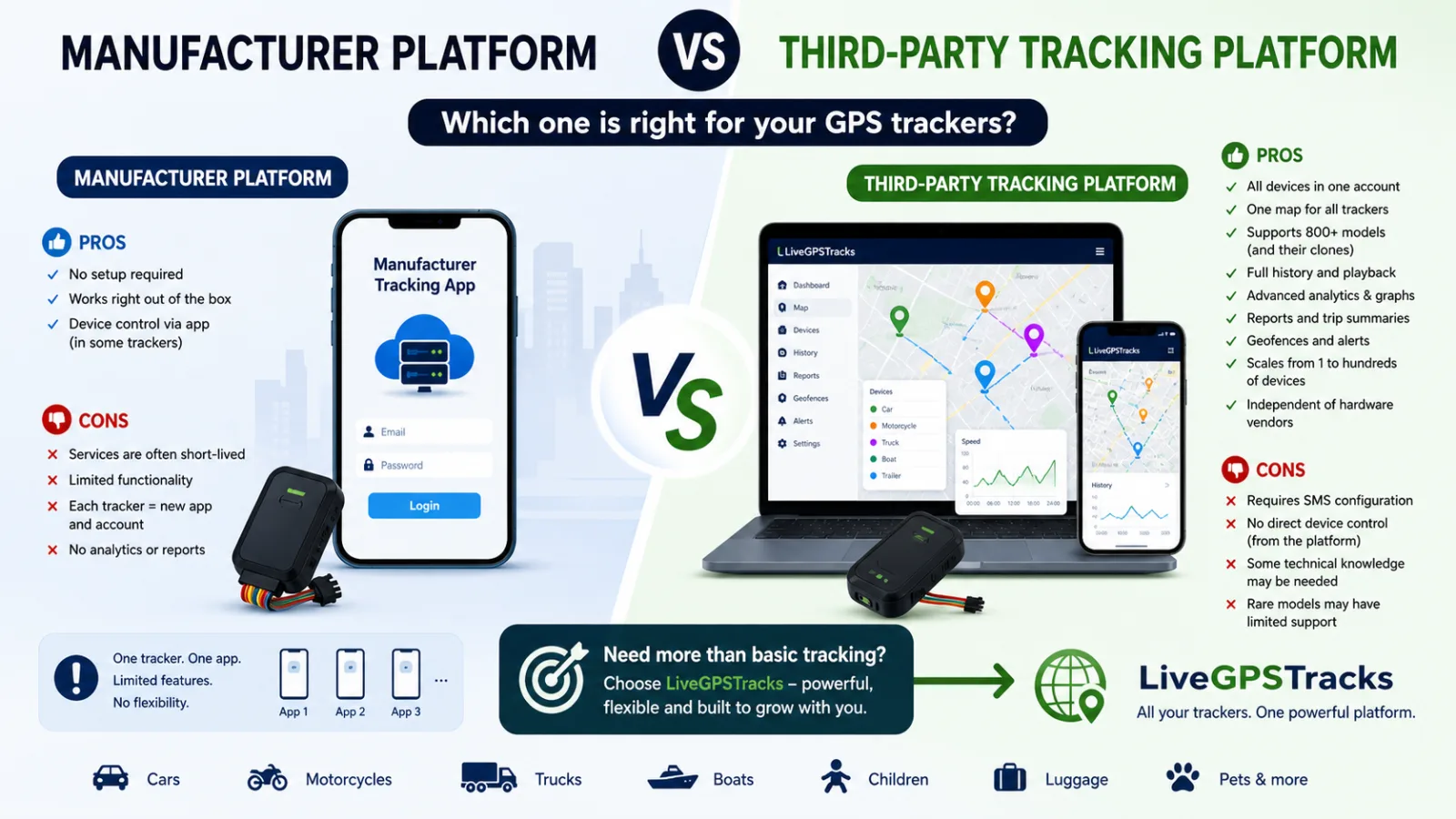
When you buy a GPS tracker, the manual almost always tells you which app or website to use. That is the **manufacturer's tracking platform**.
In most cases, the device is already preconfigured at the factory. You simply add it to the app, and it starts working right away.
So a fair question comes up: **why do third-party tracking platforms like [LiveGPSTracks](https://livegpstracks.com) even exist?**
Let's break it down.
## 📦 Manufacturer Platform: Simple and Quick
If this is your first tracker, it makes sense to start with the default app.
### Pros
- No setup required — it works out of the box.
- Fast onboarding, often in just a couple of minutes.
- Some trackers allow device control directly from the app.
### Cons
- ❗ Some platforms may be discontinued or unexpectedly switch to a paid model.
- Limited functionality, with little or no analytics, reporting, or detailed history.
- Usually tied to a specific brand or device.
- ❗ Every new tracker may mean another app.
And this is where things can start getting messy.
## 📱 When You Have More Than One Device
Let's say you buy a second tracker. Now you may need:
- a different app;
- a different website;
- a different account.
The pattern quickly becomes clear:
- 2 trackers → 2 apps;
- 3 trackers → 3 apps.
That might be tolerable for personal use, but for families or businesses it can quickly become chaotic.
## 🌐 Third-Party Tracking Platforms
This is where solutions like [LiveGPSTracks](https://livegpstracks.com) come in.
They are not tied to a single manufacturer and allow you to manage all your devices in one system.
### Pros
- ✅ All devices in one account.
- ✅ One map for everything.
- ✅ Support for hundreds of models and their clones.
- ✅ Full location history.
- ✅ Advanced analytics for speed, battery level, sensors, and more.
- ✅ Trip and activity reports.
- ✅ Geofencing.
- ✅ Real-time alerts for movement, zone exits, alarms, and other events.
- ✅ Scalability from one device to hundreds.
- ✅ Independence from hardware vendors.
Additional benefits include:
- switching devices without changing platforms;
- support for both personal and business use;
- centralized data storage and management.
In other words, it is not just “tracking on a map” — it is a complete monitoring system.
## ⚠️ Downsides of Third-Party Platforms
There are some trade-offs:
- Devices usually need to be configured with SMS commands, which can be tricky for beginners.
- In many cases, there is no direct device control in the platform interface; commands are sent by SMS instead.
- Some basic understanding of tracker setup is required.
- Rare models may require manual protocol setup.
- Some manufacturer-specific features may not be available.
## ⚖️ Final Takeaway
👉 If you have **just one tracker and do not plan to expand**, the manufacturer's platform is perfectly fine.
👉 But a third-party platform is usually the better choice if you:
- use multiple devices;
- have trackers from different brands;
- need analytics, reports, and history;
- want long-term stability.
## 🚀 Why LiveGPSTracks
[LiveGPSTracks](https://livegpstracks.com) supports:
- 800+ device models;
- countless clones and variations.
It gives you:
- one unified interface;
- full control over your data;
- flexibility in choosing hardware.
No vendor lock-in. No fragmentation. Just one system that works.