Cheap N100 and N150 mini PCs: when the marketplace bargain is real
A practical buyer check for tiny N100/N150 marketplace PCs: RAM, SSD, cooling, 2.5GbE, BIOS, power adapters and return risk.

A palm-size Intel N100 or N150 mini PC is one of the most believable marketplace temptations: for roughly the cost of a modest peripheral, a listing promises a full Windows or Linux computer with 8 or 16 GB of memory, an SSD, HDMI, Wi-Fi, several USB ports and sometimes dual or quad 2.5GbE networking. It can look perfect for a TV desk, a child’s homework station, Home Assistant, Pi-hole, Docker experiments, a camera recorder or a small OPNsense-style router. The useful question is not whether the chip is real enough to run those jobs. It usually is. The harder question is whether the exact box around that chip has honest cooling, clear memory and storage, usable firmware, a safe power adapter and a return path that still makes sense after VAT and shipping.
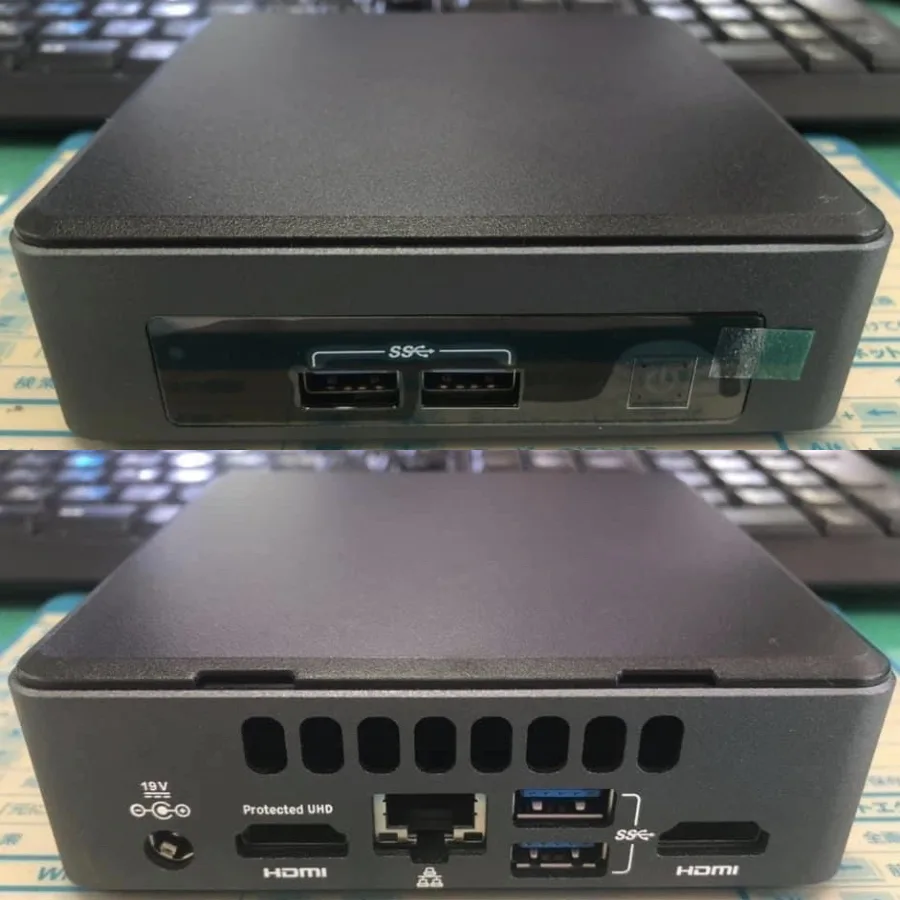
Photo: Project Kei / Wikimedia Commons, CC BY-SA 4.0. The image is an illustrative compact mini PC, not the exact AliExpress listing discussed.
Why the cheap mini-PC listing is attractive
Marketplace searches for N100 mini PC and N100 firewall show a crowded category, not a single product. There are tiny desktop boxes with one or two HDMI outputs, fanless metal router appliances with rows of Ethernet ports, and semi-branded models from companies such as Beelink or GMKtec sold beside store-brand devices with nearly identical shells. That variety is the opportunity and the trap. The processor name may be the same, but the rest of the machine decides whether the bargain feels clever or exhausting after two weeks on a shelf.
Current product pages also show why the category keeps getting attention. Beelink sells the EQ14 as a Twin Lake N150 mini PC, while GMKtec’s NucBox G3 sits in the N100 desktop-mini-PC class. OPNsense documentation reminds buyers that firewall hardware is not just a port count: it must fit the intended workload, run a 64-bit x86 system and have network hardware with appropriate driver support. Reddit and forum discussions around N100, N150 and dual-2.5GbE mini PCs are useful mostly because they reveal what buyers worry about after checkout: noise, heat, BIOS options, replaceable RAM, unknown SSDs, Realtek versus Intel NICs, coupon math and whether a used office mini desktop would have been less risky.
Three product classes that should not be judged the same way
The first class is the small desktop mini PC. It is bought as a low-power browser, document, video-call or media-playback computer. Here, one HDMI port, stable Wi-Fi, 8 GB of memory and a modest SSD may be acceptable. If the box will sit in a bedroom or on a desk, fan tone and heat matter more than a synthetic benchmark number. A listing that hides the power adapter, USB speeds and SSD details deserves more caution than a listing with a boring but complete spec table.
The second class is the home-lab or self-hosting starter box. This buyer may run Home Assistant, Pi-hole, Syncthing, a few Docker containers, a light database, a media indexer or a small development environment. In that role, 16 GB of memory is more comfortable than 8 GB, an SSD from a named brand is preferable to an anonymous high-capacity drive, and a second storage slot can be more valuable than a flashy case. A mini PC can beat a Raspberry Pi in CPU headroom and ordinary x86 software compatibility, but it is less GPIO-friendly and may draw more power at idle depending on the configuration.
The third class is the fanless multi-LAN appliance marketed as a router or firewall. This is where the words in the title can become misleading. Two or four 2.5GbE ports do not automatically mean reliable routing under real load, and a metal fanless case does not automatically mean cool operation. For OPNsense, pfSense, OpenWrt-on-x86 or similar use, the buyer should check NIC chipset, driver history, BIOS options, storage quality, thermal reports and whether the household can tolerate downtime while experimenting. Hardware alone does not make a network secure; updates, configuration, backups and a fallback internet path matter.
What the N100 or N150 name proves — and what it does not
The processor label is useful because it sets a realistic performance class. Intel’s N100 and N150 are low-power efficiency-core chips commonly advertised in this market as four-core, four-thread parts with small cache and boost clocks around the mid-3 GHz range: the N100 is commonly listed up to 3.40 GHz and the N150 up to 3.60 GHz. They are not gaming CPUs, workstation CPUs or heavy virtualization platforms. They are sensible for web work, office documents, light Linux services, media playback and simple development tasks when the machine around the processor is not compromised.
What the CPU label does not prove is just as important. It does not tell you whether the memory is soldered, whether the SSD is a decent TLC drive or a bargain-bin part, whether the firmware exposes auto-power-on after outage, whether the fan whines, whether the thermal pad touches properly, whether the seller ships the plug you expect, or whether the Windows license claim would survive scrutiny. Two N100 boxes can feel completely different because one has a quiet thermal design and documented support while the other has a recycled listing, vague RAM options and review photos from three different cases.
Memory and storage: the cheap configuration may be the expensive one
For a light desktop, 8 GB of RAM can be enough if the user keeps expectations modest. For a home server, Docker host, browser-heavy family computer or router with extra services, 16 GB is the safer baseline. The important detail is whether memory is soldered or replaceable. Some marketplace mini PCs use laptop-style SO-DIMM memory; others lock the buyer into the original amount. If the listing mixes several variants under one review pool, do not assume that a photo from a 16 GB version proves anything about the cheapest 8 GB option.
Storage deserves the same skepticism. A 512 GB or 1 TB number in the title is not proof of a reliable SSD. Look for the interface, physical size, brand visibility, heat complaints and whether there is a second M.2 or SATA bay. A small named SSD may be a better start than a huge no-name drive if the box will run 24/7. Review photos of the opened chassis are valuable here: they can show the actual drive, cooling pad, screws, slot layout and whether the seller’s internal photos match the shipped unit.
Cooling: fanless is not automatically premium
Fanless mini PCs are attractive because silence is easy to understand. A solid metal case can be excellent for a router shelf or TV cabinet, but only if it transfers heat well and has enough surface area. A thin fanless box with poor contact between the processor and case may throttle under sustained load. If reviews mention a very hot case, random reboots or performance dropping after several minutes, treat that as more important than the word fanless in the title.
A small fan is not automatically a failure either. In a desktop mini PC, a controlled fan can keep clocks stable and temperatures reasonable. The risk is noise quality: high-pitched whine, pulsing under browser load or bearing noise after dust builds up. If the machine will live behind a TV, that may not matter. If it sits next to a bed or microphone, it does. Search buyer photos and comments for thermal paste, fan replacement, case temperature and BIOS fan settings rather than trusting only the seller’s silent-office render.
Ports and networking: count them, then identify them
For a normal desk box, count display outputs, USB speed, audio, Ethernet and whether USB-C actually carries video or only data/power. Two HDMI ports can be useful for dual monitors, but check the supported resolution and refresh rate. A front USB-C port may be convenient without replacing a real DisplayPort or HDMI output. If the listing says Wi-Fi 6 or Bluetooth, look for the module model and operating-system compatibility, not just a badge in the image.
For router appliances, the network controller matters. Many marketplace listings advertise 2.5GbE but bury the NIC model in a photo or not at all. Intel i225/i226 names often appear because buyers associate Intel NICs with better FreeBSD and router-appliance compatibility, while Realtek-based boxes may still work but deserve a more careful driver check. The safe rule is simple: if the intended job is a firewall, do not buy a mystery-NIC box. Match the chipset to the OS documentation and to recent user reports for the exact generation.
Firmware, BIOS and operating-system claims
A mini PC used as an always-on appliance needs different firmware behavior from a spare desktop. Auto power-on after AC loss, virtualization options, boot order, wake settings and headless boot can decide whether the box recovers after a power cut. Some sellers mention these features clearly; many do not. If buyer reviews ask for BIOS updates or complain about missing options, assume support will be slower and less predictable than with a branded business desktop.
Windows and Linux claims also need careful wording. A listing may say Windows 11 Pro, Linux, Ubuntu, pfSense or OPNsense, but that does not guarantee license legitimacy, long-term driver updates or trouble-free installation. If Windows matters, decide whether you are comfortable with the seller’s license wording. If Linux or router use matters, search for the exact model plus the OS name and NIC model. A device that works perfectly as a browser box can still be an annoying firewall if suspend, console output, NIC naming or thermal behavior are wrong.
Power adapter and safety checks
The external power supply is part of the purchase, not a free accessory. Check voltage, current, plug type, regional adapter, certification wording and review photos of the label. Do not assume that a tiny PC is harmless because the CPU is low power. A weak adapter, loose barrel plug, thin cord or poor plug adapter can make a cheap box feel unsafe. Use the supplied or correctly specified adapter, keep ventilation clear, and stop using the unit if the adapter or case smells hot, buzzes, sparks, discolors or becomes unusually warm.
This is also where local alternatives change the value calculation. A refurbished Dell, HP or Lenovo mini desktop may be larger and use more power, but it often comes with a known power brick, clearer support history, easier parts and a local return process. If the marketplace price advantage is small after tax, shipping and return risk, the refurbished business machine may be the calmer buy.
How to read marketplace reviews without fooling yourself
The strongest review signals are recent photos from the same configuration: open case, BIOS screen, SSD label, RAM module, ports, adapter label, internal Wi-Fi module and a thermal or noise comment after real use. The weakest signals are generic five-star comments, photos of sealed boxes, or reviews attached to a listing that combines N95, N100, N150 and N305 variants in one pool. Do not let a review of the expensive barebones model prove the quality of the cheapest RAM-and-SSD bundle.
Look for patterns rather than one angry comment. Several mentions of fan whine, missing screws, hot adapters, wrong plug, dead-on-arrival units, unstable Ethernet, disappearing Wi-Fi or poor seller communication mean the low headline price has a hidden cost. On the positive side, multiple detailed photos showing the same board and ports, successful Linux installs, stable 24/7 operation and clear packaging are useful evidence. They still do not promise your outcome, but they make the listing less blind.
Buyer fit: who should consider one
Consider a marketplace N100 or N150 mini PC if you want a compact low-power computer for browsing, documents, media playback, light development, Home Assistant, Pi-hole, simple Docker services, a spare family PC, a TV desk box or a hobby router after checking NIC and OS support. It is most attractive when the exact configuration is clear, real buyer photos match the listing, the seller has recent feedback for the same variant, and you are comfortable reinstalling the OS or replacing the SSD if necessary.
It is also worth considering when space matters more than perfect support. A tiny box can sit behind a monitor, under a TV or on a network shelf where a used tower would be annoying. If the workload is modest and the buyer understands the trade-offs, the price can be genuinely useful. The bargain is strongest when you are buying a simple, boring configuration rather than chasing the most RAM, biggest SSD and highest coupon badge in the search results.
Who should skip it
Skip the cheap marketplace mini PC if you need gaming performance, professional video editing, heavy virtual machines, guaranteed silent sustained load, certified enterprise networking, mission-critical firewall uptime, official local warranty or a return process you can solve in one shop visit. Also skip it if you are not willing to verify power-supply details, reinstall an OS, check BIOS behavior, read negative reviews and accept that seller support may be limited.
Parents buying a child’s first PC, small offices needing predictable support and anyone replacing a critical router should be especially cautious. A slightly more expensive branded mini PC, a refurbished business desktop or a local marketplace machine with inspection before payment may cost less in stress. The cheapest listing wins only if the whole product is understandable, not just the CPU line in the title.
The final rule before checkout
Buy the listing only when five things are clear: the exact CPU/RAM/SSD/LAN variant, real photos of the same hardware, believable cooling reports, documented ports and power supply, and return terms you can tolerate. If one of those is missing, the discount should be large enough to pay for the risk. If several are missing, the smarter marketplace find is probably the one you close without buying.
A budget N100 or N150 mini PC can be a useful home-server starter, TV computer or light office box. It can also be a noisy, hot, under-supported cube with an unknown SSD and a power brick you do not trust. The Intel chip is rarely the whole problem. The bargain lives or dies in the less glamorous details: cooling, storage, firmware, NICs, adapter and the seller’s willingness to stand behind the exact version shipped.
Related articles
Cheap Bluetooth label makers: useful marketplace tool or sticker-roll trap?
A practical buyer guide to small thermal label printers from marketplaces: where they help, what refills and apps can ruin, and who should skip them.

Cheap USB-C portable monitors on AliExpress: useful second screen or dim travel gadget?
A practical buyer check for 15.6-inch marketplace screens: ports, brightness, power, stands, reviews and return risk before checkout.
Cheap portable jump starters from marketplaces: useful trunk tool or risky 4000A promise?
A practical guide to judging marketplace jump starters by clamps, capacity, protections and vehicle fit instead of the largest peak-amp claim.

Cheap earbuds with a case display: useful AliExpress find or shiny TWS gimmick?
A practical buyer check for low-cost TWS earbuds that advertise a bright battery screen, ANC labels and long playtime.
Comments
Sign in to comment.
No comments yet.