Cloudflare Web Analytics backlash: when CDN defaults become production changes
A Cloudflare RUM debate shows why teams should audit edge-provider defaults as carefully as application releases.

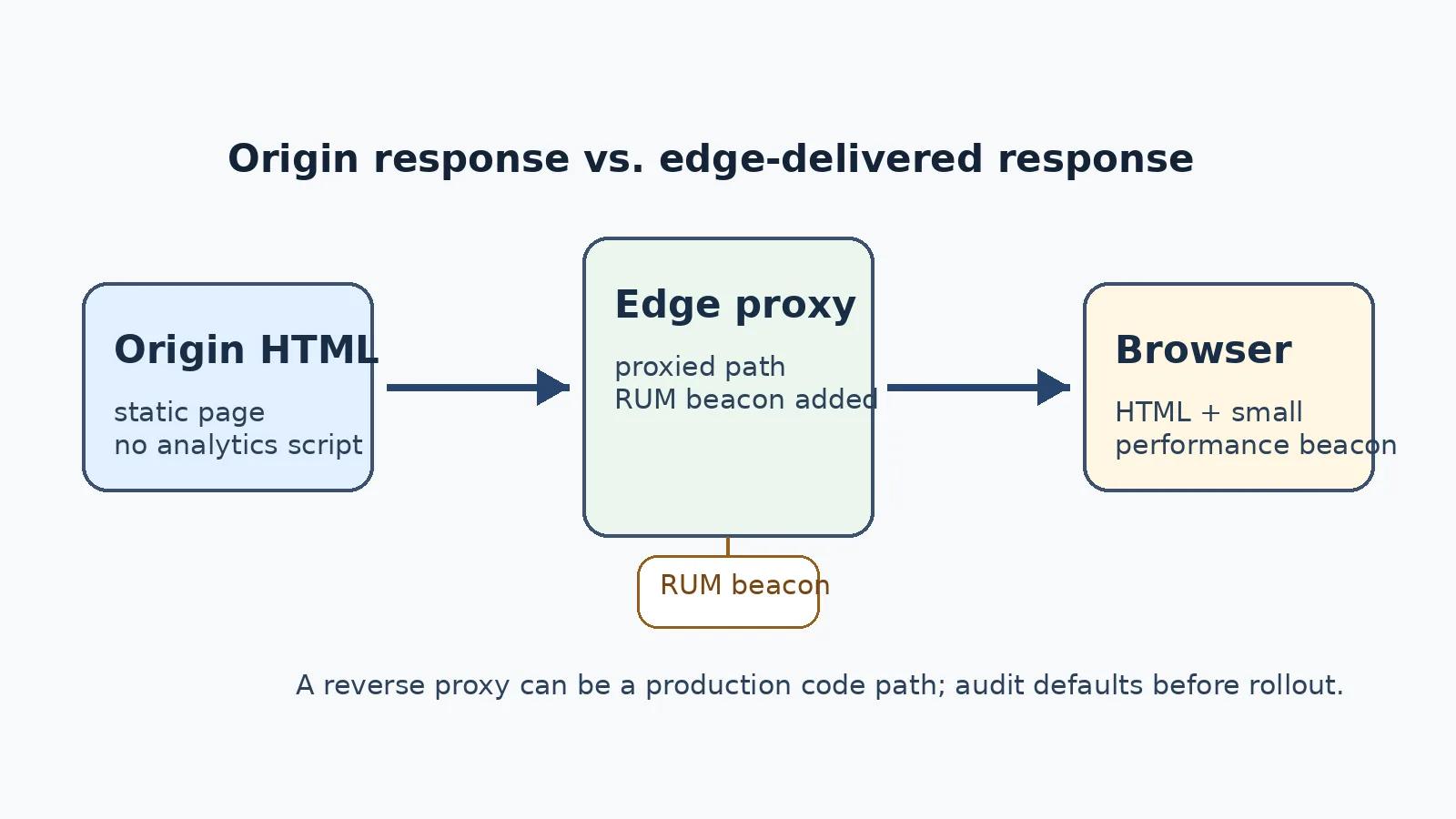
A heated Hacker News thread on August 16 turned a quiet Cloudflare setting into a useful operations lesson. The complaint was simple: a site owner expected a JavaScript-free page, moved a domain into Cloudflare’s orbit, and then found a script loaded from static.cloudflareinsights.com/beacon.min.js with a data-cf-beacon attribute in the delivered HTML. The thread’s title blamed a nameserver switch, but the important engineering boundary is narrower: plain DNS does not rewrite HTML. The relevant path is a proxied Cloudflare hostname, where the edge can terminate requests, apply products, and transform the response that reaches the browser.
What happened
The public signal is the Hacker News item “Tell HN: Cloudflare silently injects its analytics when you switch nameservers,” which had hundreds of points and more than a hundred comments when checked. Forum threads are not proof of product behavior by themselves, so the better factual baseline is Cloudflare’s own documentation. Cloudflare’s Web Analytics and Observatory RUM documentation describes a JavaScript beacon that can be inserted automatically for proxied sites. Cloudflare’s September 17, 2025 blog post announced that Web Analytics would be enabled by default for free domains starting October 15, 2025, with EU and UK traffic excluded. Current docs also describe dashboard choices to disable automatic setup or switch to manual snippet installation.
That combination explains the backlash. Cloudflare sees a privacy-first performance product that helps site owners measure real user experience. Some operators see a production response mutated by a third party without a code deployment from origin. Both readings can be true. The beacon may be documented, useful, and designed to avoid cookies; the act of adding any script at the edge can still violate a team’s change expectations.
DNS-only versus proxied traffic
The precision matters because a sloppy story teaches the wrong mitigation. A DNS-only record resolves names; it does not put Cloudflare in the HTTPS data path and cannot add a script to an HTML body. A proxied Cloudflare record is different. Traffic flows through Cloudflare’s reverse proxy, the edge may apply WAF rules, caching, compression, observability, bot checks, image or script products, and only then send the response to the visitor.
For small teams the dashboard distinction is often visual rather than architectural: a proxied hostname is the orange-cloud path, while DNS-only is gray-cloud resolution. For R2 custom domains, Pages projects, ordinary origins, and subdomains, the operational question is the same: who is in the response path and which features are enabled for that hostname. If a provider can add headers, compress content, challenge browsers, inject a beacon, or rewrite HTML, that provider is part of the application runtime, not merely a registrar-like helper.
What Cloudflare Web Analytics and RUM are
Cloudflare Web Analytics is positioned as privacy-preserving site performance analytics. The RUM beacon collects browser performance information from standard browser APIs: navigation timing, resource timing, paint timing, Core Web Vitals such as Largest Contentful Paint and Cumulative Layout Shift, and related page-load measurements. Cloudflare’s data-origin docs identify https://static.cloudflareinsights.com/beacon.min.js as the beacon script source and describe /cdn-cgi/rum as the collection endpoint for proxied sites.
The privacy caveat is important. Cloudflare’s RUM docs say the script does not access cookies, localStorage, sessionStorage, IP address, or IndexedDB, and that source IP is received as part of normal HTTP handling but discarded at the nearest Cloudflare data center rather than stored in core analytics databases. That means this incident should not be described as cookie-based tracking or malware. The professional concern is not that the script is secretly reading browser storage. The concern is that an infrastructure default changed the delivered page.
Cloudflare’s 2025 default
The timeline also matters. This was not a brand-new hidden feature discovered in August 2026. Cloudflare published the default-on plan in September 2025 and said free domains would begin seeing Web Analytics enabled by default on October 15, 2025. The company framed the move as giving free customers real user performance data without personal data collection. Current get-started documentation says proxied sites can use automatic setup, that it is enabled by default in relevant flows, and that site owners can disable it or choose manual JavaScript installation.
A documented default can still surprise an operator. Many infrastructure changes are accepted in dashboards during migrations: move nameservers, enable proxying, set up a bucket behind a custom hostname, or click through a performance panel. A team may not read those actions as permission to alter every HTML page under a zone. The difference between “documented somewhere” and “approved by the service owner” is exactly where governance failures happen.
Why operators are angry
The anger is not only about bandwidth or a tiny JavaScript file. Some sites advertise themselves as JavaScript-free. Some government, health, finance, education, media, or public-interest sites maintain a third-party script inventory. Some organizations require privacy notices, data-processing records, consent reviews, CSP approvals, security testing, and vendor review before any browser-executed third-party script appears on production pages. A CDN-inserted RUM beacon touches all of those controls even if the payload is benign.
There is also a trust problem. The origin owner deployed one byte sequence; the browser received another. For teams that use Subresource Integrity, strict Content Security Policy, static-site verification, signed exchanges, reproducible deployments, or compliance screenshots, edge mutation is not an implementation detail. It changes the evidence chain. If the operations team learns about it from a user report or a forum complaint rather than a change ticket, the process has already failed.
Why this is not a malware panic
A useful response should avoid panic language. Cloudflare is a major infrastructure vendor, Web Analytics is an official product, and the docs describe how automatic injection works. The beacon is for performance telemetry, not for keystroke logging, credential theft, or browser storage scraping. Treating every injected script as an attack makes the discussion less credible and distracts from the real issue.
The right distinction is authorization and change control. A script can be non-malicious and still be unauthorized for a particular site. A default can be useful and still be too broad for regulated traffic. A provider can be privacy-conscious and still create audit work for customers. Professional teams should be able to say: this may be acceptable on marketing pages, unacceptable on an authenticated app, and allowed only after a ticket on public documentation pages.
The governance issue
The broader lesson is that edge platforms now behave like programmable production systems. CDN, WAF, bot management, serverless edge functions, analytics, image optimization, email obfuscation, security challenges, and performance products all sit between origin and user. Their defaults can change bytes, timing, headers, JavaScript execution, error handling, caching behavior, and telemetry. That is a software supply-chain surface.
A mature organization therefore needs an edge-change model. Dashboard changes should have owners. Free-tier defaults should be reviewed like enterprise defaults. Feature announcements should map to concrete zones and hostnames. Automated transformations should be opt-in where policy requires it. When an edge provider introduces a default that changes response bodies, the receiving team should treat it like a production release from a dependency.
Audit checklist
Start with a simple diff. Fetch the same page directly from origin and through the public hostname, then compare HTML bodies, headers, and script inventories. Search for static.cloudflareinsights.com, data-cf-beacon, /cdn-cgi/rum, bot-management scripts, email decode snippets, Rocket Loader, Zaraz tags, injected challenge scripts, transformed image URLs, and unexpected preload or reporting endpoints. Repeat the test for root domains and subdomains, not only the homepage.
Review the Cloudflare dashboard for Web Analytics, Observatory, Speed, Zaraz, Rules, Transform Rules, Page Rules, Workers routes, Snippets, Bot Management, WAF managed challenges, and cache settings. The point is not that every feature is bad. The point is to know which features can alter the browser-visible response and which people approved them.
Use CSP deliberately. MDN’s Content Security Policy guide explains how CSP restricts which resources a page may load. A strict script-src can block an unexpected beacon, and Content-Security-Policy-Report-Only can show what would be blocked before enforcement. But CSP is not a substitute for configuration hygiene: blocking a provider-inserted script may create console noise, missing analytics, or support confusion unless the team also disables the unwanted feature.
Test Cache-Control: public, no-transform where it fits. Cloudflare’s Web Analytics FAQ and get-started documentation say that when this header is present, Cloudflare proxy cannot modify the original payload, so the beacon will not be automatically injected. Cloudflare’s cache-control docs also describe no-transform as a directive telling intermediaries not to transform payloads. Use it carefully: it may disable other helpful transformations or optimizations, so test representative pages before making it a global policy.
Migration checklist
Before moving a domain, decide hostname by hostname whether traffic should be DNS-only or proxied. Record the reason. If the team needs CDN caching or WAF inspection, proxied mode may be correct; if the service must preserve exact origin bytes, DNS-only or another architecture may be better. Do not let a migration assistant or speed wizard make that decision implicitly.
After enabling proxying, run a post-migration browser and command-line audit. Check delivered HTML, response headers, CSP reports, performance beacons, source maps, service workers, third-party script inventory, and requests to provider-owned endpoints. Test from more than one geography when a vendor documents regional exclusions such as EU or UK traffic. Ask compliance or counsel whether privacy notices, data-processing records, consent banners, or vendor assessments need updates; do not turn a technical article into a legal conclusion.
For agencies and freelancers, put this in the handover. A client should know whether a site depends on Cloudflare automatic Web Analytics, manual snippets, no analytics, or a separate RUM tool. If you disable a default, document it. If you accept it, document the data category, owner, purpose, and rollback path.
Broader edge-platform lesson
This debate will repeat with other providers and other defaults. Reverse proxies can add security JavaScript, serverless platforms can rewrite routes, hosting platforms can inject previews or analytics, and optimization products can transform images, scripts, fonts, and headers. The more useful the platform becomes, the less passive it is.
IT teams should stop treating the edge as neutral plumbing. The edge is an application component with its own releases, defaults, permissions, logs, and failure modes. Observability is valuable, but it should be explicit, reviewable, and reversible. The clean operational rule is simple: if a setting can change what the browser receives, it belongs in change management.
Related articles
Cloudflare is turning AI bot access into an infrastructure policy
Cloudflare’s new Search, Agent and Training controls show how the web’s old crawler bargain is becoming programmable, payable and more fragile for publishers, SEO teams and AI agent builders.


Cloudflare OS is the AI workspace question enterprises cannot avoid
Cloudflare’s new agent workspace is less interesting as a product launch than as a blueprint for governed AI work: permissions, sandboxes, Gatekeepers, audit logs and app sprawl.

AI crawlers can no longer be trusted by name
Spoofed crawler names turn AI traffic governance into a security, analytics and operations problem for sites and SaaS teams.

OpenAI’s Agents API: What Changes for Teams Building Long-Running AI Workflows
OpenAI’s public-beta Agents API packages the Codex harness, persistent sessions, tool orchestration, subagents, and managed or self-hosted sandboxes. The practical question is not whether it can run an agent, but whether its boundaries fit your workflow, budget, and data controls.

Comments
Sign in to comment.
No comments yet.