Should You Buy the PocketBook Q? Wait for Real-World Tests
PocketBook’s €199 phone-shaped e-reader looks thoughtfully focused, but its narrow display, app limits and untested performance make waiting the prudent choice.

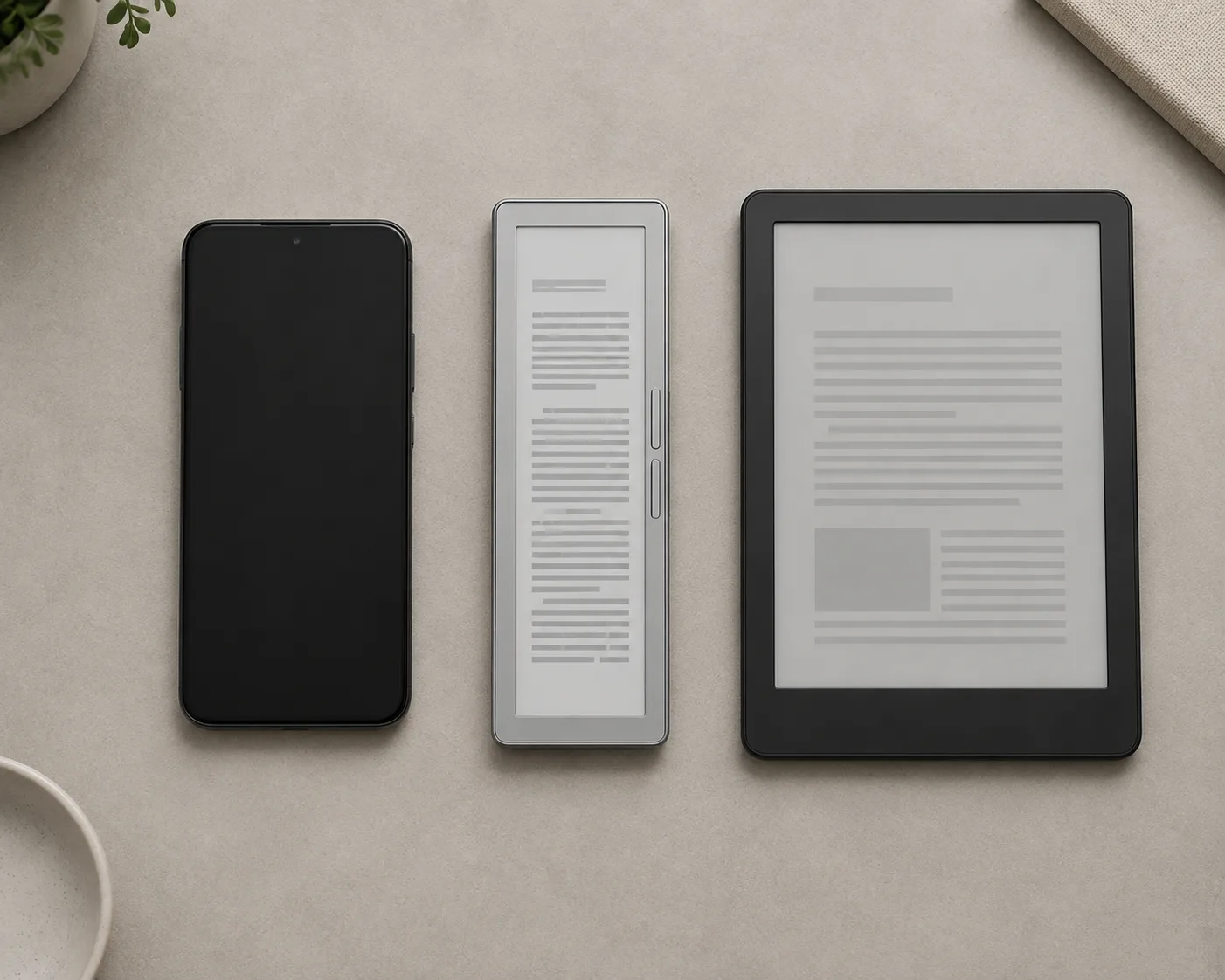
PocketBook Q: the short answer
The PocketBook Q makes a persuasive case for a second reading device, but not yet for a preorder. At €199, it promises the distraction-free character of a dedicated e-reader in a narrow, phone-like shape. Its 5.84-inch monochrome E Ink screen, 130 g listed weight, physical page-turn buttons and adjustable front light all suit reading in short bursts or while standing on a train. The problem is timing: PocketBook has announced the Q and shown it at IFA Berlin, but no independent review found by September 6, 2026 had tested its speed, screen behavior, battery life or comfort over a full book.
For most people, the sensible answer is to wait for the retail model and credible hands-on testing. The exception is unusually specific: a reader who wants a small device with no phone notifications, values one-handed reading, and has already confirmed that their books and library loans work within PocketBook's ecosystem. Even that buyer should wait for local pricing and return terms rather than treating the recommended price as a guaranteed checkout total.
The Q was announced on August 25 and displayed at IFA Berlin from September 4 to 8. PocketBook says sales are due to begin in the fourth quarter of 2026, in silver, at a recommended price of €199. That is a launch plan, not proof that stock will appear everywhere at the same time. Taxes, warranty coverage, included accessories and the final price may differ by country.
What the €199 is meant to buy
The central feature is a 5.84-inch E Ink Carta 1300 touchscreen with a resolution of 788 × 1576 and a density of 300 ppi. That density is competitive on paper, while the narrow dimensions distinguish the Q from the familiar six- or seven-inch reader. Buttons along the side provide an alternative to swiping. PocketBook also advertises SMARTlight controls for brightness and color temperature, plus a dark mode.
Those specifications establish what the device is, not how good it feels. A 300 ppi rating does not reveal contrast, page-refresh speed or ghosting. A smaller diagonal does not automatically mean better pocketability once a protective case is fitted, and a narrow page may require more frequent turns. Readers who use large type could see far fewer words at once. Until reviewers compare font sizes, margins and refresh settings on production hardware, convenience remains a plausible benefit rather than a demonstrated one.
The listed weight of 130 g is genuinely notable and is lower than the Palma 2's listed weight of about 170 g. Yet weight alone cannot establish balance, grip, button placement or whether the body is comfortable for a long session. These are precisely the details that a specification sheet cannot settle.
The strongest reason to consider it
The Q is not trying to replace a tablet. It runs the Linux-based PocketBook OS and is designed around books and audio rather than arbitrary Android apps. For the right person, that limitation is the product: a separate screen can create a clear boundary between reading and the notifications, messages and habitual browsing attached to a phone. Physical controls may also make it easier to hold the device steadily and turn pages with one hand.
That advantage should not be dressed up as a guaranteed “digital detox.” A dedicated reader can still be neglected in a drawer, while a phone already in your pocket may be the device you actually use. The buying question is therefore behavioral as much as technical: would carrying a second object cause you to read more, or merely give you another battery to manage?
Books, library loans and the compatibility trap
PocketBook says the Q can open 25 e-book formats without conversion and supports both Adobe DRM and LCP DRM. It also advertises PocketBook x Libby, along with synchronization of books, bookmarks and reading position through PocketBook Cloud and the PocketBook Reader app. This could make the Q more flexible than a reader tied exclusively to one store.
However, broad format support is not the same thing as an open operating system. Buyers should not assume they can install Kindle, Kobo, Hoopla or Google Play Books. Nor does the Libby name guarantee that every library, loan type or country will be supported. Availability depends on the participating library and its rules, and the exact account, DRM and transfer process has not yet been verified on a retail Q.
Do a compatibility check before considering the hardware. List where your current books came from, whether they carry DRM, and which service supplies your library loans. Then seek confirmation for that exact route—not merely the file extension—from PocketBook or your library. If most of your collection lives inside an app that the Q cannot run, nominal support for many formats will not solve the problem. Cloud synchronization also warrants a look at account requirements and privacy terms once final documentation is available.
This is the most important dividing line in the purchase decision. Someone with compatible EPUB files and a supported lending setup may find PocketBook OS appropriately focused. Someone whose reading life depends on several proprietary Android apps may experience the same focus as a wall.
Audio is useful, but the details are incomplete
PocketBook lists audiobook playback and Text-to-Speech, with sound sent to Bluetooth headphones or speakers. That adds value for a reader who alternates between text and audio without wanting a multipurpose phone-like device. It may also help people who use spoken text as an accessibility feature.
Several practical questions remain unanswered in the verified announcement material. It does not establish whether the Q has a built-in speaker or a wired audio connection. The quality of Text-to-Speech and its language coverage have not been tested. Bluetooth audio will also place different demands on the battery than silent reading. Treat audio as a supported category, not as proof of a polished listening experience, until the final manual and independent reviews fill in those gaps.
Splash resistance, not carefree waterproofing
The Q carries an IPX4 rating. In ordinary language, that means protection against splashes; it does not make the reader suitable for immersion. It should not be bought on the assumption that it can be used in a bath, held under a strong stream of water or left exposed to heavy rain. Splash resistance is a welcome safeguard against minor accidents, but it is much less extensive than full waterproofing.
Battery claims need a real test
PocketBook says the Q can provide more than a month of reading on a charge. Good e-Reader describes three to four weeks under light use. Neither figure comes from a disclosed, independent battery test, so neither should be treated as a personal guarantee. Front-light brightness, Wi-Fi activity, Bluetooth audio and refresh behavior can all change the result considerably.
Industry reports list a 1,550 mAh battery, 1 GB of RAM, 32 GB of storage and a Rockchip RK3566 processor. Those details should be checked against the final product listing. More importantly, component names cannot answer the everyday questions. One gigabyte of memory does not by itself prove that page turns and menus will be slow, just as a particular processor does not prove that they will be fast. A proper review needs to time wake-up, library navigation, search, opening a large book and repeated page turns.
The narrow screen is both the point and the risk
A phone-shaped reader solves a different problem from a conventional e-reader. It can be easier to hold in one hand and less cumbersome during a commute, in a queue or on a short break. It also presents a narrower line and less page area. Whether that feels pleasantly focused or unnecessarily cramped will depend on type size, eyesight, the kind of book and the length of the session.
Straightforward novels are the most natural fit. Documents with complex layouts, technical books, tables, illustrated material and PDFs are less convincing on a 5.84-inch display, even when the underlying file opens correctly. People who increase font size should be especially cautious: more page turns and shorter passages may cancel out the ergonomic benefit. The Q should not be judged solely by whether it fits a pocket; it should be judged by whether the visible page fits the reader.
This is why an in-store trial or a return policy matters. Load a representative book, set the type to the size you really use, and read for at least several pages with the buttons and touchscreen. Check whether your thumb reaches the controls naturally, whether accidental presses occur, and whether the case changes the grip. No launch photograph can answer those questions.
How it compares with the BOOX Palma 2
The most obvious established alternative is the BOOX Palma 2. The official US store lists a 6.13-inch Carta 1200 screen at 824 × 1648 and 300 ppi, Android 13 with Google Play and third-party apps, 6 GB of RAM, 128 GB of storage, microSD expansion, a 3,950 mAh battery and a weight of about 170 g. The checked page showed a price of US$249.99, although it also marked the product unavailable. That price is not directly comparable with a European recommended price and may change.
Both devices claim the same pixel density, but that does not make their screens equivalent. The Palma 2 has the larger diagonal; contrast, ghosting, effective page area and responsiveness require direct testing. The more meaningful distinction is software. The Palma 2 is the stronger candidate when access to Android reading apps is essential. The Q is the cleaner proposition when the goal is a lighter, book-centered device and the buyer's files and loans are already compatible.
Android flexibility has costs as well as benefits. More apps do not guarantee simpler operation, fewer distractions or longer battery life. Conversely, PocketBook's focused operating system does not guarantee smooth performance or effortless library access. Choose the software model that matches how you obtain books instead of treating one platform as universally superior.
Three alternatives that may be better
Use the phone you already own. This costs nothing and preserves every reading app and library service you currently use. A matte screen protector, a restrained notification mode and a dedicated reading shortcut can improve the experience. The drawbacks are the luminous display, interruptions and the temptation to leave the book. Try this first if your reading is occasional or if you are unsure that another device would change your habits.
Buy a conventional six- or seven-inch e-reader. A wider page is often the safer choice for long sessions, larger fonts and material that benefits from more visible context. It will be less phone-like in a pocket, but portability should not outweigh readability. This category also gives buyers mature models with established reviews, known accessories and immediate availability.
Choose an Android E Ink device such as the Palma 2. This makes sense when Kindle, Kobo, Hoopla, Google Play Books or another app is non-negotiable. The trade-off is a US$249.99 listing on the checked US store page, greater weight, a more complex platform and no assurance that a larger battery translates into better real-world endurance. Availability must also be checked rather than assumed.
Who should put the Q on a shortlist?
The best prospective buyer reads mostly linear books, often in short sessions, and genuinely wants a separate device that is lighter and narrower than a standard reader. That person prefers physical page buttons, does not need arbitrary Android apps, and can confirm that their files, DRM and library service work with PocketBook. Bluetooth audio or Text-to-Speech may be a useful bonus, but should not be the sole reason to order before their implementation is reviewed.
The Q may also appeal to an existing PocketBook user who already relies on PocketBook Cloud and the Reader app. Even then, synchronization on the production Q and the relevant account terms should be verified rather than inferred from the announcement.
Who should wait or look elsewhere?
Wait if you rely on large type, read PDFs or illustrated books, or spend hours reading at a time. A narrow display may still work, but buying without trying it would turn the device's defining feature into a gamble. Wait as well if fast page turns, low ghosting or dependable multiweek battery life is critical: none of those outcomes has yet been established by independent tests.
Look elsewhere if your collection depends on Kindle, Kobo, Hoopla, Google Play Books or another app that requires Android. Open file support cannot replace an unavailable service. A conventional reader is likely to be the better tool if page width and long-session comfort matter more than carrying the smallest possible device. And if a phone already meets your needs once notifications are silenced, the most economical decision is not to buy another screen.
Anyone expecting rugged water protection should also pass. IPX4 is limited splash resistance, not permission to submerge the Q or expose it casually to severe weather.
What to verify before paying
First, confirm that the Q is actually on sale in your country and obtain the final local price, tax treatment, warranty, return period and box contents. The fourth-quarter date and €199 figure are announced targets, not universal retail terms.
Second, verify your own reading path from beginning to end. That means the store or library, the precise DRM system, the account requirements, transfer or synchronization method, and offline access. If Libby matters, ask whether your particular library participates and how borrowing works on the Q in your region.
Third, wait for reviewers to examine a retail unit. Useful coverage should show page turns, ghosting, wake time, library navigation, large-font layouts and behavior under different front-light settings. Battery testing should disclose brightness, wireless use, audio use and reading frequency instead of repeating a duration without a method.
Finally, assess the physical design with a case fitted. The relevant measurements are not just weight and diagonal, but pocket fit, grip, button reach and how much text remains visible at your preferred settings.
Verdict
The PocketBook Q has a coherent purpose. It combines a sharp-on-paper 300 ppi E Ink display, a very light listed weight, page-turn buttons, adjustable front lighting, broad stated format support and Bluetooth audio in a form intended for one-handed reading. At €199, it could occupy an appealing middle ground between using a phone and paying more for an Android E Ink device.
But the purchase case currently rests on announced specifications. There is no independent evidence yet for the qualities that determine whether this particular design succeeds: responsiveness, ghosting, usable battery life, pocketability with protection, comfortable large-type reading and the smooth operation of library services. The small screen is not a minor compromise; it is the central choice.
For most buyers, do not preorder. Wait for production-unit reviews and confirmed regional terms, then compare the Q with a regular six- or seven-inch reader and the phone already in your pocket. Consider buying only if its narrow, notification-free design solves a real problem for you and compatibility has been confirmed. The Q may become an excellent carry-everywhere reader, but as of September 6, 2026, that conclusion still needs evidence.
Related articles
Should You Buy the Apple Watch Series 12? The Health Sensors Are New, but the Upgrade Case Is Narrow
Apple’s Series 12 adds higher-frequency heart sensing and a readiness score, but its everyday case remains familiar. Here is who should buy now, who should wait, and when an older or cheaper Apple Watch makes more sense.
Should You Buy the Valve Steam Frame? Only If Wireless PC VR Is Already Your Main Use Case
Valve’s new headset is not a cheap way into VR. It is a premium Steam-first device with excellent streaming promise, a young standalone library, short battery limits, and a reservation system that rewards patience.
Should You Buy the Samsung Galaxy S26 FE? Only at the Right Price
The Galaxy S26 FE offers a big 120Hz display, telephoto camera, wireless charging, IP68 protection, and long software support. Its familiar hardware and $699.99 starting price make the discount, storage choice, and alternatives more important than the new model number.
Should You Buy the Sonos Beam Ultra? A Strong Compact Atmos Bar With a Narrow Upgrade Case
The Sonos Beam Ultra adds real up-firing Atmos drivers, stronger bass, and clearer dialogue to Sonos’s compact soundbar line. It is a compelling first soundbar, but existing Beam owners should buy only if height effects and room-filling sound solve a specific problem.
Comments
Sign in to comment.
No comments yet.