Should You Buy Apple HomeView? The $299 Smart Display Has a Narrow First-Generation Case
Apple HomeView is a polished answer to a problem many households do not have yet. Its private, family-aware design is promising, but the $299 price, Apple-only focus, launch limits, and unproven Siri AI make waiting the sensible choice for most buyers.

Apple HomeView is now a real product rather than a long-running rumor. Apple opened preorders on October 13 for a $299 smart display and speaker that combines a 7-inch screen, a camera, microphones, home controls, media playback, FaceTime, and a new Siri AI experience. Availability is scheduled to begin on November 13.
That launch creates a familiar Apple buying question: is HomeView a useful new household computer, or an expensive screen for tasks an iPhone, Apple Watch, HomePod, or Apple TV already handles?
The answer is unusually dependent on the home around it. HomeView may be a sensible purchase for an Apple-heavy household that wants a permanent, shared control point for lights, locks, cameras, calendars, music, and routines. It is a much weaker proposition for anyone looking for a general-purpose smart display, an inexpensive kitchen screen, or a device that works equally well across Apple, Google, and Amazon ecosystems.
The practical recommendation is to wait unless you already know the exact room, people, accessories, and daily routines HomeView will serve. Apple has made a carefully integrated first-generation product. It has not yet demonstrated that integration is worth $299 for a broad audience.
What Apple HomeView actually is
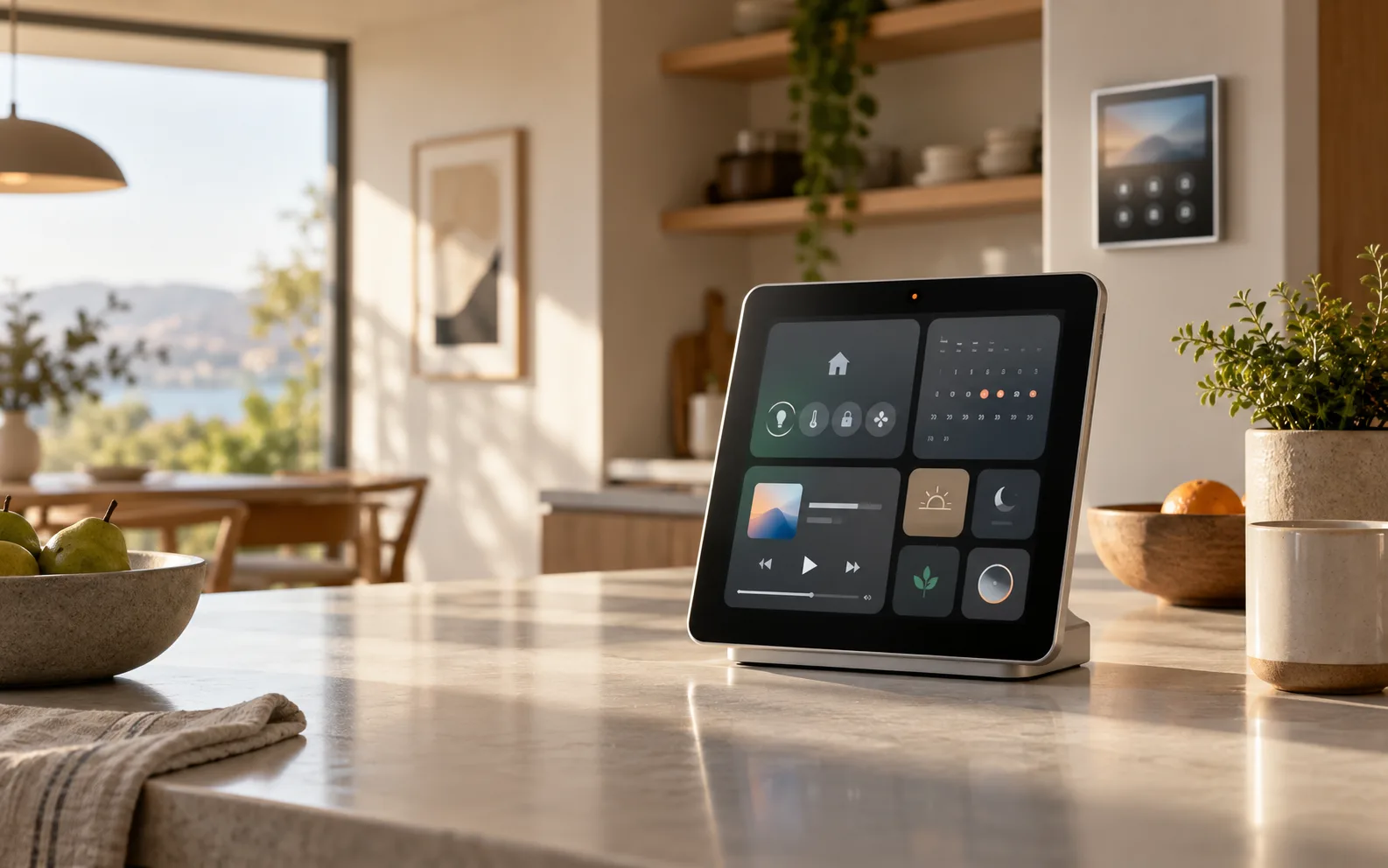
HomeView is a dedicated smart-home display with a square 7-inch Liquid Retina screen, an A18 chip, built-in speakers, a camera, and microphones. Apple offers a freestanding version and a wall-mounted version. Both are designed to sit in a central location where several people can interact with them.
The device is intended to do several jobs at once. It can display controls for compatible lights, locks, blinds, thermostats, and cameras. It can play music and podcasts, show photos, support FaceTime, surface personal information, and respond to voice commands. Apple also positions it as a place to see home activity, including camera feeds and notifications.
The important distinction is that HomeView is not simply an iPad on a stand. Apple has designed its software around a shared home, with individual experiences for recognized users and a guest mode for people who are not enrolled. Apple says the device can recognize up to six people and switch to a personalized Home Screen for each one.
That design gives HomeView a clear identity. Amazon Echo Show products are usually framed as Alexa displays, while Google Nest displays are built around Google Assistant and Google services. HomeView is an Apple household dashboard with a screen attached. Its value rises sharply if the household already uses iPhones, Apple Music, iCloud, HomeKit-compatible accessories, and Apple TV.
The strongest reason to buy: a shared Apple control point
Apple has historically left a gap between personal devices and the shared spaces of a home. An iPhone is powerful but belongs to one person. An Apple Watch is even more personal and too small for a family dashboard. A HomePod can hear commands, but it cannot show a calendar, a camera feed, a thermostat, or a visual routine. An iPad can do those things, but it is a general-purpose tablet that must be placed, charged, updated, and configured for a different use case.
HomeView is meant to occupy the space in between. It can be left in a kitchen, hallway, bedroom, or living room. A family member can glance at information without picking up a phone. Another person can ask Siri to run a scene, check the weather, start a timer, or continue audio. The screen makes the interaction visible to everyone nearby.
This matters most in households where smart-home control is already part of daily life. If people regularly argue about which app controls the lights, walk across the room to find a phone, or use several separate dashboards for cameras and automations, a permanent display can reduce friction. That is a real use case, not merely a specification-sheet feature.
HomeView may also help households that want shared information without exposing every person's private information. Apple says each recognized user gets personalized apps and widgets, while guests can still control shared accessories, check the weather, set timers, and play music without seeing personal content. The concept is more thoughtful than putting one person's full phone interface on a kitchen counter.
The catch is that a shared dashboard is valuable only if the household uses it. A device that sits in a prominent place but is consulted twice a week is a $299 decoration. Before ordering, identify at least three recurring actions that would move from a phone or voice-only speaker to HomeView. If you cannot name them, the product is solving a theoretical problem.
The privacy story is better than a generic camera display, but it is still a camera display
HomeView includes a camera and uses face recognition to distinguish people. That is central to the personalized experience: the device can show different content to different household members and keep personal information separate.
Apple says the A18 chip includes Secure Exclaves that process camera and microphone feeds in a protected compartment. The company presents this as a way to recognize faces and voices without exposing the recognition data to the operating system or to Apple. Apple also says personal content appears when the paired iPhone or iPad is on the same Wi-Fi network, has been recently unlocked, and HomeView recognizes the person.
Those are meaningful safeguards, especially compared with a household display that treats everyone in the room as the same account. They also create conditions that buyers should understand. HomeView's privacy behavior depends on Apple's account model, nearby devices, network state, recognition accuracy, and the household's comfort with a camera and microphones in a shared room.
A privacy claim is not the same as the absence of privacy tradeoffs. Some people will not want a camera pointed at a kitchen or hallway, regardless of where recognition happens. Others may be comfortable with it but still want a physical camera shutter or a clear hardware indicator. Apple's product material emphasizes secure processing, yet independent testing will be needed to answer practical questions: how often does recognition fail, what does the screen show during a false match, how easy is it to disable personalization, and what remains visible to an unrecognized guest?
HomeKit Secure Video is another potential cost consideration. Apple says compatible cameras can work with HomeView and, with a supported iCloud+ subscription, provide encrypted recognition of people, familiar faces, pets, packages, and vehicles. That can make HomeView more useful as a home-monitoring screen, but buyers should price the complete camera and cloud-storage setup rather than treating the display as a standalone security system.
The buying rule is simple: buy HomeView because its privacy model fits your household, not because the word privacy appears in the launch material. If you want a screen with no camera, or if you do not want personal recognition in a shared room, HomeView is the wrong shape of product.
Siri AI is the biggest promise and the least proven part
HomeView launches with Siri AI, which Apple describes as a new version of Siri powered by Apple Intelligence. Apple says it can understand personal context, use onscreen awareness, answer broad questions, and take actions across apps when an Apple Intelligence-enabled iPhone or iPad supplies the relevant personal context.
That sounds more useful than a speaker that only starts timers and turns lights on. In a home, conversational context could make routines easier to create and modify. A person might ask for a morning scene, request a calendar summary, ask whether a package arrived, or change the atmosphere in a room without remembering a precise automation name.
But this is also the part of the product that deserves the most caution. Siri AI is central to the pitch, yet the launch materials do not establish how consistently it will handle complex household requests. Artificial intelligence demos are good at showing an ideal path. A real home produces interruptions, multiple voices, unclear device names, missing permissions, conflicting schedules, and requests that cross several services.
There is a difference between answering a question and safely changing a home. A mistaken weather answer is annoying. A mistaken command involving a lock, alarm, garage door, or heating system can be consequential. Buyers should wait for testing that examines failure modes, confirmation behavior, latency, offline behavior, and what happens when the paired iPhone is unavailable.
Do not buy HomeView on the assumption that Siri AI will eventually become the household's all-purpose agent. Buy it only if the current, documented Home app controls and media features already justify the purchase. Future software improvements should be treated as upside, not as the reason to spend the money today.
The $299 price is not the whole cost
At $299, HomeView is priced above many voice assistants and below a new iPad. That comparison makes it difficult to classify. It is too expensive to be an impulse smart speaker, but it may be reasonable as a dedicated family device if it replaces several functions.
The wall-mounted model introduces another question. Mounting a device in a useful location may require additional hardware, power planning, and installation. Apple and accessory partners list separate mounting and power options, including USB-C, electrical, and future PoE-related accessories in some markets. The display may still cost $299, but a finished wall installation can cost more and can make relocation inconvenient.
The freestanding version avoids installation but competes with devices many households already own. An existing iPad can serve as a recipe screen, a camera monitor, a calendar display, or a Home app controller. It may not offer HomeView's dedicated interface, user recognition, or integrated audio, but the difference could be smaller than Apple's presentation suggests.
There is also the opportunity cost of buying into another fixed device. Phones and tablets can be carried from room to room, upgraded for more than one purpose, and resold more easily. HomeView may be better at being present, but presence is its entire point. If you are unsure that you want a permanent screen in the room, do not pay a premium to discover that preference later.
A useful test is to compare HomeView with the cheapest complete alternative, not just with its retail price. That alternative could be an iPad already in the drawer, a HomePod plus an iPhone, an Apple TV already connected to a television, or a competing smart display. Then ask whether HomeView saves enough time or removes enough friction to repay its premium over two or three years.
The ecosystem limits are a feature for Apple users and a warning for everyone else
HomeView is most coherent inside Apple's ecosystem. Apple says it works with Apple Home accessories and Matter devices, and its personal features connect to iPhone, iPad, iCloud, Apple Music, Messages, Calendar, Photos, FaceTime, and Find My. That integration is the reason to choose it over a cheaper generic screen.
It is also the reason not to choose it if the household is mixed. A home built around Google Home, Alexa, Android phones, YouTube, or services that do not participate in Apple's system may find HomeView restrictive. Even when a third-party accessory supports Matter, the quality of the experience depends on what Apple exposes through its Home software and how much configuration remains in the accessory's own app.
A display that can show many camera feeds is not necessarily a display that offers every service you expect. Early commentary and user discussion have already focused on questions about third-party apps, YouTube, the absence of a conventional tablet-style app environment, and how much HomeView behaves like an oversized Apple Watch rather than a small iPad. Those concerns are not proof that the product is bad, but they point to the central buying risk: HomeView may be intentionally focused when some buyers want flexibility.
Apple's focus can be a benefit. A household dashboard is easier to use when it does not become another app grid. Yet focus becomes limitation when the missing service is the one your family actually uses. Check your non-Apple requirements before ordering: video services, home-security brands, shared shopping lists, calendars, music accounts, camera feeds, and accessibility features. A single missing integration can matter more than several polished Apple features.
What the first reviews need to answer
Because HomeView is a new category for Apple, specifications cannot settle the purchase decision. The most useful reviews will need to test the product as a household object rather than as a launch-day demo.
First, reviewers should measure display visibility and audio quality in ordinary rooms. A 7-inch square display may be clear at a counter and awkward from across a living room. Its speakers may be satisfying for podcasts and background music but not a replacement for a larger HomePod or dedicated speaker.
Second, reviewers should test interaction at distance. How reliably does HomeView hear commands over music, kitchen noise, running water, or several people speaking? How quickly does it respond? Does it ask for confirmation before making a sensitive change? Does the screen remain useful when Siri AI is unavailable?
Third, the recognition system deserves sustained testing. Can it distinguish family members under different lighting? What happens when two people stand nearby? Can a guest accidentally see private content? Does the device become frustrating when it fails to recognize the person who is trying to use it?
Fourth, the Home app and Matter experience need scrutiny. Buyers should know whether adding a device is straightforward, whether automations are understandable, and whether a household member who is not the account owner can do ordinary tasks without hitting permission boundaries.
Finally, reviewers should examine the long-term software proposition. A smart display is not only a piece of hardware. It is a promise that the manufacturer will keep the interface useful, maintain compatibility, and avoid turning core features into a subscription. Apple has not announced a general HomeView subscription, but cloud camera features and other services can still carry separate costs.
Who should buy Apple HomeView now
HomeView makes sense for a fairly specific buyer. You are a good candidate if most of the following are true:
- Your household already uses iPhones and Apple services.
- You have several compatible smart-home accessories and want a shared control point.
- You can identify a permanent location where a screen will be consulted every day.
- You want family personalization and are comfortable with a camera and microphones.
- You value Apple's privacy and account model more than broad third-party app support.
- The current Home app, media, and communication features already justify $299 without relying on future Siri AI improvements.
For that buyer, HomeView could be the missing physical layer in an Apple home. The product's appeal is not one spectacular feature. It is the reduction of small points of friction: finding a phone, opening the right app, asking which camera saw movement, checking a shared routine, or controlling a device from the room where the action is happening.
Who should wait or skip it
Most other buyers should wait. That includes anyone who is mainly curious about Apple's first smart display, anyone hoping for a cheap kitchen tablet, and anyone who expects an open app platform. A first-generation Apple product with a new AI interface is exactly the kind of device where a few months of real-world feedback can change the recommendation.
You should also wait if your smart home is still unsettled. If you are choosing between HomeKit, Google Home, Alexa, and Matter, HomeView should not be the device that forces the decision. Map the accessories and services first. A beautiful control panel does not repair a fragmented ecosystem.
Skip it if a current iPad already does the job. You may lose the dedicated HomeView interface and some of its household recognition features, but you keep a more flexible device. Likewise, skip it if you do not want a camera in a shared room, if your home relies on Android phones, or if video and app support are more important than Apple integration.
Verdict
Apple HomeView is a credible first attempt at a shared Apple home computer, and its family-aware privacy design is more considered than the usual single-account smart display. The 7-inch screen, dedicated Home controls, integrated audio, personal profiles, and Apple Intelligence features form a coherent product.
The problem is that coherence does not automatically create necessity. At $299, plus any mounting, accessory, iCloud, or smart-home costs, HomeView needs to become part of a household's routine rather than merely look good on a counter. Its most important features are also the least settled: Siri AI must work reliably in messy homes, recognition must fail gracefully, and Apple's focused software must include the services families actually use.
Buy HomeView now only if you already have an Apple-centered smart home, a clear daily role for a permanent display, and enough confidence in the current feature set that you would be satisfied even if Siri AI improves slowly. For everyone else, wait for independent reviews and early software updates. The product is promising, but the sensible purchase decision is to let HomeView prove that it is a household tool before treating it as one.
Related articles
Should You Buy Apple’s First Foldable iPhone? Wait for the Hinge, Repair Terms, and Real-World Reviews
Apple’s September 9 event may introduce its first foldable iPhone. The sensible buying question is not whether the screen folds, but whether the premium buys a reliable daily tool with clear repair coverage.
Should You Buy Apple Home Gear Before the October 13 Event? Wait on the Hub, Buy Only for a Real Gap
Apple’s October 13 “Welcome Home” launch could reset its smart-home lineup. The sensible buying rule is simple: delay ecosystem-defining purchases, but buy a current device now if it solves a concrete problem and the return window covers the announcement.
Should You Buy the Apple Watch Series 12? The Health Sensors Are New, but the Upgrade Case Is Narrow
Apple’s Series 12 adds higher-frequency heart sensing and a readiness score, but its everyday case remains familiar. Here is who should buy now, who should wait, and when an older or cheaper Apple Watch makes more sense.
Should you buy a Mac mini for local AI? Only if the workload is real
A quiet Apple Silicon desktop can be a useful private AI server, but memory, model quality and cloud alternatives matter more than the local-AI hype.
Comments
Sign in to comment.
No comments yet.