Should You Buy the Galaxy Tab S12 Ultra? Buy the Screen, Not the Laptop-Replacement Promise
Samsung’s Galaxy Tab S12 Ultra is a superb 14.6-inch Android tablet, but its $1,399 starting price and optional $399 keyboard make the value case narrow. Here is who should buy it, who should choose the S12+, and who should wait.

The Samsung Galaxy Tab S12 Ultra arrives as one of the most conspicuous tablet launches of the fall: a 14.6-inch OLED slate only 5.1 mm thick, with a desktop-style multitasking mode, an included S Pen, and enough processing power to make laptop comparisons feel inevitable. It is also a $1,399 tablet before the keyboard that makes the laptop comparison most plausible.
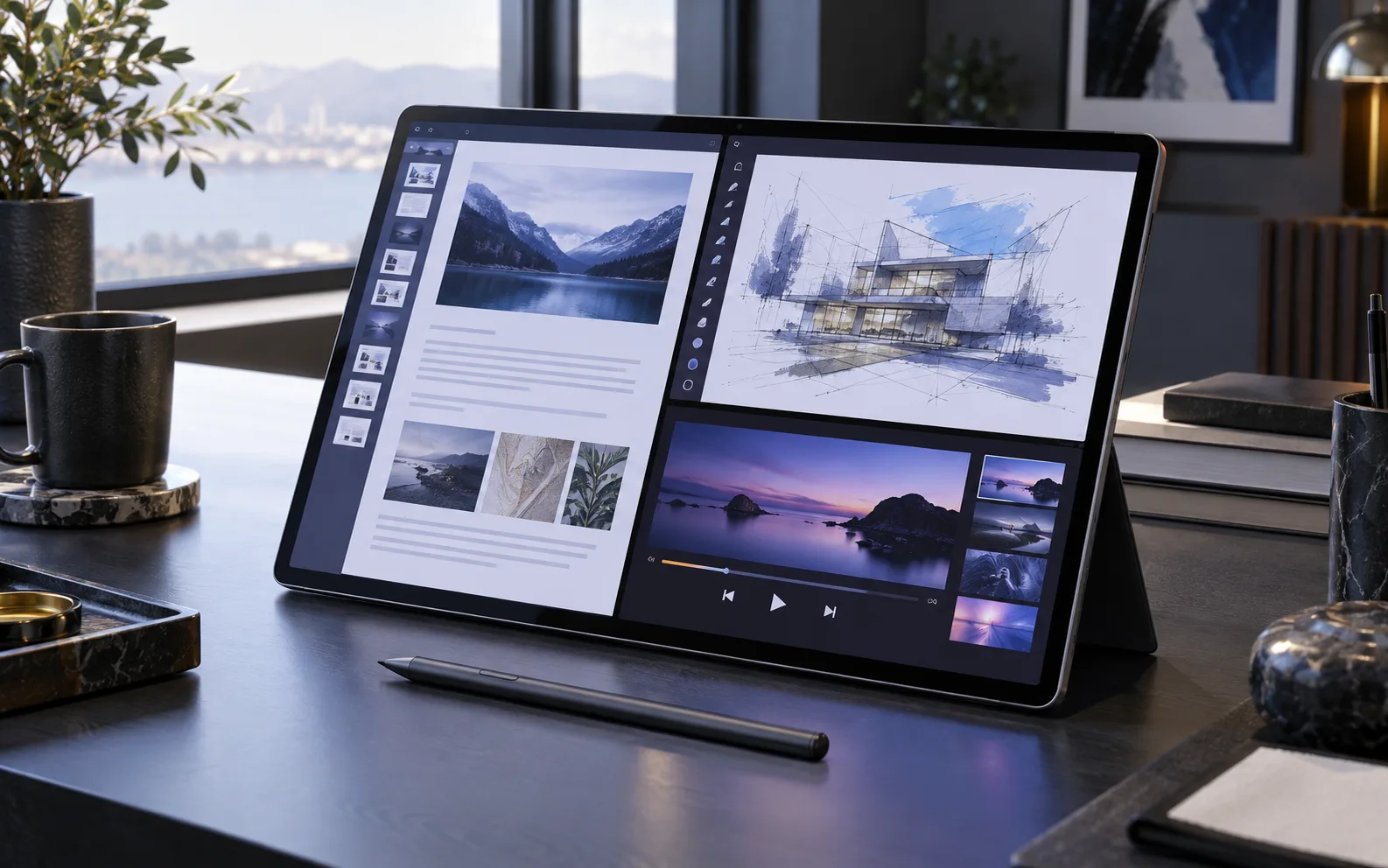
That combination makes the buying question unusually specific. The Tab S12 Ultra is not a bad tablet that needs to be rescued by a discount. It is a very good large-format Android tablet whose best qualities are easy to understand and whose limits become expensive once you try to make it replace a computer.
The short version is simple: buy it if you want the largest, brightest Android canvas for drawing, handwritten notes, media, split-screen work, or Samsung’s connected-device ecosystem. Do not buy it merely because the word “Ultra” suggests a laptop replacement. Existing Galaxy Tab S11 Ultra owners should be especially cautious, because the new model is a refinement with a faster chip, not a fundamental redesign.
What the Galaxy Tab S12 Ultra actually is
Samsung is selling the S12 Ultra as a premium productivity tablet, but its identity is closer to a portable large-screen workstation than to a conventional laptop. The 14.6-inch Dynamic AMOLED 2X panel runs at 2,960 by 1,848 pixels and up to 120 Hz. Samsung lists peak brightness of 1,600 nits, while independent testing found a vivid, high-contrast screen that is bright enough for demanding indoor and travel use. The size is the main event: two documents can sit beside each other without feeling cramped, and a canvas for illustration or photo work has room that smaller tablets cannot provide.
The tablet is remarkably thin and weighs about 692 grams in the Wi-Fi configuration. That makes it easier to carry than its footprint suggests, but thinness does not make a 14.6-inch device small. It is comfortable on a desk, a tray table, or a stand. It is less comfortable to hold one-handed for a long reading session, and it is awkward to use in bed unless it is supported. The physical question matters more here than it does with an 11-inch tablet: the screen is an advantage only when the surrounding space allows it to be one.
The S Pen is included. That is important because handwriting and sketching are central reasons to choose Samsung’s large tablet over a similarly priced laptop. The pen supports low-latency input and works with Samsung’s note-taking, annotation, and creative tools. The tablet also has a microSD card slot, IP68 water and dust resistance, Wi-Fi 7, four speakers, and an 11,600 mAh battery. Samsung rates it for up to 23 hours of video playback, while Tom’s Guide measured 11 hours and 31 minutes in a continuous web-browsing test at 150 nits. Those figures describe different workloads, but together they point to a device that can cover a substantial workday without being an endurance champion.
The box includes the tablet, S Pen, cable, and documentation. It does not include a charger, and the keyboard accessories are sold separately. That last detail changes the purchase calculation more than a specification sheet does.
The upgrade is real, but smaller than the name suggests
The S12 Ultra moves from the previous generation’s MediaTek Dimensity 9400+ to a 3-nanometer MediaTek Dimensity 9500. Samsung claims gains of up to 19 percent in CPU performance, 17 percent in GPU performance, and 61 percent in NPU processing compared with the Tab S11 Ultra. Independent testing confirms a capable, responsive tablet, but the results are not in the same class as an Apple iPad Pro powered by an M-series chip.
For ordinary tablet work, that distinction is mostly academic. Chrome tabs, video playback, note-taking, split-screen apps, Android games, and photo adjustments feel quick. The S12 Ultra has enough headroom that it does not invite constant compromises. The gap becomes more meaningful in sustained creative work, demanding 3D applications, heavy video editing, or software that is designed around a full desktop operating system.
The chassis, display size, resolution, battery capacity, and general design language remain very close to the S11 Ultra. TechRadar describes the refresh as a familiar product with a new processor, better heat management, and a revised four-channel speaker system. PhoneArena reaches a harsher conclusion: the tablet is difficult to justify over the S11 Ultra because the hardware and dimensions are so similar while the starting price is $200 higher. Both assessments lead to the same practical advice: do not evaluate the S12 Ultra as a completely new category of device. Evaluate it as a more expensive version of an already good one.
That is not an argument against the tablet. It is an argument against paying launch-day money without deciding which generation actually solves your problem.
The screen is the strongest reason to buy
There are cheaper Android tablets with good displays, but few make the physical experience of a huge OLED screen this convincing. The S12 Ultra’s panel has the deep blacks, strong contrast, and high refresh rate expected at this price. It is excellent for films, games, sheet music, reference documents, digital art, and any workflow where a smaller tablet forces too much scrolling or too many page changes.
Tom’s Guide measured strong color performance and found the panel brighter than competing displays in some SDR testing, although the iPad Pro retained an advantage in HDR brightness. The Samsung screen is tuned for vivid output, which many buyers will enjoy for video and games. People who need strict color matching for professional work should still calibrate their process and check how their preferred applications handle color management.
The 14.6-inch ratio is also useful for multitasking. Samsung DeX and ordinary Android split-screen tools can place a browser beside a document, a note app beside a video call, or a reference image beside a drawing app. The result feels less like using a stretched phone and more like using a light workstation. That advantage is difficult to express in benchmark charts because it comes from the physical layout of the workspace.
It is also the source of the tablet’s biggest ergonomic compromise. An enormous screen is wonderful when it is propped up and demanding when it is carried around. Buyers who mostly read, browse, or watch video from a sofa should consider whether a lighter 11- or 12-inch tablet would be used more often. A device that is technically more capable but harder to pick up can become an expensive piece of furniture.
DeX helps, but it does not turn Android into Windows
Samsung DeX remains the feature most likely to create an unrealistic expectation. It gives the tablet a desktop-like interface with resizable windows, a taskbar, and better support for keyboard and mouse workflows. With the tablet on a desk and the right applications installed, it can handle email, documents, research, presentations, light editing, and many administrative tasks comfortably.
The limitation is software, not merely interface design. Android tablet applications do not always behave like their Windows or macOS equivalents. Some are enlarged phone applications. Others have fewer features, weaker file-management tools, or awkward support for multiple windows. Samsung’s own software is generally well adapted, but a polished shell cannot supply desktop versions of every application.
Tom’s Guide also found that the most complete DeX experience depends on an external monitor: the connected display receives the more Windows-like workspace while the tablet’s own taskbar is less capable. That may be useful in a fixed desk setup, but it weakens the idea that the tablet alone is a complete computer. If your work requires specialist desktop applications, complex browser extensions, local development tools, full Adobe workflows, engineering software, or enterprise utilities built for Windows and macOS, the S12 Ultra should be treated as a companion device rather than your only computer.
The optional keyboard makes the distinction sharper. Samsung’s Pro Keyboard costs about $399 according to Tom’s Guide. Adding it to the $1,399 tablet produces a package near $1,800 before tax, and the result still does not offer the software breadth of a similarly priced laptop. The keyboard is worthwhile for people who already want the tablet and need occasional typing. It is a poor reason to choose the tablet over a laptop.
Galaxy AI and bundled apps are useful extras, not the purchase case
The S12 Ultra includes Samsung’s newer Galaxy AI functions, including Now Nudge suggestions in multi-window use, browser assistance, Now Brief recommendations, automated app actions, and Creative Studio features that can turn sketches into more finished artwork. The Pro Keyboard and Slim Keyboard covers also include a Galaxy AI key.
These tools may reduce friction in small tasks, especially for people already using Samsung phones and services. They do not change the fundamental trade-off between Android tablet software and desktop software. AI assistance can help summarize, suggest, or automate a step; it cannot make an incompatible application available or replace a keyboard, trackpad, file system, and peripheral setup for every professional workflow.
Samsung and its regional stores are also promoting app trials and subscriptions, including offers involving Photoshop, Notability, Clip Studio Paint, Notion, and Goodnotes. Such bundles can be valuable if they match the way you already work. They should not be counted as permanent hardware value without checking the duration, renewal price, regional eligibility, and whether the app’s Android version has the features you need. A six-month trial is a reason to test the workflow, not a reason to pay a premium indefinitely.
S12 Ultra versus S12+: the smaller model may be the smarter buy
Samsung launched the Galaxy Tab S12+ alongside the Ultra. The S12+ uses the same MediaTek Dimensity 9500 processor and a 12.6-inch 120 Hz AMOLED display. It weighs roughly 553 grams in the Wi-Fi version, compared with about 692 grams for the Ultra, and uses a 10,600 mAh battery. It gives up some of the Ultra’s camera hardware and the very largest canvas, but it preserves much of the experience that makes the series attractive.
The Plus is the better fit for someone who wants a premium Android tablet that can travel frequently, fit on smaller tables, and be held for longer periods. It still offers enough room for notes, documents, drawing, and media. The Ultra is worth the extra size when the display itself is the reason for the purchase: a musician reading wide scores, an artist using a large canvas, a researcher comparing multiple documents, or a Samsung user who wants a portable second monitor-like workspace.
The absence of a standard Tab S12 complicates the lineup. Samsung is concentrating its new flagship range on the Plus and Ultra, which means the entry price is high. Buyers who do not need OLED, an included S Pen, or high-end performance should look down the Samsung range instead of treating the S12+ as the default choice. A less expensive Galaxy Tab FE model, a Lenovo tablet, or a used previous-generation model may deliver more of the experience that matters for reading and streaming.
S12 Ultra versus iPad Pro
The iPad Pro remains the stronger choice for buyers who prioritize maximum tablet performance, long-term access to specialized creative applications, and Apple’s broader professional software ecosystem. Its M-series chip is faster in the benchmarks reported by Tom’s Guide, and iPadOS has a deeper selection of tablet-optimized apps in several creative and professional categories.
The Samsung wins on different terms. It includes the S Pen, supports expandable storage through microSD, integrates naturally with Galaxy phones and Windows PCs, offers a vivid large OLED panel, and provides the flexibility of Android. Samsung’s DeX can also feel more familiar than iPadOS for people who want windows and a taskbar. Neither platform is universally better. The correct choice depends on the software and phone ecosystem already in your life.
Switching platforms is expensive in ways that do not appear on the receipt. App purchases, cloud storage, accessories, file formats, messaging habits, and shared photos all affect the total cost. An Android user who already owns Galaxy Buds, a Galaxy phone, and Samsung Notes may get more practical value from the S12 Ultra than an iPhone user starting from scratch. Conversely, an Apple user who depends on iCloud, Final Cut workflows, or iPad-specific applications should not buy the Samsung simply because its screen is larger.
Who should buy it
The Galaxy Tab S12 Ultra makes sense for a fairly clear group of buyers:
- You want the largest high-quality Android tablet available and will use the screen several times a week for work, drawing, notes, media, or split-screen reference.
- You already use a Galaxy phone and value Samsung’s account, accessory, file-sharing, and multitasking features.
- You want an included stylus and a premium OLED screen without moving to an iPad.
- You understand that the keyboard is an optional accessory and that the tablet will complement, rather than replace, a full computer for demanding software.
- You are buying your first large premium Android tablet, or your current tablet is old enough that the performance and display improvements will be obvious.
For these buyers, the S12 Ultra is a strong purchase at the right price. The right price does not have to mean waiting forever. It means comparing the final package cost with the S12+, last year’s S11 Ultra, and the iPad Pro before accepting a launch promotion as proof of value.
Who should wait or buy something else
The S12 Ultra is a poor fit if your main goal is a cheap streaming screen, a casual e-reader, or a replacement for a Windows laptop. It is also a weak upgrade for an S11 Ultra owner whose tablet already feels fast and whose current display is in good condition. The new chip and audio changes are welcome, but they do not alter the basic experience enough to make a routine annual upgrade compelling.
Wait if you want a better understanding of long-term battery behavior, accessory pricing, software support, or real-world app compatibility. Early reviews are enough to identify the tablet’s strengths and major limitations, but a few months of retail pricing can make the buying decision easier. Samsung’s flagship tablets often become more attractive when discounts, trade-in offers, or keyboard bundles are compared against the initial list price.
Choose the S12+ if you want most of the speed and Samsung software in a more manageable body. Choose an iPad Pro if the professional app ecosystem and raw performance matter more than expandable storage or Android flexibility. Choose a conventional laptop if your definition of productivity includes desktop software, extensive keyboard time, or specialized peripherals. Choose a cheaper tablet if the job is mostly video, reading, browsing, and occasional notes.
The verdict
The Galaxy Tab S12 Ultra is worth buying as a very large premium Android tablet. It is not worth buying on the assumption that a keyboard and DeX automatically turn it into a laptop. The display, S Pen, thin design, microSD slot, strong performance, and Samsung ecosystem form a coherent product for a specific kind of user. The $1,399 starting price, the separate keyboard, the $200 increase over the previous Ultra, and the limited generational change make the purchase harder to justify for everyone else.
Buy it when the 14.6-inch canvas is the feature you will use. Buy the S12+ when portability matters more. Consider the S11 Ultra or a sale before paying full price for a modest upgrade. If none of those statements describes your daily work, a smaller tablet or a real laptop will probably serve you better.
Related articles
Should You Buy the Samsung Galaxy S26 FE? Only at the Right Price
The Galaxy S26 FE offers a big 120Hz display, telephoto camera, wireless charging, IP68 protection, and long software support. Its familiar hardware and $699.99 starting price make the discount, storage choice, and alternatives more important than the new model number.
Should you buy Sennheiser MOMENTUM True Wireless 5 before the reviews?
Sennheiser’s new $299.95 earbuds make a rare promise: user-replaceable batteries in the buds and case. That could change the ownership math, but most buyers should wait for reviews and battery-part details before paying launch price.
Should You Buy Apple’s First Foldable iPhone? Wait for the Hinge, Repair Terms, and Real-World Reviews
Apple’s September 9 event may introduce its first foldable iPhone. The sensible buying question is not whether the screen folds, but whether the premium buys a reliable daily tool with clear repair coverage.
Pixel Watch 5 buyer’s guide: smarter health and GPS, same charging question
Pixel Watch 5 is Google’s most capable Android watch yet, but the buying decision depends on battery tolerance, health-data trust, GPS needs and whether a cheaper alternative fits better.
Comments
Sign in to comment.
No comments yet.