Should You Buy a Googlebook? Preorder Only If Android Continuity Matters More Than Proven Laptop Compatibility
Googlebook is a $899-and-up Android-based laptop with premium hardware, Gemini integration, and a year of bundled services. Its phone continuity is promising, but the first generation still leaves important questions about apps, processors, subscriptions, and long-term support.

Google is asking laptop buyers to pay MacBook money for a new category called Googlebook. Preorders opened on September 21, with five launch families from Acer, Asus, Dell, HP, and Lenovo starting at $899 and reaching $1,299. Retail availability begins October 4 in the United States, followed by other markets on October 5.
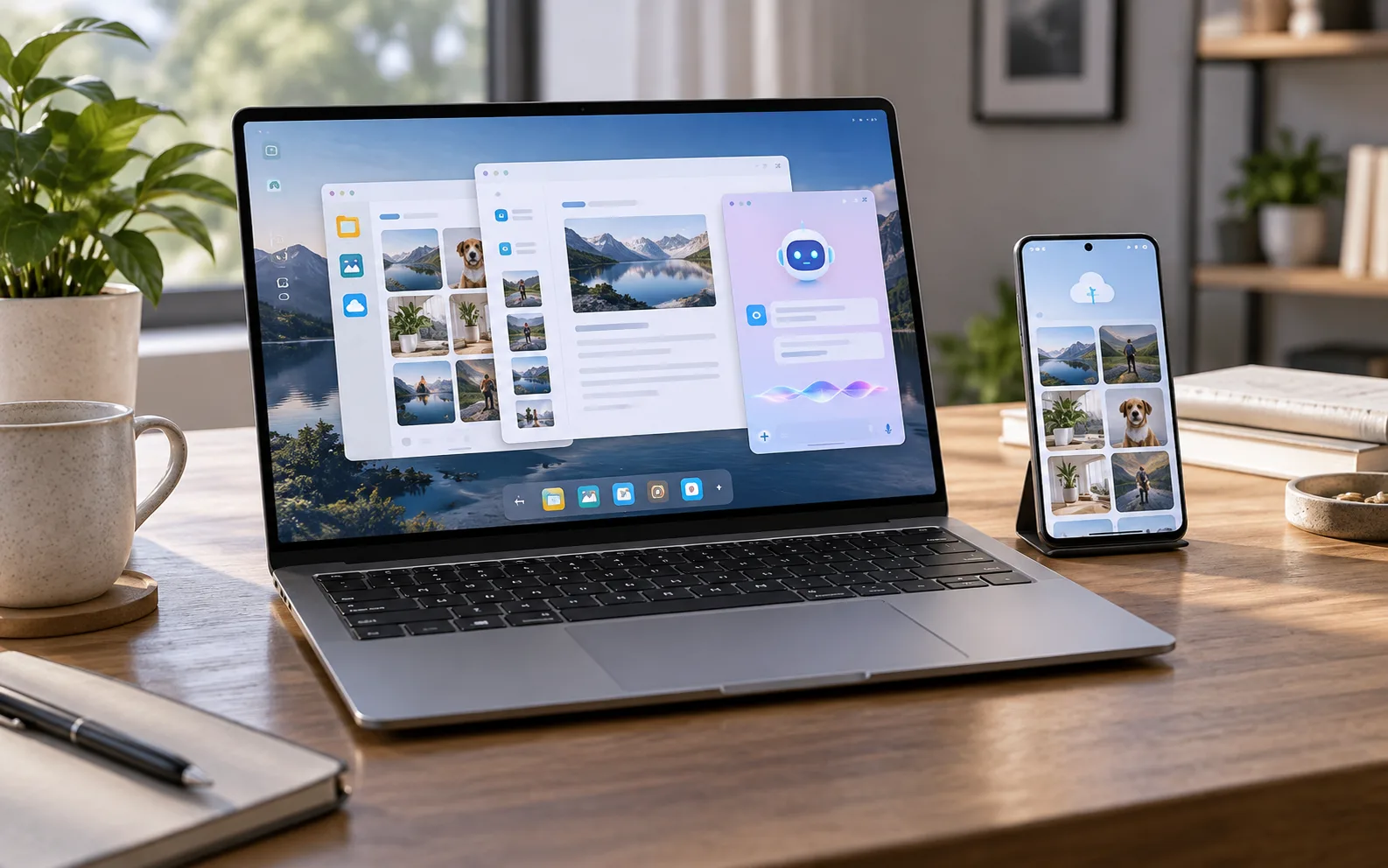
The pitch is easy to understand: take the convenience of Android, the desktop foundations of ChromeOS, and Gemini’s assistant features, then make them work together as naturally as an iPhone and MacBook. Google says a Googlebook can continue tasks started on an Android phone, expose phone files and apps on the laptop, and provide a more capable desktop environment than a conventional Chromebook.
That is a credible problem to solve. It is not yet a complete reason to preorder.
For most buyers, the sensible answer is wait for independent reviews, unless Android-phone continuity is the main reason you are replacing a laptop and your work fits Googlebook’s application model. The launch hardware looks competitive on paper, but the most important parts of this product are software behaviors that are difficult to judge from a specification sheet: whether Android apps behave like desktop applications, how well Microsoft 365 and Linux tools cover real workloads, what happens after the first year of bundled subscriptions, and how the different Intel and Snapdragon models age.
What Googlebook is actually selling
Googlebook is not simply a more expensive Chromebook with a new logo. Google describes it as a new class of laptop built on the Android technology stack and paired with desktop foundations from ChromeOS. The company previewed the platform in May and positioned it as a response to the way people now move between phones and computers.
The official launch description emphasizes four ideas:
- Android apps and phone content are integrated into the laptop experience.
- Chrome remains available as a full desktop browser rather than a mobile shell.
- Gemini is built into the operating system and central workflows.
- The hardware is intended to feel premium rather than budget-oriented.
Google’s own preorder announcement says Googlebook combines Android with ChromeOS foundations and is designed to work with an Android phone immediately. The Google Store product information lists 16 GB of memory, 512 GB of storage, up to 14 hours of battery life, a starting weight of 2.2 pounds, and touchscreen displays across the range.
Those details make the $899 starting price easier to understand than the word “Chromebook” might suggest. The comparison is no longer an inexpensive web laptop against a premium MacBook. It is a choice between a new Android-centered computer, a mature Windows laptop, or Apple’s tightly integrated hardware-and-software system.
The risk is that Googlebook inherits the compromises of both sides. It may not have the application breadth and peripheral compatibility of Windows, while also lacking the long-established polish and predictable behavior that make a MacBook easy to recommend at this price.
The launch lineup is broader than one Google laptop
Google is supplying the operating system and the overall platform, but partners are building the machines. Current reporting identifies five manufacturers: Acer, Asus, Dell, HP, and Lenovo. Prices begin at $899 and extend to $1,299, which means the buying decision will depend heavily on the individual model rather than the Googlebook label alone.
That distinction matters. A lightweight Snapdragon model may deliver excellent battery life and quiet operation, while an Intel model may be a safer choice for software, peripherals, and older tools. A 13-inch premium machine may be comfortable to carry but restrictive for split-screen work. A larger model may have the better screen and keyboard while losing the portability that helps distinguish the category.
Google’s store currently advertises several common platform characteristics: 16 GB of RAM, 512 GB of storage, touchscreen panels, and premium materials. Those are useful baselines, but they do not answer the questions that normally separate a good laptop from a frustrating one. Buyers still need to check the exact processor, display brightness, panel technology, webcam, port selection, wireless standard, repairability, and battery capacity for the specific model.
Googlebook should therefore be treated as a software platform with several laptop implementations, not as a single device with one predictable experience. A review of one model will not automatically tell you how every other Googlebook performs.
The strongest reason to buy: you already live in Android
Googlebook makes the most sense for someone whose current phone is already the center of daily computing. Google promises that phone files can appear in the laptop’s file manager, that tasks can move from phone to computer, and that mobile apps can be used from the desktop. The value is not that any one of these features is impossible elsewhere. Windows and macOS already offer their own phone-link systems, and web applications can bridge many gaps.
The potential advantage is consistency. If Googlebook can make messages, photos, copied text, recent files, notifications, and app handoffs feel like one environment, an Android user may save small amounts of friction throughout the day. Those small moments add up when the alternative is emailing a file to yourself, searching for a photo twice, or opening a mobile app on a phone simply because the desktop version is missing.
The benefit is especially plausible for users who already depend on Google Photos, Drive, Gmail, Calendar, Meet, YouTube, and Gemini. Googlebook comes with those core services, and the platform is clearly designed around the assumption that the user’s identity, files, and assistant history already live in Google’s ecosystem.
But ecosystem continuity is not automatically the same as productivity. A feature can be convenient in a demonstration and still feel awkward after several weeks of use. Phone apps may open in narrow windows, use touch-oriented layouts, or fail to support keyboard shortcuts. A task handoff may work only for selected applications. File access may depend on permissions or cloud synchronization. Notifications can become more distracting, not less, if the laptop duplicates every phone alert.
Buy Googlebook for this reason only if you can name the repeated daily problem it will solve. “It works with my Android phone” is a platform description. “I regularly need to move photos from my Pixel into a desktop editing workflow” is a buying reason.
The application question is more important than Gemini
Google’s marketing puts Gemini Intelligence at the center of Googlebook. The company presents Gemini as a proactive assistant that can help move from an idea to an action, while the platform includes tools such as Magic Pointer and a dedicated shortcut for AI functions. The Google Store also bundles a year of Google AI Pro with every machine.
Those features may be useful, but they should not decide the purchase by themselves. AI assistants change quickly, are often available on existing phones and browsers, and can be modified behind the scenes. A laptop should still be worth owning when the novelty of the assistant wears off.
The better question is whether the underlying software can run the applications you use for work, study, or creative projects. Google says Googlebook includes Microsoft 365 support for opening, editing, and saving Word, Excel, and PowerPoint files. It also promotes Android apps, Chrome web applications, Linux tools, Photoshop, CapCut, YouTube Premium, and cloud gaming through services such as GeForce NOW.
That is a more capable list than the old image of a Chromebook limited to browser tabs. It is still not equivalent to native Windows or macOS software. Compatibility may vary by application, and the difference between “the file opens” and “the workflow is dependable” is substantial. Advanced Excel add-ins, specialist enterprise software, developer toolchains, audio interfaces, color-managed creative applications, and niche peripherals are the areas where a new operating system is most likely to show its limits.
If your work depends on one irreplaceable application, verify that application before buying. Do not rely on a general statement that Android, Linux, or Microsoft 365 support exists. Check whether the exact version supports your required plug-ins, external devices, file formats, shortcuts, fonts, collaboration features, and offline mode.
For ordinary web work, documents, video calls, streaming, email, study, and light photo or video editing, Googlebook appears much easier to justify. For specialized professional software, it remains a wait-and-see product.
The bundled services make the launch price look better than the long-term price
Every Googlebook includes 12 months of Google AI Pro, which brings expanded Gemini access and 5 TB of cloud storage. Google and retailers also describe bundled access to services including YouTube Premium, Adobe Photoshop, and CapCut for limited periods. Google presents the bundle as a value of roughly $500, while its store separately describes the Google AI Pro portion as a $239 value.
This is useful at purchase time, but it can distort the comparison. A subscription included for one year is not a permanent reduction in the cost of the laptop. If the services are central to the experience, the eventual renewal price becomes part of the ownership cost. If you already pay for some of them, the bundle may replace an existing bill. If you do not use them, the headline value is mostly irrelevant.
Before preordering, write down three prices:
- The laptop price today.
- The price of the services you would actually keep after the included year.
- The price of the closest Windows or Mac alternative without counting temporary promotions.
The exercise prevents a common mistake: treating a cloud-storage allowance and a collection of trials as if they were hardware features. Googlebook may still be good value, but the value has to survive the end of the promotion.
There is another reason to be cautious. More cloud integration can make switching away harder. Files, AI history, photos, and workflows may become increasingly tied to Google accounts and Google services. That is not unique to Googlebook—Apple and Microsoft create their own forms of lock-in—but it should be part of the decision rather than an afterthought.
Intel versus Snapdragon could become the most important model choice
The Googlebook range uses more than one processor family. Google’s store refers to Intel and Snapdragon options, and individual partner models will differ. Buyers should not assume that every Googlebook has the same performance, battery life, or compatibility.
Snapdragon systems may offer a strong combination of low weight, quiet operation, and long battery life. They can be attractive for people who spend most of their time in the browser, Google apps, video calls, documents, and Android applications. Their ARM architecture can also create a different compatibility profile for older desktop software and hardware accessories.
Intel models may be the more conservative option for buyers with established Windows-like workflows, Linux tools, or peripherals whose drivers have not been tested on the new platform. That does not guarantee perfect compatibility, and it may come with a battery or weight trade-off. It does mean the buyer is choosing a more familiar processor family.
At this stage, specifications are not enough to settle the question. Battery claims are based on test conditions. App compatibility depends on the software layer and the exact program. Performance can look excellent in a short demonstration and become less impressive when the laptop is connected to an external display, running several Android apps, handling a large spreadsheet, and synchronizing cloud files at the same time.
Wait for reviews that test sustained performance, sleep and wake behavior, external monitors, video calls, Android app multitasking, Linux development tools, and battery life away from the manufacturer’s preferred workload. Those tests will tell you much more than a processor name.
Google’s 10-year update promise is reassuring but incomplete
Google’s launch material says Googlebooks will receive regular feature drops and updates for up to 10 years. Long software support is a real advantage, particularly compared with the short useful life of many inexpensive laptops. It should also reduce anxiety about buying into a new operating system.
However, a long update period does not guarantee that every feature will arrive on every model, that performance will remain unchanged, or that the battery and hinges will last a decade. Nor does it guarantee that partner-specific components will remain easy to repair.
The practical questions are more specific:
- Will the manufacturer sell replacement batteries and screens?
- Are the memory and storage upgradeable or soldered?
- How long will the exact model receive driver and firmware support?
- What is the warranty in your country?
- Can the device be repaired by an independent shop?
- What happens to resale value if Google changes the product line?
Googlebook is a first-generation category, and first generations tend to have the weakest resale history. Buyers who replace laptops every two or three years should care less about a theoretical ten-year support window than about the quality of the first twelve months, the return policy, and the availability of replacement parts.
Who should preorder
Preordering is defensible for a narrow group. You are a good candidate if most of the following are true:
- You already use an Android phone, especially a Pixel, as your primary mobile device.
- Your work is mainly browser-based or uses Google’s ecosystem.
- You want a light, premium laptop rather than a budget Chromebook.
- Phone-to-laptop file access and task continuation solve a real daily annoyance.
- You are comfortable testing a new operating system.
- You have checked the exact applications and peripherals you need.
- The included Google AI Pro and storage are services you would otherwise pay for.
For this buyer, Googlebook could be the first Android-centered laptop that feels like a complete personal computer rather than a Chromebook with a few phone features attached. The platform’s value comes from accumulation: familiar services, fast file access, Android apps, Gemini tools, and premium hardware in one place.
Even then, use the retailer’s return window as part of the purchase decision. A preorder should not become an irreversible commitment to an untested workflow.
Who should wait
Wait if you need dependable support for specialist software, gaming without cloud services, advanced local media production, niche business tools, or unusual hardware. Windows remains the safer choice when compatibility matters more than ecosystem elegance.
Wait if you use an iPhone. Googlebook may still work for you through the browser, but its signature advantage is designed for Android owners. Buying a laptop whose strongest feature is tied to a phone ecosystem you do not use makes little sense unless the hardware itself is exceptional.
Wait if you are replacing a functioning laptop simply because Googlebook is new. The launch period is when manufacturers and reviewers are most likely to expose differences between the advertised experience and ordinary long-term use. A current Windows laptop or MacBook will not suddenly become less capable because Google announced a new category.
Wait if you are tempted by the bundle rather than the machine. Once the trial subscriptions are removed from the mental calculation, the $899 starting price is no longer obviously cheap. At that point, screen quality, keyboard, ports, processor, warranty, and application support deserve more weight than Gemini branding.
What to check before placing an order
Start with the exact model, not the Googlebook name. Confirm the processor, memory, storage, display resolution and brightness, webcam quality, battery size, charging standard, port selection, and weight. If you work with a monitor or dock, check the number and capability of external displays. If you travel, check whether the charger is compact and whether the laptop supports charging from the power banks you already own.
Then test the software on paper. Make a list of every application used in a normal week, including tools you open only occasionally. Mark each one as native, web-based, Android, Linux, cloud-streamed, or uncertain. Uncertain items are not minor details; they are reasons to wait for a review or confirm compatibility with the developer.
Next, price the alternatives. Compare the same $899 to a well-reviewed Windows laptop, a MacBook Air, and a current Chromebook Plus if your needs are modest. Do not compare only processor specifications. Compare the complete ownership experience: repair options, software, support, ports, battery, display, and resale.
Finally, read the return and warranty terms before ordering. A new platform should be easy to send back if the keyboard, app behavior, battery, or phone integration does not match your expectations.
Verdict
Googlebook is a serious attempt to turn Android into a more convincing laptop ecosystem, not merely a rebranding exercise. The combination of Android apps, ChromeOS desktop foundations, Gemini, phone continuity, 16 GB of RAM, 512 GB of storage, and premium partner hardware gives it a stronger starting point than the cheapest Chromebooks.
But the category is not proven enough for a broad preorder recommendation. The biggest unknowns are exactly the ones that matter after the unboxing: app compatibility, processor-specific behavior, external-device support, repairability, and the cost of keeping the bundled services.
Buy now only if Android continuity is your primary laptop requirement and your existing workflow is already compatible. Everyone else should wait for independent testing and the first meaningful discounts. The hardware may be good on day one, but the reason to trust Googlebook will be whether it remains useful after the promotional year and after the launch excitement has passed.
Sources and reporting context
This article uses Google’s launch and product documentation for the platform description, hardware baselines, bundled services, and support claims. Independent reporting from Axios, Tom’s Guide, TechRadar, and TechCrunch was used to cross-check pricing, launch partners, availability, and early hands-on context. Community discussion was treated only as an indicator of buyer concerns, not as confirmation of product specifications.
Related articles
Should you buy a robot vacuum-mop combo in 2026?
A practical verdict on when a robot mop-vacuum earns its price, and when it becomes one more chore.
Should you buy a portable air conditioner in 2026?
A practical verdict on when a portable AC is a smart heat-wave backup and when it is just a loud compromise.

Should you buy a portable power station in 2026?
A practical verdict on portable power stations: when they help, when they disappoint, and what to check before spending money.
Should you buy a PlayStation before discs disappear?
Sony’s 2028 disc cutoff does not make PS5 a bad buy, but it changes the real cost of digital games, PS Plus and long-term access.
Comments
Sign in to comment.
No comments yet.