How to Turn Creative Feedback Into an Actionable AI Video Brief
A six-second product reveal shows how teams can prioritize feedback, choose references, and set clear approval criteria for an AI video revision.

A designer asks for more movement. A marketing manager wants the product visible sooner. The founder likes the opening but wants it to feel more premium. All three are reviewing the same six-second video, yet each is asking for a different revision.
Combine those comments in a prompt and the next version could introduce a faster camera move, stronger reflections, and an earlier reveal. If the result improves, the team may struggle to explain which change helped. If it gets worse, the next review starts with three more opinions.
A workable revision brief connects each comment to a visible problem, assigns it a priority, and defines what the reviewer should approve.
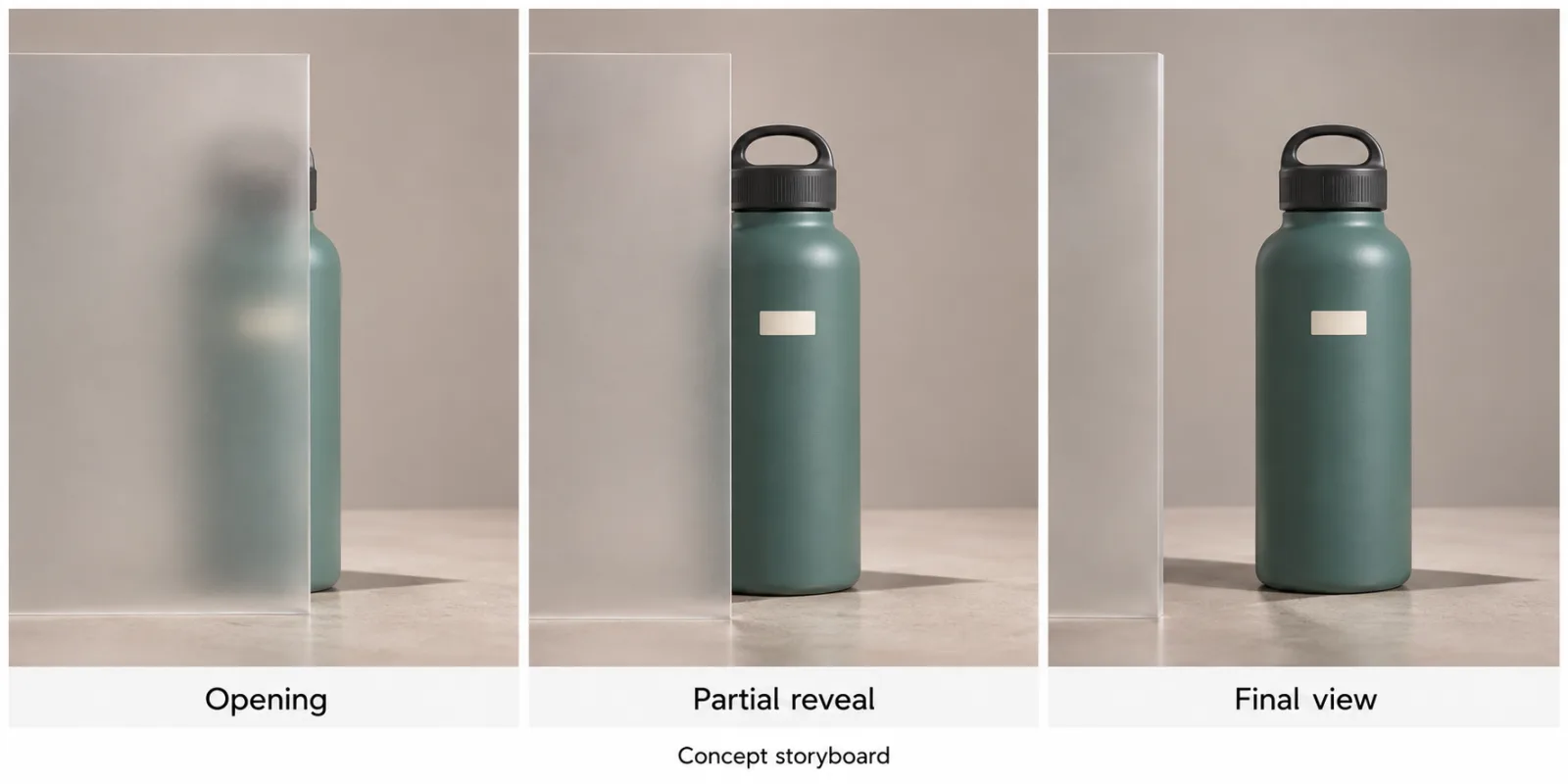
Consider a concept for a reusable water bottle. The bottle stands behind a translucent panel. A camera move gradually reveals it, ending on a clear product view. JXP’s Kling 4.0 AI Video Generator provides text, reference, and keyframe modes for developing this kind of sequence. The task is to choose the input that best communicates the requested change.
Agree on the first problem to solve
Start with the purpose of the video. Suppose it will appear beside a product description on a launch page. The team wants visitors to recognize the bottle quickly and see its distinctive cap.
That gives the marketing manager’s comment a concrete basis. Review the opening together and identify the first frame where the bottle becomes recognizable. If recognition comes too late, fixing the reveal takes priority.
The brief can then say, “Make the bottle’s shape and cap visible within the first two seconds.” Keep that as the target for the next draft. The request for a more premium appearance can be addressed once the reveal works, unless the current styling prevents viewers from seeing the product clearly.
This sequence gives the team a reason for its decisions and reduces the number of variables changing at once.
Match the change to the right input
A prompt can describe a shorter opening hold or a slower sideways camera move. A reference image can communicate the bottle’s appearance and the intended composition. A keyframe can show how much of the bottle should be visible at a particular stage of the action.
For the reveal, prepare an intermediate image showing the bottle partly clear of the panel, with its cap already visible. The final image should show the approved ending composition. Keep the camera height, bottle position, and panel consistent across the images.
Treat these frames as visual guidance. Review the generated timing to see whether the intended reveal actually happens within two seconds.
If the existing motion is acceptable and only the opening hold is too long, try trimming the clip first. A small edit may resolve the comment while preserving a shot the team already likes.
Give references explicit roles
Before the next generation, write a short description of what each input controls.
The current product photograph establishes the bottle’s shape, cap, and label. The intermediate frame establishes how far the reveal has progressed. The final frame establishes the closing view.
Check the materials for contradictions. A product photograph with an old cap design can send the revision in the wrong direction. A final frame taken from a different height can encourage an unexpected camera shift.
Use approved images and give them recognizable filenames. Keeping the input set consistent also makes the next comparison easier.
Translate style feedback into production choices
“More premium” becomes actionable when reviewers agree on visible attributes. For this example, they might choose soft reflections, a plain background, and a steady camera move.
Record those choices before requesting another version. A suitable prompt could read:
“Move the camera slowly to the right as the bottle emerges from behind the translucent panel. Reveal the bottle’s shape and cap early in the shot. Keep the lighting soft and steady, then hold the final composition.”
Handle exact product lettering during finishing if the generated label is unstable. The reviewer responsible for product accuracy should compare the usable frames with approved photographs.
Close the review with a decision
Ask the person responsible for the launch page to approve the reveal timing. Ask the product reviewer to check the bottle and cap. Assign one person to combine their feedback into the next instruction.
Record the result in concrete terms. “The bottle is recognizable early enough, but the cap changes during the final hold” preserves an accepted decision and identifies the remaining problem.
Then choose the next action. Trim the hold, revise the closing reference, or accept the clip for its intended use. Carry the accepted timing forward so the next revision begins with a settled decision.
Related articles

OpenShot 4.1 adds native text and CLI automation, but the real test is the handoff between them
OpenShot 4.1 is a substantial open-source video editor release: direct text editing, automatic optimization for demanding footage, smarter exports, and a command-line workflow aimed at scripts and coding agents. The useful question is how much of that workflow is dependable today.


Healing With AI Codes: Turn Your Ideas into Tools That Help People
With AI Services We Can Create Code Easily...to Heal the World!


School AI tools for children: what parents should ask before the classroom chatbot arrives
New school AI rules are arriving faster than parent handbooks can explain them. Here is a practical way to judge classroom AI by age, privacy, supervision and real learning value.
How an Entire Orphanage—and an Entire Refugee Community—Could Utilize Virtual Reality
What if a single virtual reality center could help children feel safe, explore new worlds, continue learning, reconnect with their dreams, and access psychological support—even in places where resources are scarce? What if that same vision could grow into a healing and educational network for an entire community?
Comments
Sign in to comment.
No comments yet.