Fake coding interviews are now a developer security problem
A malware-laced take-home assignment shows why untrusted interview code belongs in a disposable environment, not on a workstation with real tokens.
A fake job interview can now look exactly like normal developer work. That is why this story matters.
A recruiter message arrives on LinkedIn. The role is remote, the pay is attractive and the next step is a take-home coding assignment. The ZIP archive looks like a small backend project. The dependencies do not scream malware. A busy candidate opens it, inspects the files quickly, runs the expected setup steps and maybe makes a commit before submitting the exercise. In the case published by security-minded developer Citizen Dot on July 23, that ordinary rhythm was the trap.
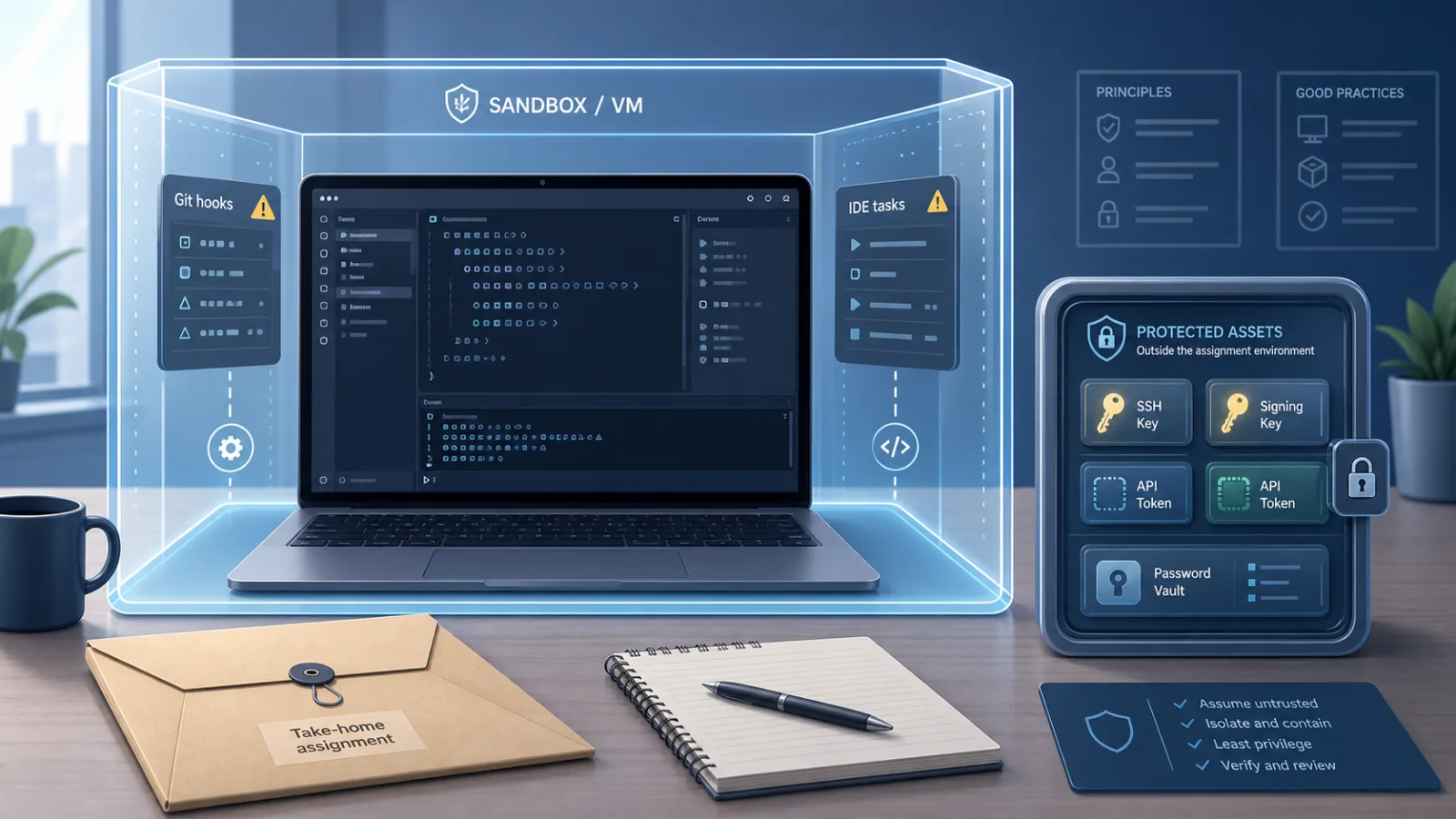
The project contained a ready-made .git directory with hooks. The pre-commit hook selected an operating-system-specific payload for Linux, macOS or Windows and launched a remote command quietly. The later stages, according to the author's analysis, downloaded more scripts, installed Node.js dependencies and ran an obfuscated parser. The package list included libraries that made sense for credential, wallet and token theft. The article also noted that changing a tracking parameter returned a different script, suggesting victim-specific tracking.
The Hacker News discussion reached roughly 408 points and 112 comments by publication time. The useful part of the thread was not panic. Developers compared disposable VMs, devcontainers, Git hook behavior, VS Code Workspace Trust and recruiter verification. One commenter said the story made him realize a similar scheme had already hit him after a credible video call with someone posing as a CTO. That is the unsettling lesson: the malware delivery mechanism is technical, but the attack succeeds because the hiring flow feels familiar.
This is not one weird ZIP file
The fresh personal write-up fits a broader pattern that security teams have been tracking all year. The Hacker News, Proofpoint, DomainTools and OpenSourceMalware have all described recruitment-themed campaigns against developers. The names vary by researcher and cluster: Contagious Interview, Famous Chollima, Void Dokkaebi, UNK_DeadDrop, BeaverTail, InvisibleFerret and OtterCookie all appear in reporting around developer lures, malicious repositories, fake crypto or AI companies and cross-platform malware.
Proofpoint's UNK_DeadDrop reporting described more than 250 emails over six weeks aimed at people in nearly 100 organizations, mostly in the United States, with targets in finance, cryptocurrency, education, technology and other sectors. The lures used code review or repository themes. Other reporting described malicious GitHub repositories, VS Code or Cursor projects, malicious extensions, package scripts and loaders for Linux, macOS and Windows.
That does not mean every fake interview is North Korean, or that the Citizen Dot case should be attributed to a specific actor without vendor confirmation. It does mean the tactic is mature enough to be treated as a normal threat model. Developers are attractive targets because their laptops often contain the keys to other systems.
Why developers are such good targets
A developer workstation is rarely just a workstation. It may hold SSH keys, GitHub tokens, npm or PyPI publishing credentials, cloud CLI sessions, .env files, browser sessions, password-manager unlock state, VPN profiles, CI access and source code. For maintainers of popular packages, one stolen token can become a supply-chain problem. For crypto and Web3 developers, wallet theft is an obvious goal. For a company, the same foothold can expose private repositories, cloud accounts or deployment pipelines.
The attack also arrives at a moment when the victim is motivated to cooperate. Candidates want to look responsive. They want to show they can run the project, fix the tests and submit clean code. A recruiter can frame every dangerous step as part of the assignment: open this repo, install dependencies, run the dev server, commit your work, share your screen while debugging. None of those actions is strange in a real interview.
Developer tooling adds the execution surface. Git hooks are useful in trusted repositories. Package scripts are useful. VS Code tasks, debug launch configurations, devcontainers, Makefiles and setup scripts are useful. In an untrusted project, each one is a possible place to hide execution. The danger is not that Git itself is broken. A normal git clone does not automatically install a remote repository's hooks into your local hooks directory. The danger increases when the attacker sends an archive that already contains a .git directory, provides explicit instructions that trigger hooks, abuses core.hooksPath, leans on package scripts or asks the candidate to trust a workspace in an IDE.
That distinction matters. The right conclusion is not "never use Git" or "VS Code is malware." The right conclusion is that a coding assignment from a stranger is untrusted code until proven otherwise.
What to inspect before running anything
Start with the boring checks. Unpack an archive in a temporary directory and list hidden files. Look for .git, .git/hooks, .vscode, .idea, .devcontainer, package.json, pyproject.toml, requirements.txt, Makefile, Dockerfiles, shell scripts, install scripts and CI files. Search for postinstall hooks, setup commands, task definitions, debug launch commands, remote URLs, raw IP addresses and encoded blobs. You do not need to reverse engineer every byte to decide not to run it on your main machine.
If the project arrived as a ZIP, be more suspicious than if you cloned a public repository yourself. A ZIP can include a prepared .git directory with hooks. A public repository can still be malicious through scripts and dependencies, but the hook behavior is different. If the recruiter insists on using a ZIP, asks you to commit locally, asks you to run an opaque setup script or pushes you to share-screen while executing unfamiliar commands, treat that as a strong warning sign.
Do not rely on requirements.txt or package.json looking normal. The Citizen Dot case looked ordinary at first. The suspicious part was hidden in the project structure and the staged behavior. Malware authors know developers skim dependency lists.
How to work on untrusted assignments safely
Use a disposable environment. A cloud VM you create, a local VM, or a hardened devcontainer can all help, but the details matter. Do not mount your home directory. Do not mount your SSH directory. Do not expose your browser profile, password manager, cloud credentials, GitHub tokens, npm tokens, PyPI tokens or real .env files. If the assignment needs credentials, use fake ones. If it needs network access, assume that access can be abused and consider egress logging or blocking.
A container is not magic if it mounts the host filesystem or Docker socket. A VM is not magic if you sign into the same browser and password manager. A recruiter-provided VM is not more trustworthy than recruiter-provided code. The safest pattern is an environment you control, with nothing valuable inside, created for the assignment and destroyed afterward.
Disable convenience features when opening unknown projects. In VS Code, respect Workspace Trust prompts and do not trust a folder until you understand what it can run. Review tasks and launch configurations before starting them. Avoid letting IDE extensions execute project-provided actions automatically. Consider using a separate operating-system user for risky work, with no access to your normal secrets.
For Git, remember that hooks are local files. Before committing inside an untrusted project, inspect the hooks directory and relevant Git configuration. If a take-home assignment requires a commit, make it in a throwaway environment. You can also set global habits that reduce surprise, such as treating hooks in unknown worktrees as hostile and using templates or tooling that make hook execution visible. The exact setup will vary, but the rule is stable: do not let a stranger's repository run code on the machine that holds your work identity.
What companies and recruiters should change
This is not only a developer hygiene problem. Hiring teams helped create the opening by normalizing vague recruiters, private archives and "just run our project" tests.
A safer take-home assignment starts with a specification, not a mystery codebase. If code is necessary, use a public template, a clean repository and minimal dependencies. Publish the assignment from the company's real domain or verified organization account. Let candidates verify recruiters through an official careers page or company email. Do not ask candidates to share-screen while executing unknown commands. Do not penalize candidates for saying they will run the assignment only inside an isolated environment.
Security teams should also brief HR. A fake recruiter is not only a brand impersonation issue. It is a route to developer endpoints. If a company hires remote engineers, its security guidance should cover interview artifacts the same way it covers phishing attachments.
For open-source projects, maintainers of popular packages should assume they are higher-value targets. A maintainer with publishing rights may be more attractive than a random employee at a large company. If you maintain a package with meaningful downloads, do not run recruitment code on the same machine where you publish releases.
If you already ran one
Do not keep poking at the project on the same machine to satisfy curiosity. Disconnect from the network if you think the code executed. Preserve evidence if your employer or an incident-response team may need it. From a clean device, rotate passwords and revoke sessions. Revoke and recreate SSH keys, GitHub tokens, npm tokens, PyPI tokens, cloud keys and any other developer credentials that were present. Check GitHub and package-registry audit logs if you have access. Review shell history, startup items, cron jobs, launch agents, browser extensions and recently modified files.
If the machine had work access, notify your security team quickly. This is not a moment for embarrassment. The whole lure is designed to look like work. If the machine had crypto wallets or signing keys, assume the risk is higher. For high-value targets, a wipe and rebuild may be faster and safer than trying to prove the absence of persistence.
Calm rules that actually help
The point is not to scare every developer away from interviews. The point is to change one default. Code from a stranger does not belong on your main workstation.
Put it in a disposable environment. Keep secrets out. Inspect hidden files and automation. Treat Git hooks, package scripts, IDE tasks and devcontainer settings as execution surfaces. Verify recruiters through official channels. Ask companies to provide assignments that do not require trust in a private archive. If someone pushes back on reasonable isolation, that is information about the process.
Developer machines are now part of the supply chain. Fake interviews exploit the gap between professional eagerness and security boundaries. Closing that gap does not require paranoia. It requires a new habit: untrusted code gets a clean room, not the keys to your real work life.
Related articles

AI agents need trust boundaries before they get a shell
Friendly Fire shows why companies should treat autonomous coding agents as privileged automation, not just smarter chat tools.
AI agents did not escape the sandbox. They were given too much road
AISI’s incident report turns agent safety into an operational IT question: internet egress, GitHub permissions, fake identities and supply-chain controls now belong in every agent rollout plan.
SQLite fake Critical CVEs show why scanners need evidence, not panic
Six rejected SQLite CVEs are a calm reminder that vulnerability management must verify source, reachability and vendor context before treating a score as an emergency.
Debian’s AI vote is a policy template, not a free pass for generated code
The project’s new rule is practical: AI may help, but the human contributor still owns quality, licensing, security and maintenance.
Comments
Sign in to comment.
No comments yet.