Why a GPS tracker starts sending IMEI 888888000000888 and ID 88000000888
Why some GPS trackers suddenly report IMEI 888888000000888 and ID 88000000888, why the device stops updating under its original ID, and how to restore the correct IMEI on GT02, GT02A, TK110 and similar trackers.

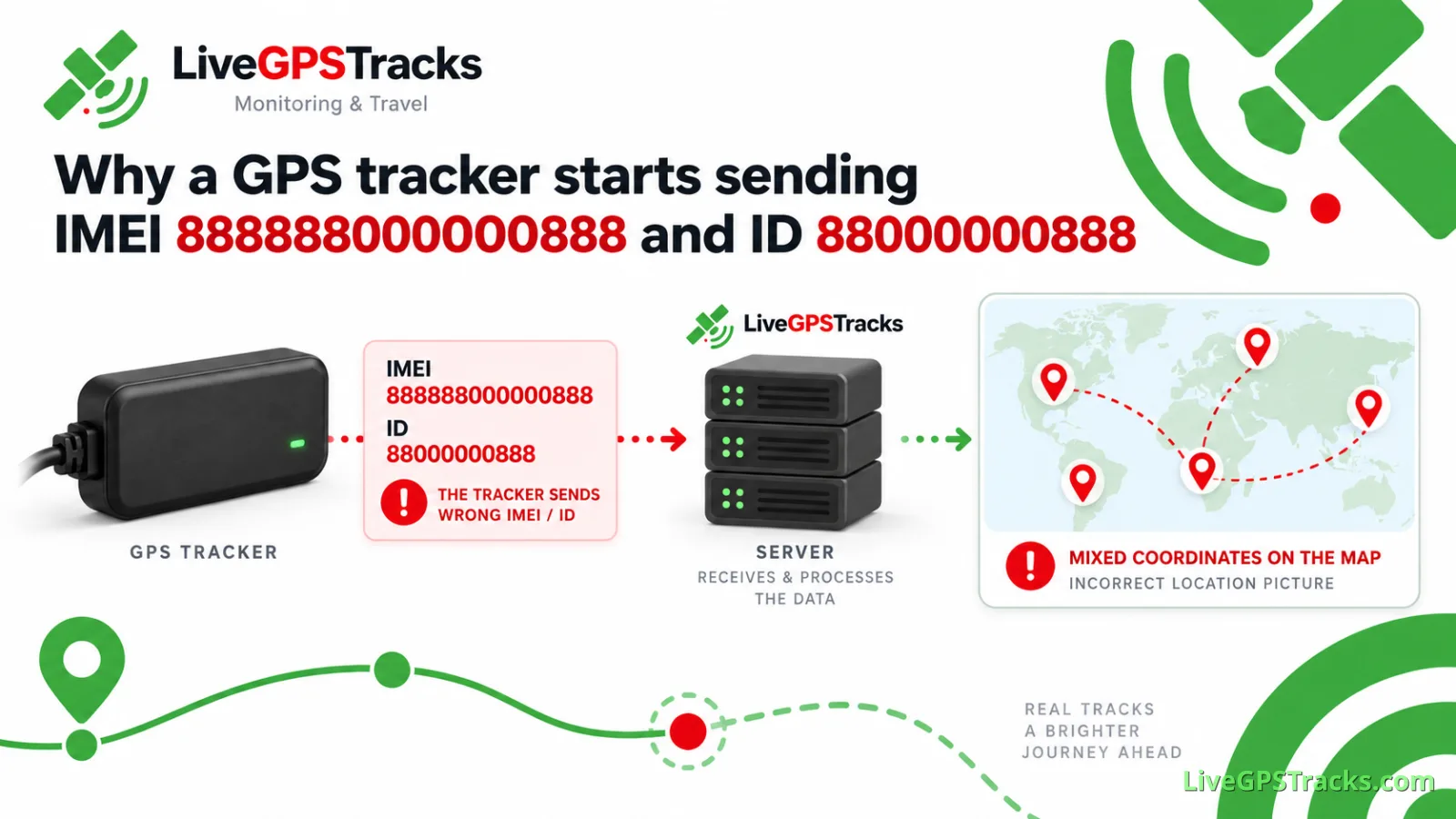
A GPS tracker may work normally for years and then suddenly stop updating in the account. The device itself may still be powered on, have mobile internet access, connect to the server, and continue sending location data.
The difference is that it now identifies itself as:
88000000888
If you request the device parameters by SMS, you may also see an unusual IMEI:
888888000000888
We have seen this more than once on the LiveGPSTracks platform. Similar packets also appear in logs from other GPS tracking systems.
So where do these numbers come from, and can the original IMEI be restored?
Where does 88000000888 come from?
The identifier a GPS tracker sends to a monitoring server does not always match its full IMEI.
Older GT02, GT02A, TK-110 and many similar trackers use a shortened device ID. Only part of the 15-digit IMEI is used to identify the device on the server.
A short ID by itself is therefore not a sign of a fault.
In this particular case, the tracker starts using this value instead of its normal IMEI:
888888000000888This produces the ID:
88000000888and the protocol may send it with a leading zero:
088000000888The three values are connected:
888888000000888
        ↓
88000000888
        ↓
088000000888
You can see both values in the packet itself:
(088000000888BP00888888000000888HSO199)It contains:
088000000888as the device identifier used by the protocol, and:
888888000000888as the IMEI value reported by the tracker.
The same IMEI may also appear when the device parameters are requested by SMS.
This rules out a server-side parsing problem in most cases. The LiveGPSTracks server does not replace the original IMEI with a string of eights. The tracker is already connecting with 888888000000888.
The same values have been seen in logs from other GPS tracking systems. 888888000000888 is most likely a default, fallback or service value used by some firmware when the normal IMEI is no longer available.
We have not found manufacturer documentation that explicitly describes the purpose of this value.
Why can the original IMEI disappear?
The exact cause is not known.
Possible causes include:
a failure when reading non-volatile memory;
corrupted stored settings;
an initialization error during startup;
unstable power;
an unexpected reboot;
a firmware bug.
The existence of SETIMEI commands is significant here. On some trackers in this family, the IMEI value used by the firmware can be written through a command. That also means this stored value can potentially be lost or replaced.
What the owner sees
The tracker does not disappear from the account. It simply stops updating.
The physical device may still:
be powered on;
register on the mobile network;
have internet access;
connect to the LiveGPSTracks server;
send coordinates.
The server is now receiving those packets under a different ID.
It has no way to know that 88000000888 is the same physical tracker that previously connected under another identifier. The device already added to the account therefore stops receiving new data.
What to do if your tracker starts using 88000000888
The first goal is to restore the original IMEI.
1. Check which IMEI the tracker reports
Older GT02A firmware often supports:
PARAM,<password>#For example:
PARAM,666666#Other firmware versions may use commands such as:
imei<password>or:
getimei<password>Some versions use:
CXZTIf the SMS response contains:
888888000000888the incorrect IMEI is already being reported by the tracker itself.
2. Find the original IMEI
Check the label on the tracker first.
The IMEI may also be available:
on a label inside the case;
on the original packaging;
in the manual or warranty documents;
in old photos of the device;
in old SMS messages from the tracker;
on another tracking platform where the device was previously used.
If you only have the shortened ID that was added to your account, that may not be enough to reconstruct the full IMEI.
Do not copy the missing digits from another GT02A or search for a “typical TK110 IMEI.” You need the IMEI assigned to that specific device.
3. Check the firmware version
It is better to identify the firmware before changing the IMEI.
Some older GT02A versions support:
VERSION,<password>#The firmware version may also be included in the response to PARAM.
TK110, GT02 and GT02A do not refer to one single hardware and firmware combination. Many different trackers have been sold under these names over the years, and their SMS commands are not always the same.
4. Write the original IMEI back to the tracker
Some TK110/GT02 firmware supports the SETIMEI command.
One documented format is:
#SETIMEI#<password>#<original IMEI>#Other firmware uses:
SETIMEI<password>,<original IMEI>#Some similar trackers use:
setimei<password> <original IMEI>Do not send every variant one after another. Identify the firmware or at least the command family used by the tracker first.
Which password should be used?
Common factory passwords include:
123456and:
666666The owner or seller may have changed the password, so a password shown in one manual will not necessarily work with every TK110.
5. Check the result
Request the device parameters again after writing the IMEI.
Instead of:
IMEI: 888888000000888the tracker should report its original IMEI.
After reconnecting to the server, it should also return to its previous device ID. If that ID is already registered in the LiveGPSTracks account, the existing tracker should start updating again.
There is normally no need to change the APN, server address or port just because the IMEI was restored.
If SETIMEI does not work
The tracker does not recognize the command
It probably uses different firmware and a different SMS command set.
Look for documentation for the actual firmware version rather than relying only on the TK110 or GT02 name printed on the case.
The tracker reports an incorrect password
A factory reset should not be the first response. The password may have been changed earlier.
Check old configuration notes or SMS commands that were previously accepted by the tracker.
The IMEI is restored but later changes back to eights
If the correct IMEI can be written successfully but later returns to:
888888000000888after a reboot or some time in operation, the problem is probably no longer just a configuration issue.
Possible causes include:
failing memory;
unstable power;
a firmware fault;
another hardware problem.
Repeatedly writing the IMEI again will not fix the underlying fault.
The original IMEI cannot be found
If the label, packaging, old SMS messages and records from another platform are all unavailable, the remaining option is to contact the seller or manufacturer.
Do not use an IMEI from another tracker or invent a new one.
Should you try a factory reset?
Some GT02A firmware provides a FACTORY command, but it resets user settings.
A factory reset may remove:
APN settings;
server address;
port;
reporting intervals;
time zone;
other configuration.
There is no guarantee that it will restore the original IMEI.
You may end up with the same 888888000000888 and a tracker that also needs to be configured from scratch.
Restoring the IMEI first is usually the better approach.
Why 88000000888 cannot be used as a device ID
88000000888 is not unique to one physical tracker. Different devices can start using the same ID after their normal IMEI has been replaced by 888888000000888.
If such an ID were added to an account, several unrelated trackers could start sending data to the same device entry.
The result would be obvious on the map: one point could appear in one city, the next hundreds or thousands of kilometres away, followed by another point somewhere else again. It would look like one tracker was jumping between completely unrelated locations, while the coordinates were actually coming from different physical devices.
For this reason, the LiveGPSTracks platform blocks 88000000888 as a device identifier. A tracker with this ID cannot be added to an account.
If your tracker starts connecting under this number, the solution is to restore its original IMEI and unique device ID.
Why can the tracker still use mobile internet with the wrong IMEI?
The IMEI or ID sent inside the GPS tracking protocol does not necessarily tell us which identifier the GSM modem is using to register with the mobile operator.
A tracker reporting 888888000000888 in its GPS protocol may still:
register on the mobile network;
use mobile data;
connect to the monitoring server;
send GPS coordinates.
The problem appears when the monitoring server has to decide which tracker those packets belong to.
In short
If a tracker stops updating in the account and its parameters show:
888888000000888the server may start receiving it under the ID:
88000000888That value is generated and sent by the tracker itself.
The usual recovery path is:
request the tracker parameters;
find the original IMEI;
identify the firmware version;
find the correct
SETIMEIcommand for that firmware;write the original IMEI back;
check the parameters and server connection again.
The LiveGPSTracks platform does not allow 88000000888 to be added as a device ID because the same identifier can be used by multiple physical trackers.
If the restored IMEI later changes back to eights, the tracker may have a memory, power, firmware or hardware fault.
Related articles
Your GPS Tracker Already Works with Another Service. How to Switch to LiveGPSTracks
Already using your GPS tracker with another service? Learn how to switch it to LiveGPSTracks safely: save the original server settings, use the test port, verify the device ID, and complete the connection without losing the option to switch back.
How to Set Up a GPS Tracker: From SIM Card to Your First Location on the Map
Learn how to set up a GPS tracker from start to finish. This complete guide walks you through SIM card preparation, SMS commands, APN settings, server and port configuration, testing, and connecting your device to LiveGPSTracks for real-time GPS monitoring.
What GPS Tracker Should You Choose for a Child? Smartwatch or Personal Tracker?
Choosing a GPS tracker for a child? We compare kids’ smartwatches and personal trackers based on how they actually work day to day: GPS accuracy, battery life, school use, and route tracking.
How to Set Up a SinoTrack ST-904 for a Schoolchild and Connect It to LiveGPSTracks
Set up the SinoTrack ST-904 for a school backpack: 10-second location updates while moving, sleep mode at school and at home, LiveGPSTracks connection, battery alerts, and a simple way to check the tracker before daily use.
Comments
Sign in to comment.
No comments yet.