Phone thermal cameras from marketplaces: what a $300 plug-in imager can actually diagnose
USB-C thermal cameras are becoming a tempting marketplace buy for electronics, HVAC and home checks. Here is what the category can reveal, where temperature readings mislead, and which buyers should skip the gadget.

A phone thermal camera is one of those marketplace gadgets that can look either genuinely useful or completely theatrical, depending on the problem in front of it. Point one at a laptop, a fuse box, a radiator or a phone charger and the screen fills with false-colour heat. That immediate visual payoff makes the products easy to sell. It also makes them easy to misunderstand.
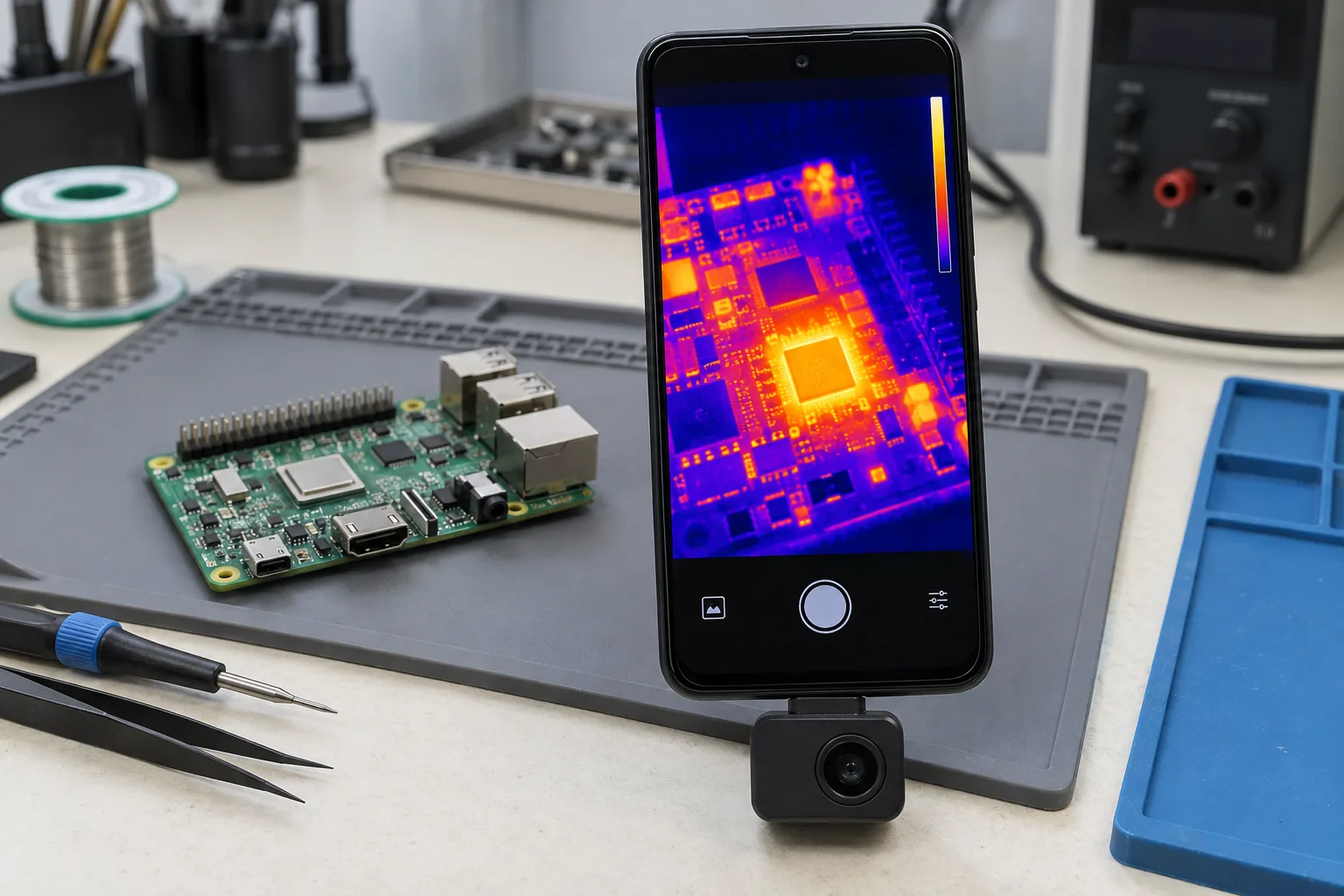
The category has become more visible during the September AliExpress promotion cycle. Deal listings currently span electronics, tools and home equipment, while thermal-camera owners on Reddit continue to discuss compact models for PCB work, insulation checks and troubleshooting. That is a useful signal of interest, but it is not evidence that every cheap listing is a good buy. A sale page can tell you what a seller claims. It cannot tell you whether the camera has a real sensor, whether the app will work with your phone, or whether the temperature number deserves confidence.
The practical question is narrower: can a small camera connected to a phone help you locate a problem before you take something apart? Often, yes. Can it certify that a component, wall or battery is safe? No.
What this gadget actually does
A thermal imager detects infrared radiation from surfaces and turns differences in that radiation into an image. It does not see through walls, reveal the inside of a battery or measure air temperature like a weather instrument. It sees the apparent temperature of a surface, and the result depends on the surface material, the environment and the camera settings.
That distinction matters more than the colour palette. A hot spot on a circuit board can indicate a failing component, a short, excess resistance or simply a part that is designed to dissipate heat. A cold patch on a wall can suggest a thermal bridge or moisture-related issue, but it can also be caused by airflow, shade or a difference in surface finish. The picture is a clue for investigation, not a diagnosis by itself.
The most useful specifications are therefore not the words “AI” or “super resolution”. Look for native infrared resolution, thermal sensitivity, focus, frame rate, temperature range, measurement controls and phone compatibility. A device may advertise a 512 × 384 output while its detector is 256 × 192 and the larger image is created through software processing. That can improve visual presentation, but it is not the same as having a 512 × 384 detector.
Thermal Master’s official P3 page is a good example of why the specification needs to be read carefully. The page lists a native 256 × 192 VOx detector, a software-enhanced 512 × 384 X³IR output, a manual-focus lens, a 25 Hz frame rate and a stated measurement range of -20°C to 600°C. It also lists ±2°C or ±2% accuracy, whichever produces the larger tolerance. Those are useful facts, but they describe the manufacturer’s stated capability under its test conditions, not a guarantee for every object in a kitchen or workshop.
Why resolution and focus matter more than the listing photo
Resolution determines how much detail the camera can separate. A low-resolution module can still show that one section of a power adapter is warmer than another, but it may not distinguish two adjacent components on a crowded board. For home inspection, distance and field of view may matter more than extreme detail. For electronics repair, the opposite is often true.
Focus is especially important at close range. Fixed-focus cameras are convenient because there is nothing to adjust, but the image may be soft when the target is only a few centimetres away. A manual-focus lens lets the user bring a component, solder joint or connector into clearer separation. It also introduces a small learning curve: turn it too far and the image becomes less useful, even if the temperature overlay still looks impressive.
The P3’s macro-oriented design is aimed at this close-up use. Its official specifications identify a manual-focus lens and a 4.3 mm focal length, with PCB inspection listed among the intended applications. That makes the model more interesting to someone repairing electronics than to a buyer who only wants to check whether a radiator is warm. It is also why a cheaper fixed-focus camera may be perfectly adequate for a different buyer.
Do not treat digital zoom as extra thermal detail. Enlarging a small image can make it easier to inspect on a phone, but it does not create new sensor information. The same caution applies to “ultra-clear” and “AI-enhanced” modes: they may make edges and colour transitions easier to read, while the underlying measurement remains limited by the detector.
The temperature number is the risky part
A thermal image is usually more reliable for comparison than for absolute measurement. If one connector is visibly warmer than identical connectors beside it, that difference is worth investigating. If the camera says a glossy metal surface is exactly 83°C, the number needs more skepticism.
FLIR’s technical guidance identifies emissivity and reflected temperature as two of the most important measurement parameters. Emissivity describes how effectively a surface emits infrared radiation. Shiny metal has low emissivity and can reflect the surrounding room, a window or even the operator, which can distort the apparent reading. Painted, matte or oxidized surfaces are generally easier for a compact imager to interpret, although the exact result still depends on the material and conditions.
Distance, ambient temperature, humidity and the angle of observation also affect accuracy. A camera that is credible at a short distance from a matte component may produce a poor reading across a room or through a window. A transparent plastic cover is not automatically transparent to the wavelengths used by the camera, either. The image may show the cover’s surface rather than the object behind it.
A sensible home procedure is to use the camera to find patterns, then confirm important findings with an appropriate contact thermometer, electrical test or manufacturer documentation. Avoid touching a suspected hot electrical part simply because the thermal image looks interesting. Disconnect equipment before opening it when the procedure allows, and remember that a thermal camera does not make mains-voltage work safe.
The stated accuracy also needs to be translated into ordinary language. At a reading of 100°C, “±2°C or ±2%” means the larger permitted error is 2°C. At 400°C, the percentage allowance is 8°C. That may be sufficient for finding a hot spot, but it is not laboratory precision. A marketplace listing that presents a single temperature with several decimal places is not necessarily more accurate.
Where a phone thermal camera earns its place
The strongest use cases are problems where the important information is a temperature difference and the camera can guide the next step.
Electronics and PCB troubleshooting
A board under power can reveal an unusually warm regulator, diode, MOSFET, connector or trace. The camera can help narrow the search before a technician reaches for a microscope or removes components. Macro focus and a reasonably sensitive detector are valuable here because the targets are small and close together.
There are limits. A component can warm up because the circuit is operating normally. A very small fault may not produce a visible thermal signature. Reflections from metal shielding can create distracting patterns. The camera also cannot identify a failed component with certainty; it only shows a thermal consequence that needs electrical testing.
This is the use case for which paying more can make sense. Someone who regularly repairs game consoles, laptops, power supplies or audio equipment may benefit from a sharper sensor, manual focus and adjustable measurement areas. Someone who opens a circuit board once every two years may get more value from a basic multimeter and a good light.
Chargers, adapters and cables
Thermal imaging can show whether a charger or connector is heating unevenly under load. It can reveal a hot USB plug, a stressed power brick or a cable termination that is warmer than the rest of the cable. The comparison is useful because heat concentrated at a connector is more informative than a generally warm enclosure.
Do not use the camera as a substitute for checking the charger’s markings, insulation, plug design or certification status. A cheap adapter can remain visually cool while being poorly designed in other ways. Conversely, a modern fast charger may run warm within its normal operating range. Test with a known load, observe from a safe position and stop if there is smell, smoke, deformation, crackling or rapid temperature rise.
HVAC, radiators and insulation checks
A thermal imager can make distribution problems visible. Uneven radiator panels, a warm pipe that stops abruptly, a draught around a window or a hot section of a floor may all justify a closer look. The camera is particularly convenient for scanning a large area quickly.
It is easy to overread these images. A cold-looking patch may be caused by air movement or a different coating. A wall surface can look uniform while insulation is missing deeper inside. Building diagnosis often requires moisture measurements, pressure testing or an energy audit. A pocket camera is a screening tool, not a building certificate.
For this work, a wide field of view and quick refresh are more useful than a macro lens. A buyer should choose based on the distance and area they plan to scan, rather than buying the highest advertised pixel count.
Automotive checks
Temperature differences can help identify an unevenly braking wheel, a bearing that is running hotter than its neighbours, a blocked radiator section or a connector under unusual load. The camera also makes it possible to inspect a hot engine bay without placing a hand near moving or heated parts.
Automotive surfaces are often reflective, dirty or exposed to moving air, so readings require interpretation. A hot brake disc after driving is not automatically a fault. Compare left and right sides under similar conditions and look for a consistent pattern. Never let the phone, cable or camera interfere with belts, fans, steering controls or driving.
The marketplace traps to check before ordering
The first trap is confusing an infrared image with a genuine thermal measurement. Some listings use product photographs that look like industrial cameras while the actual item is a low-resolution module with a generic app. Ask for the detector’s native resolution and the name of the application. If the seller only repeats “high definition” and “AI temperature”, the important information is missing.
The second trap is an inflated temperature range. A device may claim it can display temperatures up to several hundred degrees, but that does not mean it can measure every surface accurately throughout that range. High-temperature targets bring greater demands on emissivity settings, distance, optics and safety. For ordinary home use, a trustworthy low-to-medium range with clear documentation is more useful than a spectacular maximum number.
The third trap is phone compatibility. USB-C is a connector shape, not a promise that every phone supports the same accessory behaviour. Android devices may differ in USB host support, operating-system versions and permission handling. iPhones may require a different connector or an adapter, and an adapter that physically fits may not support the required data mode.
Before buying, check the exact phone model against the manufacturer’s compatibility list. Look for a current app in the relevant app store, not only an APK download link in the listing. Read the required Android or iOS version, whether the camera is powered by the phone, and whether the phone case must be removed. Thermal Master lists support for iPhone, iPad, Android phones and PCs for the P3, but the buyer still needs to verify the connector and software path for the specific handset.
The fourth trap is confusing a brand store with a verified product. A marketplace can contain official stores, authorized sellers, parallel imports and listings using similar names. A logo on a product photograph does not establish provenance. Compare the model number, packaging, app name, warranty language and serial-number process with the manufacturer’s own page. Keep screenshots of the listing and do not assume that a low price proves a counterfeit or proves authenticity.
The fifth trap is buying for an imagined emergency. A thermal camera is not a smoke detector, a gas detector, a medical thermometer or a fire-safety inspection instrument. It can help locate a warm area, but it does not replace the device designed for the hazard. Do not point it at a person and treat the reading as a medical result. Do not use a consumer module to decide that damaged battery cells, mains equipment or structural materials are safe.
What current pricing tells you—and what it does not
Prices in marketplace searches are difficult to compare. Sellers may show a crossed-out reference price, a coupon-dependent figure, a choice of connector or a different sensor under one listing. Shipping, tax treatment and regional stock can also change the checkout total. A headline discount is therefore less useful than the final price for the exact model.
At the time of research, Thermal Master’s official P3 page displayed a $299 sale price against a $349 regular price and described a two-year limited warranty and a 30-day return window under its stated conditions. That is a manufacturer-direct reference, not a promise about an AliExpress, Ozon or Wildberries order. A marketplace listing below that figure may be attractive, but its seller identity, included accessories and support route need separate checking.
The price gap should be judged against the job. If the camera will be used for repeated PCB diagnosis, a better sensor and focus system can save time. If the intended task is checking whether a radiator warms evenly, a simpler unit may do the same job. If the buyer has no specific diagnostic question, the gadget may become an expensive way to produce colourful photos.
A short buying checklist
Before pressing the order button, answer these questions:
- What exact problem will the camera help locate?
- Do I need close-up PCB work, broad home scanning or occasional automotive checks?
- Is the quoted resolution native to the detector or software-enhanced?
- Does the device have manual focus, fixed focus or a separate macro lens?
- Is the app available for my exact phone and operating-system version?
- Does the camera draw power from the phone, and is that acceptable for a long inspection?
- Can I set emissivity and reflected temperature, or does the app expose only a single colour scale?
- Are the seller’s model number, accessories and return terms clear?
- Am I expecting a screening tool to perform a safety-critical measurement?
Also check independent photographs and long-term comments rather than relying on the average star rating. The most useful reviews often mention whether the connector fits through a phone case, whether the app remains usable, how quickly the module drains the phone and whether the image is sharp at the distance that matters. A review that only says “works great” tells you very little.
Who should consider one
A phone thermal camera is worth considering for a buyer who already has a repeatable inspection task: electronics repair, HVAC maintenance, workshop troubleshooting, vehicle comparison checks or documenting heat distribution around the home. That buyer can choose the sensor and lens around a real need and will know when a finding requires confirmation.
It is also a reasonable shared tool for a technically minded household, provided everyone understands its limits. Finding a draught, a blocked radiator section or an overheating connector can be genuinely useful even when the image is not suitable for precise certification.
Who should skip it
Skip the purchase if the main attraction is the novelty of seeing heat, if the listing cannot identify the sensor and app, or if the intended use is medical, fire-safety or mains-electrical certification. Skip it as well if the phone is incompatible or if the buyer is unwilling to learn the difference between a visual heat pattern and an accurate temperature measurement.
For occasional household checks, borrowing a camera, hiring an inspection service or buying a basic contact thermometer may be more sensible. For electronics work, a multimeter, current-limited bench supply and suitable lighting may solve more problems than an imager bought without a defined task.
Verdict
The useful part of a marketplace phone thermal camera is not the dramatic colour map. It is the ability to compare surfaces quickly and identify where a closer inspection should begin. That can justify the gadget for repairers, maintenance workers and careful DIY users.
The weak part is the temptation to trust a precise-looking number from a small sensor pointed at an unfamiliar surface. Emissivity, reflections, distance, airflow and phone compatibility all matter, and a better-looking image does not remove those limitations.
The Thermal Master P3 illustrates the category’s upper end more clearly than a generic listing: a real native sensor, manual focus, close-up ambitions and documented phone support, paired with a price that makes the purchase a tool decision rather than an impulse deal. Buyers who need that capability should compare the exact model and seller. Everyone else should first name the problem they want to diagnose. If there is no problem, the most honest marketplace verdict is to leave the thermal camera in the cart.
Related articles
Solar and 4G security cameras from marketplaces: what the bargain listing leaves out
Solar marketplace cameras can be useful for sheds, gates and remote buildings, but “solar,” “4G” and “no subscription” hide important trade-offs. Check power, storage, connectivity, app security and recording mode before buying.
After AliExpress’s €550 Million Fine: How to Check a Marketplace Gadget Before You Buy
A marketplace listing can look polished and still leave the important safety questions unanswered. Here is a practical pre-purchase check for chargers, batteries, lights and other electronics, using recent regulator findings as context.

Should You Buy the OPPO Find X10 on Launch Day? The Hardware Is Clear; the Regional Deal Is Not
OPPO’s Find X10 and Find X10 Pro Max arrive globally with unusually large batteries, 200MP camera systems, and ColorOS 17. The sensible choice depends less on the headline specifications than on your region’s price, battery capacity, warranty, and final configuration.

Power banks are useful, but recent recalls show why you should check the battery in your bag
Repeated recalls involving Casely, Anker and lithium-ion travel batteries turn the humble power bank into a practical safety check for 2026.
Comments
Sign in to comment.
No comments yet.