Apple’s M6 MacBook Pro Is a Strong M1 Upgrade—but a Harder Sell for Recent Buyers
Apple’s new 14-inch MacBook Pro with M6 starts at $1,999 and promises major gains in graphics, local AI, connectivity, and battery life. The practical question is which owners will notice the difference—and which should wait.

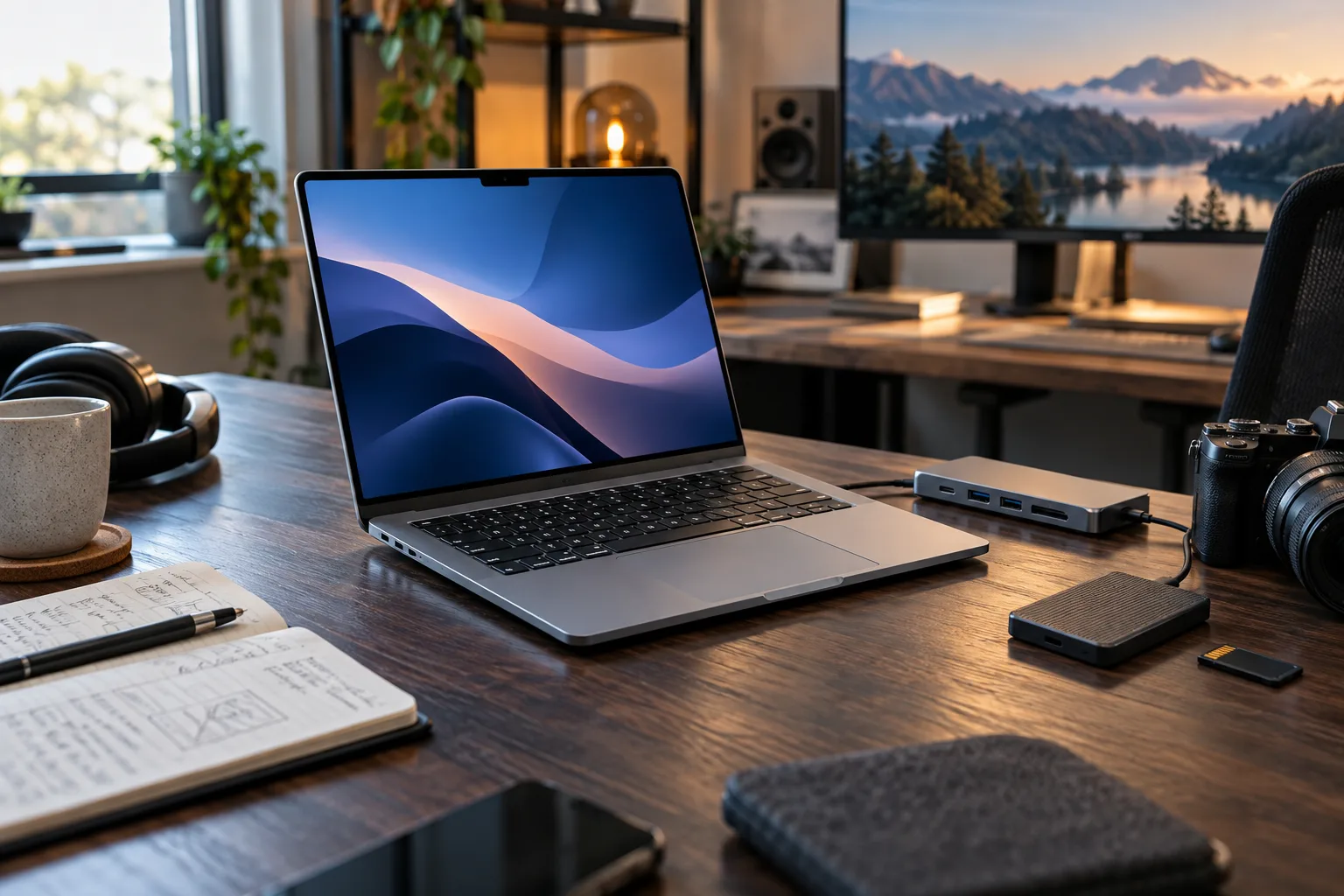
Apple’s new 14-inch MacBook Pro with M6 arrives at an awkward moment for buyers. On paper, it is a substantial laptop: a 12-core CPU, 12-core GPU, faster unified memory, Wi-Fi 7, three Thunderbolt 4 ports, an SDXC card slot, HDMI, a high-brightness Liquid Retina XDR display, and Apple’s claimed battery life of up to 24 hours. It starts at $1,999 in the United States and will be available from November 6 after pre-orders open on October 28. Apple’s announcement is clear about the hardware. It is less clear about the question most people actually need answered: what kind of owner should spend that much now?
The answer depends less on the name of the chip than on the age of the Mac it replaces, the amount of memory required by the buyer’s workload, and whether the laptop is used as a portable workstation or simply as an expensive general-purpose computer. Apple is quoting impressive improvements, but those are Apple’s own tests, often against carefully selected M5 or M1 configurations. They are useful signals, not independent review results.
For someone still using an Intel Mac, the M6 MacBook Pro looks like a completely different class of machine. For an M1 owner doing video work, software development, or local AI experiments, it may also be a sensible upgrade. For a recent M4 or M5 buyer, the case is much narrower. The new model is faster and better connected, but the basic ownership experience remains familiar: the same professional laptop category, the same premium price structure, and the same need to choose memory and storage carefully at checkout.
What Apple actually changed
The headline change is the M6 system-on-chip. Apple says the 14-inch model has a 12-core CPU, a 12-core GPU with Neural Accelerators in each core, and a dual 16-core Neural Engine. Compared with the previous 14-inch MacBook Pro with M5, Apple claims up to 30 percent faster graphics and up to 25 percent faster performance for on-device AI workloads. The company also claims the Neural Engine is up to 1.9 times faster than the M5 version.
Those percentages should be read as workload-specific claims rather than a universal speed guarantee. Apple says the comparisons were made against a 14-inch MacBook Pro with M5, a 10-core CPU, a 10-core GPU, 32GB of unified memory, and a 4TB SSD. That matters because memory capacity and storage configuration can affect professional work independently of the processor. A buyer using the base configuration is not necessarily buying the exact system used for every performance comparison.
Apple’s more dramatic numbers compare the M6 system with older hardware. The company says the new laptop can deliver up to 13 times faster time-to-first-token performance for local large-language-model prompt processing than a 13-inch MacBook Pro with M1. It claims up to 11.7 times faster ray-traced Blender rendering, up to 3.3 times faster image processing in Affinity, and up to 2.5 times faster project builds in Xcode when compared with the cited M1 system.
These figures describe the potential of the platform, not what every owner will experience during web browsing, email, office work, or video calls. For those tasks, an older Apple-silicon Mac is already quick. The M6’s value appears when the computer is repeatedly pushed: compiling large projects, exporting media, editing high-resolution images, rendering 3D scenes, running local models, or working across many demanding applications at once.
The chip also brings a practical connectivity update. Apple lists Wi-Fi 7 and Bluetooth 6, support for up to two external displays, three Thunderbolt 4 ports, HDMI, MagSafe 3, an SDXC card slot, and a headphone jack. The additional Thunderbolt port and the faster wireless standards will matter to people who use docks, external storage, cameras, monitors, and other peripherals. They will matter far less to somebody whose daily setup is a charger, a browser, and a pair of wireless headphones.
The battery claim is useful, but it is still a claim
Apple rates the new MacBook Pro for up to 24 hours of battery life, describing it as the longest battery life in a Mac. Apple says the figure comes from its own testing and varies with use and configuration. That qualification is important. A light video playback test is not the same as sustained code compilation, local AI inference, bright HDR work, or a demanding export.
Still, the battery figure has a practical implication. The M6 MacBook Pro is designed to keep its performance available away from a wall outlet rather than turning into a heavily throttled travel machine. That is especially relevant for photographers, editors, developers, and students who move between classrooms, studios, offices, and client locations.
Apple also says the laptop can reach 50 percent charge in 30 minutes when paired with a compatible higher-wattage USB-C adapter such as the 96W power adapter. Buyers should check which adapter is included with the configuration they choose and whether they already own a suitable charger. A fast-charge claim does not mean every USB-C charger in a bag will provide the same result.
Battery life should therefore be treated as a reason to consider the M6, not a reason to assume a particular number of hours in normal work. Screen brightness, wireless activity, external displays, background processes, browser tabs, and demanding software all change the result.
The base memory configuration deserves more scrutiny than the chip name
The 14-inch MacBook Pro with M6 starts with 16GB of unified memory and can be configured with up to 32GB, according to Apple. Unified memory is shared by the CPU, GPU, and other processing units, so it is not equivalent to adding conventional system RAM after purchase. The configuration decision is effectively permanent.
Sixteen gigabytes is enough for ordinary productivity, research, schoolwork, programming projects of moderate size, and many creative workflows. It is not automatically inadequate. But the buyer who chooses a MacBook Pro because they expect to keep it for several years should consider how quickly their workload may grow. Large photo libraries, multi-camera video projects, virtual machines, containers, local language models, 3D applications, and many browser-based workspaces can consume memory quickly.
The most important buying rule is simple: choose memory based on the workload you expect to keep, not the workload you have today. Storage can be expanded with an external SSD. Unified memory cannot be replaced later. A fast external drive may be inconvenient, but it is a workable answer to limited internal storage. There is no equivalent workaround for a machine that repeatedly runs out of memory during a long project.
That does not mean every buyer should pay for 32GB. The upgrade is worthwhile when the laptop will be used for sustained professional work, local AI, large development environments, or heavy multitasking. For a student writing papers, a household computer user, or a professional whose demanding work happens on remote servers, 16GB may be a rational choice. The point is to avoid spending nearly $2,000 on a professional laptop and then treating the least flexible configuration decision as an afterthought.
The $1,999 starting price changes the value calculation
The new 14-inch MacBook Pro starts at $1,999 in the United States, with an education price of $1,899. The computer goes on sale November 6, while pre-orders begin October 28. Apple also advertises a lease option starting at $38.99 per month for 36 months, excluding taxes and trade-in credit. That monthly figure should not be confused with the total cost of ownership: lease terms, eligibility, upgrade conditions, and end-of-term choices matter.
At this price, the M6 MacBook Pro is not competing only with other professional laptops. It is competing with a less expensive MacBook that may already be fast enough, a desktop Mac paired with a monitor, a previous-generation model sold at a discount, and a Windows workstation whose memory and storage can be upgraded more easily.
The product makes the most financial sense when one machine must cover several jobs. A mobile editor can carry it between locations, a developer can use it as a primary workstation, and a creator can connect it to external displays and fast storage without relying on a collection of dongles. The price is harder to justify when the main benefit is that ordinary tasks open slightly faster on a device that was already responsive.
Buyers should also budget for the accessories that turn the laptop into a workstation. A high-capacity external SSD, a calibrated display, a dock, a camera card reader, or a second charger can add substantially to the real cost. The MacBook Pro has more built-in ports than a MacBook Air, but a professional setup can still become expensive once storage, backup, and display needs are included.
Who should upgrade now
The strongest candidate is an Intel Mac owner. Apple says the M6 provides up to 14 additional hours of battery life for Intel-based upgraders, along with a major performance improvement, modern wireless standards, more unified memory than older systems, and an additional Thunderbolt port. An Intel Mac may still be usable, but the gap is now large enough that waiting for another processor generation is difficult to defend if the machine is slow, unsupported, or limiting paid work.
M1 owners with demanding workloads are the next group to consider. The M1 generation remains capable for everyday use, but the M6’s claimed gains in graphics, local AI, rendering, and compilation address the areas where an older system is most likely to feel constrained. The upgrade is especially logical when the current machine has 8GB of memory, a small internal drive, poor battery health, or trouble handling external displays and recent software.
A professional whose income depends on shorter exports or faster build times can also make a straightforward business case. Saving even a modest amount of time every working day can matter more than the benchmark percentage. That calculation should be based on measured time lost in the current workflow rather than on Apple’s headline comparisons.
The M6 is also a reasonable first Mac for somebody who needs a portable pro machine and already works inside Apple’s ecosystem. Continuity features let a Mac and iPhone share files, photos, tasks, and other activity, and Apple says users moving to Mac can transfer settings, files, photos, and passwords from an iPhone. Those benefits are real, but they are ecosystem benefits rather than M6-exclusive reasons to buy.
Who should wait
Recent M4 and M5 MacBook Pro owners should be cautious. Apple’s own comparisons show smaller gains when moving from the immediately previous generation than when moving from M1 or Intel. A newer laptop that already handles the owner’s workload is unlikely to become dramatically more useful merely because the M6 is faster.
A MacBook Air buyer should also ask whether the professional display, extra ports, sustained performance, and higher configuration ceiling are actually needed. The Pro’s Liquid Retina XDR display reaches up to 1600 nits peak HDR brightness and offers a nano-texture option. Its HDMI port, SDXC slot, and three Thunderbolt ports can reduce the need for adapters. Those are meaningful differences for creative and technical work. They are not meaningful enough to justify the price for every office user.
Some buyers may also benefit from waiting for independent testing. Apple has published extensive performance claims, but the machine was announced on October 27 and will not be available to customers until November 6. Review testing can answer questions the launch release cannot: sustained performance under long workloads, fan behavior, actual battery life, display characteristics, SSD speeds in the base configuration, and the practical limits of 16GB of memory.
Waiting is particularly sensible if the current computer is stable and the buyer is attracted mainly by local AI language. “On-device AI” covers many different workloads. A built-in assistant, image-editing feature, and locally run language model may have very different memory and thermal requirements. Buyers should identify the exact software they plan to use instead of assuming that a neural engine automatically makes every AI task fast or private.
The iMac M6 is the less obvious alternative
Apple also announced a new 24-inch iMac with M6. It starts at $1,499 with a 10-core CPU and 10-core GPU, or $1,699 with a 12-core CPU and 12-core GPU. The iMac includes a 24-inch 4.5K Retina display, a 12MP Center Stage camera, built-in speakers and microphones, Wi-Fi 7, Bluetooth 6, and up to four Thunderbolt 4 ports on the higher configuration. Pre-orders begin October 28, with availability from November 6.
The iMac is not a direct replacement for the MacBook Pro because it cannot travel and its display is part of the package. But it changes the value calculation for a household, studio, or small business that already has a reliable laptop or phone. At $1,499, it provides a large integrated screen and a clean desktop setup without requiring a separate monitor, webcam, speakers, and keyboard.
Apple claims the M6 iMac can deliver up to 18 times the performance of the most popular Intel-based iMac and up to five times the on-device AI performance of M4 in its own tests. As with the MacBook figures, those numbers need to be understood as specific comparisons. The practical advantage of the iMac is less about its maximum benchmark and more about the fact that the display, camera, audio, and accessories are included.
The iMac is the better fit for a fixed desk. The MacBook Pro is the better fit for somebody whose work moves. Buying the laptop and then leaving it permanently connected to a monitor may still be the right choice if flexibility matters later, but it is worth recognizing that a meaningful portion of the purchase price is paying for mobility.
What the M6 launch does not change
The new MacBook Pro remains a closed, premium computer. Memory is not a later upgrade, internal storage is not designed for casual replacement, and repairs remain more specialized than on a modular laptop. Apple says the M6 model is designed to be durable and repairable and contains 45 percent recycled content overall, including recycled aluminum in the enclosure and recycled cobalt in the battery. Those are positive design and materials claims, but they do not turn the laptop into a user-upgradable machine.
The launch also does not eliminate software compatibility questions. Buyers who depend on a particular plug-in, virtual machine, driver, game, scientific package, or development tool should check Apple-silicon support before switching from Intel or another platform. A faster computer is not a substitute for a compatible workflow.
Nor does the arrival of a new chip make cloud services unnecessary. Local processing can improve responsiveness, reduce dependence on an internet connection, and keep some data on the device. It can also require more memory, consume battery, and produce different results from a cloud model. Privacy depends on the specific application and its settings, not simply on the presence of a Neural Engine.
The practical verdict
The M6 MacBook Pro is a meaningful upgrade for Intel owners and a credible productivity upgrade for M1 owners whose work involves graphics, code, video, photography, or local AI. It is also a well-equipped portable workstation for first-time Mac buyers who genuinely need the ports, display, battery life, and sustained performance.
It is a much less compelling impulse purchase for somebody with a recent M4 or M5 MacBook Pro. The launch delivers a faster chip and useful connectivity updates, but the day-to-day experience of a recent owner may not change enough to justify $1,999 before trade-in, accessories, and configuration upgrades.
The safest buying process is to start with the workload. List the applications that must run, the memory they consume, the displays and storage they require, and the number of hours the current machine loses each week to waiting. Then compare the M6 MacBook Pro with a discounted previous-generation Mac, an iMac M6, or a less expensive laptop. If the calculation depends on a benchmark, wait for independent testing. If it depends on time saved in paid work, measure the current bottleneck.
The M6 is powerful. The more useful question is whether that power will leave your desk, shorten your projects, or replace another computer. If it will, the new 14-inch MacBook Pro has a clear case. If it will not, the better value may be the Mac you already own—or the one Apple just discounted by launching this one.
Related articles
AirPods 5 bring noise cancellation to Apple’s open fit. The real choice is how much isolation you need
Apple’s AirPods 5 make open-fit earbuds more capable, but ANC cannot change the basic physics of an unsealed earbud. Here is who benefits, which $149 version makes sense, and when AirPods Pro remain the better buy.

Apple’s September 2026 devices are in stores. The first-day setup is where the upgrade earns its place
The iPhone 18 Pro, Apple Watch Series 12, Ultra 4, and AirPods 5 are now available. The practical decision is not which launch feature sounds best, but which setup, transfer, health, audio, and return checks prevent an expensive mismatch.
Apple HomeView is a $299 smart-home hub. The real question is whether your home fits Apple’s rules
Apple’s first smart display combines a 7-inch screen, Siri AI, FaceTime, home controls and personalized profiles. Its value depends less on the hardware than on language support, Apple devices, home hubs, subscriptions and the accessories you already own.


A G3 Storm Has Already Hit: How to Use FT8 and WSPR to Measure the October 11 HF Recovery
NOAA recorded G3 geomagnetic activity on October 10 while CME effects continue into October 11–12. Here is a controlled way to use FT8, WSPR and ordinary band checks to separate ionospheric change from station problems.

Comments
Sign in to comment.
No comments yet.