The September Android Drop’s Most Useful Changes Are a New Memory for Your Stuff and a Better Way to Read in Motion
Google’s September Android Drop adds remembered items to Find Hub, Motion Assist for passengers, Guided Vision, and new Messages tools. Here is what each feature does, which phones need Android 16 or 17, and what to check before trusting it.

Google’s September Android Drop is easy to mistake for another collection of small software tweaks. It is more interesting than that, but not because every new feature deserves equal attention. The update changes the phone’s role in two very practical situations: remembering where you put something that has no tracker attached, and making a moving vehicle less hostile to people who need to read a screen as a passenger. It also adds accessibility improvements and a few Google Messages conveniences.
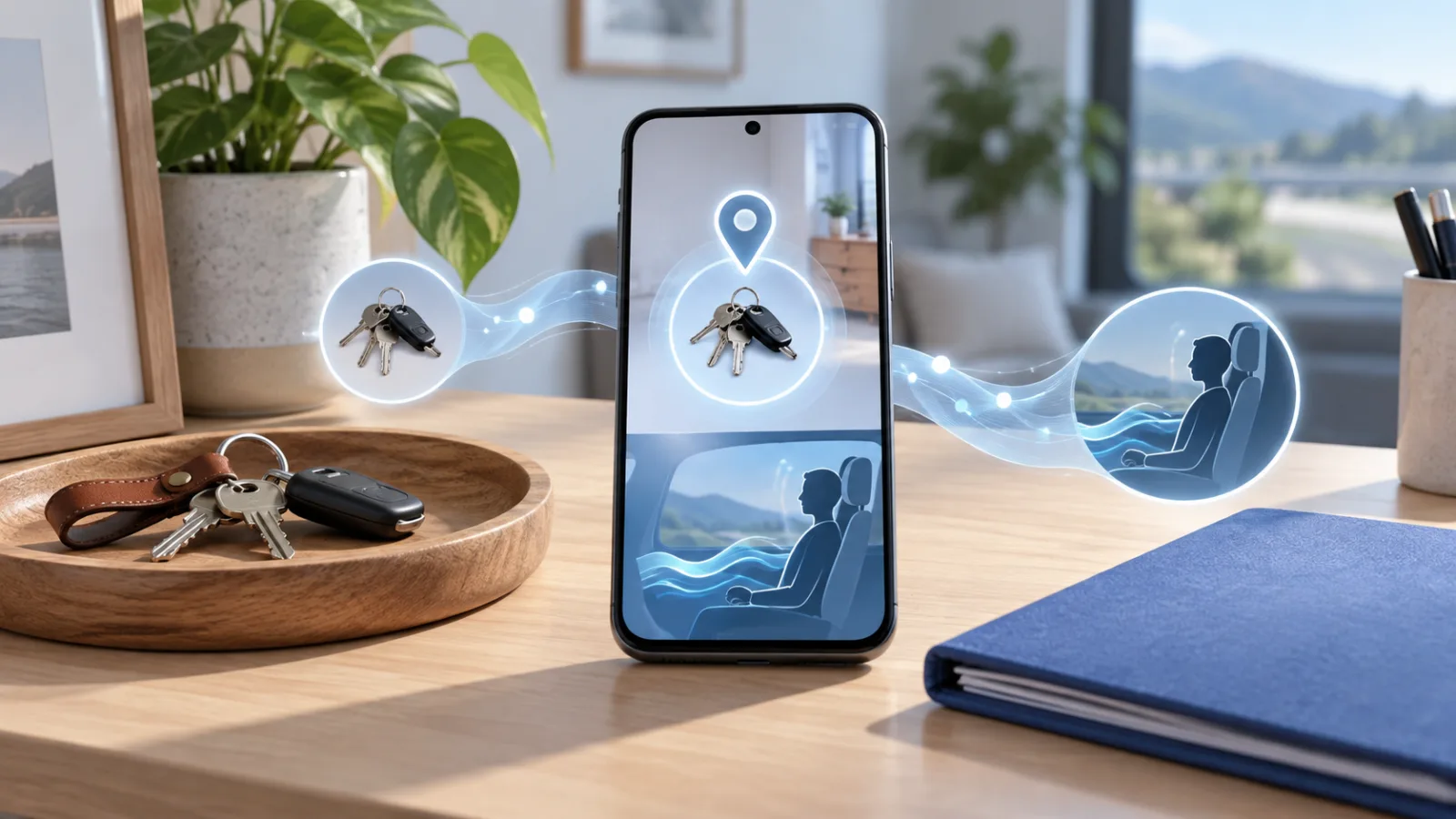
The useful question is not whether the drop sounds impressive. It is whether a particular feature fits the way you use your phone, whether it has reached your device, and what information it requires. Google’s own announcement describes the package as five new features, while the company’s support pages provide the more important limitations: remembered items need Android 16 or later, Gemini and Find Hub installed under the same Google Account, and Gemini set as the default assistant. Motion Assist has a different compatibility story and is intended for passengers, not drivers.
This guide separates the genuinely useful changes from the easy-to-miss conditions around them. The central advice is simple: treat remembered items as a searchable household note, not a tracking system, and treat Motion Assist as an experiment that may reduce discomfort, not a guarantee that a phone will become pleasant to use in every vehicle.
What Google actually released
The September 2026 Android Drop covers five areas: remembered items in Find Hub, Motion Assist for motion sickness, Guided Vision for people who are blind or have low vision, collaborative notes and personalization in Google Messages, and additional Gemini-related features. Google’s official Android feature page presents the package as a broad usability update rather than a single operating-system redesign.
That distinction matters. A feature drop can arrive through Google Play services, an app update, or a system component rather than as one large Android version upgrade. Two people with the same phone model can therefore see different menus on different days. Samsung, Motorola, Xiaomi, and other manufacturers may also expose or delay individual capabilities according to their software builds. The announcement is a statement of availability plans, not a promise that every phone receives every feature at once.
The most consequential additions are the ones that reduce a specific kind of friction. Find Hub already works well for tagged objects, but many things people lose are not worth attaching to a Bluetooth tag. Motion Assist addresses a physical problem that affects phone use in cars, buses, trains, and boats. The other changes are useful in narrower circumstances and should be judged on that basis.
Find Hub remembered items: a memory layer, not a tracker
The new remembered-items function lets you tell Gemini where you put a physical object, then retrieve that information later in Gemini or in a dedicated area of the Find Hub app. A typical command might be: “Hey Google, remember in Find Hub that I put my passport in the top bedroom drawer.” You can also save an item manually, add a photo, and attach notes. Google’s Android Help documentation lists passports, spare keys, glasses, tools, batteries, documents, borrowed chargers, and even the place where you parked as possible uses.
This fills a gap between ordinary notes and Bluetooth tracking. A tracker can report where a tag is, but it cannot tell you which drawer contains an untagged passport. A note can record the drawer, but it is easy to forget where the note lives. Find Hub puts the record alongside the place many Android users already visit when looking for a lost device or tagged belonging.
The feature is most useful when the item is intentionally stored somewhere and the problem is prospective memory. You know you put the spare key somewhere safe, but not which safe place you chose. You know you moved the warranty document before guests arrived. You know you lent a charger to someone, but the details have faded. In those cases, a short voice command can be faster than opening a notes app and deciding how to organize the information.
It is less useful when the item moves frequently. If you carry a wallet between a coat, desk, bag, and kitchen counter, a remembered location becomes stale unless you update it. The support documentation says that using the same item name can update its storage spot rather than creating a duplicate, but that still depends on giving Gemini a clear command. “Move my spare house key to the kitchen drawer in Find Hub” is more reliable than an ambiguous statement such as “I put the key somewhere else.”
The wording matters for another reason: Gemini is not simply transcribing a note. It has to identify the item, interpret the storage spot, and connect the request to Find Hub. Google’s troubleshooting guidance recommends explicitly saying “Find Hub” if the assistant does not save the entry. The same guidance says Gemini needs an internet connection to process new requests. Already saved items may remain visible in the Find Hub app during a temporary connection failure, but you should not assume that a new voice request was recorded if the phone was offline.
Compatibility and setup
Google says remembered items require an Android device running Android 16 or later. The phone must have both the Find Hub and Gemini apps, and both apps must be signed in to the same Google Account. Gemini must be the device’s default digital assistant, and Find Hub must be enabled as a connected app in Gemini’s settings. The feature is offered only where Gemini and Find Hub are supported.
That list explains why the feature may be absent even after a phone receives a recent security update. It is not enough to have a new Android version. The account, assistant choice, apps, and regional support all matter. If the option does not appear, check the software version, update both apps, confirm the active Google Account, and search Settings for Find Hub or Gemini rather than assuming the phone is incompatible.
Google also allows a photo and notes to be added to a remembered item. That can help with a drawer containing several similar documents or a storage box full of cables. It also creates a privacy decision. A photo of a passport, medical supply, key, or financial document may make the record more useful while putting more sensitive context into a cloud-linked account. The practical rule is to store the minimum detail needed to find the object. “Passport in the blue document folder” is often enough; a close-up of the passport is probably unnecessary.
What remembered items cannot do
Remembered items do not provide live location. They do not turn a passport into a trackable object, and they cannot tell whether someone moved an item after you saved the entry. They are not a replacement for a tracker on luggage, a set of keys that travels outside the home, or equipment that needs recovery in the field.
The function also does not track digital files, abstract ideas, or events. It is designed around physical things and places. If you need a reminder to renew a document or return a borrowed tool by Friday, a calendar or task app remains the appropriate tool. Find Hub can remember where the tool is; it is not a deadline manager.
Google says remembered items are currently private to the individual Google Account. That means the feature is not automatically a shared household inventory. If several family members need to see the same storage information, a shared note or household inventory may still be better. The private-by-default behavior is helpful for sensitive objects, but it limits the feature’s value for communal storage.
Motion Assist: a promising comfort feature with a narrow job
Motion Assist is designed for people who feel motion sick while reading, browsing, or watching content as a passenger. It adds a subtle bubble overlay to the display. The bubbles move in response to the vehicle’s motion, creating a visual signal intended to reduce the mismatch between what the eyes see on the screen and what the body feels while moving. Google’s support page for Motion Assist describes it as a passenger feature and explains that it can be reached through Settings or a quick control.
The idea is not new. Motion-cue overlays have appeared in accessibility research and third-party apps, and Apple has offered a similar vehicle-motion option on iPhone. The Android implementation is notable because it is integrated into system settings rather than being a decorative overlay from an unknown app. It should therefore be easier to enable, disable, and trust than a random utility that asks for broad permissions.
The benefit will depend heavily on the person and the vehicle. A smooth train ride is different from a winding back seat. A large tablet is different from a small phone held close to the face. Some passengers may be able to read comfortably with the bubbles; others may still need to put the phone down. Google’s language is appropriately cautious: the feature is meant to help reduce motion sickness, not eliminate it.
Do not use Motion Assist as a reason to look at a phone while driving. The intended use is for a passenger in a moving vehicle. Even for passengers, the overlay is a comfort aid, not a medical treatment. If screen use causes severe or persistent nausea, headaches, dizziness, or visual symptoms, the sensible response is to stop using the screen and address the symptoms rather than trying to tune the animation until it becomes tolerable.
How to try it safely
Search for “Motion Assist” in the Settings app. Depending on the device and software build, it may also appear through Google settings or a Quick Settings tile. Google says it can be configured to turn on automatically when the phone detects that you are in a moving vehicle. Start with a short trip in the passenger seat, keep the phone at a comfortable distance, and make the overlay easy to disable.
If the bubbles are distracting, cover too much content, or make you feel worse, turn the feature off. The right result is not a perfect visual effect; it is whether you can use the screen with less discomfort. Automatic activation can be convenient, but it is worth checking the setting before a long trip so it does not appear unexpectedly during a situation where you need an unobstructed display.
Availability is another complication. Google’s September announcement presents Motion Assist as part of the current Android feature rollout, while reporting from Ars Technica notes that the feature is exposed through Google services and quick controls rather than being limited to a single Pixel application. In practice, rollout timing and device support can still vary. If the setting is missing on a phone that appears otherwise current, update Google Play system components and the relevant Google apps before concluding that the hardware cannot run it.
Guided Vision is the accessibility feature to watch
The drop also expands Guided Vision, a camera-based assistance feature intended to describe what is in front of a user. Google positions it for people who are blind or have low vision. In broad terms, the phone can use the camera and Gemini’s capabilities to provide descriptions or guidance about the surrounding scene.
This kind of tool can be helpful for orientation, identifying an object, reading a sign, or getting a spoken description of a room. It should not be treated as an authoritative source for safety-critical decisions. Camera-based systems can misread text, fail to notice hazards, confuse similar objects, or describe an image with more confidence than accuracy. Lighting, camera angle, motion, language support, and network connectivity can all affect the result.
The practical boundary is the same one that applies to other visual AI tools: use the description as an aid, then verify anything that could affect personal safety, medication, money, travel, or another person’s privacy. A spoken description of a menu may be convenient. A description of traffic conditions at a road crossing is not a substitute for established mobility techniques or another reliable source of information.
Google’s own Android feature material groups Guided Vision with the broader accessibility changes in the September release. The company is not presenting it as a replacement for dedicated assistive technology. That is the right framing. The value of a phone feature is often that it is available in an unexpected moment, not that it replaces tools designed for a specific disability or professional task.
Google Messages gets more useful, but also more decorative
Google Messages gains collaborative notes through Google Keep integration, along with chat themes and custom backgrounds. The note capability is the more practical of the two. A group can work on a shared note from within a conversation instead of copying text between Messages and Keep. That could be useful for a shopping list, a travel plan, a list of household jobs, or a group of people coordinating an event.
The feature’s usefulness depends on whether everyone in the conversation can access the same note and whether the group understands where the canonical version lives. Collaboration tools become confusing when one person edits the note while another continues updating an old message. Use the shared note for the current list, and use messages for discussion around it.
Custom chat backgrounds and colored bubbles are less important, but they may improve recognition when several conversations look similar. A background can also reduce readability, especially with photographs containing high contrast or busy detail. If messages become harder to scan, the personalization has failed its basic test. Accessibility and legibility should take priority over matching a theme.
These changes illustrate the uneven nature of feature drops. One person may get a daily benefit from remembered items, another may use Motion Assist only during travel, and a third may never open the new Messages controls. There is no reason to force every feature into a single opinion about the update.
What to check before relying on the new features
A current Android version is necessary for some functions, but it is not the whole compatibility story. Google’s feature rollout can depend on the device, country, language, account, app version, Google Play services, and manufacturer software. The following checks are more useful than repeatedly restarting the phone:
- Open the Play Store and update Gemini, Find Hub, Google Messages, and Google Keep if updates are available.
- Check Settings > About phone for the Android version, then check Google Play system updates separately.
- Confirm that Gemini and Find Hub use the same Google Account.
- If remembered items do not work, verify that Gemini is the default digital assistant and that Find Hub is enabled among Gemini’s connected apps.
- Search Settings for Motion Assist instead of looking only inside the Android version information screen.
- Test each function with harmless information before storing sensitive details or depending on it during travel.
- Review location, microphone, camera, and assistant permissions and disable anything the feature does not need for your preferred use.
The test with harmless information is particularly important for remembered items. Save the location of a common household object, then ask Gemini to retrieve it and inspect the entry in Find Hub. If the assistant misunderstands the item or location, revise the command before trusting it with a passport, medication, key, or legal document.
Privacy: the convenience comes from connecting systems
The new features are useful because several Google systems can work together: Gemini interprets a request, Find Hub stores or presents an item record, the phone provides location or sensor data, and Google Messages can hand users into Keep. That integration removes steps, but it also means the privacy question is not limited to one app.
For remembered items, ask what information is truly necessary. The item name and a general storage location may be enough. Avoid adding identifying document numbers or photographs that reveal more than the search task requires. Keep in mind that a location record can be sensitive even when it contains no exact address: “spare key under the porch” is useful information to anyone who should not have it.
Find Hub’s broader lost-item network has its own privacy protections. Google says the network aggregates reports from nearby Android devices and uses safeguards such as encrypted location information. That protection applies to the network’s lost-item function; it should not be confused with the remembered-items feature, which is a record of what you told Gemini. The latter is not crowdsourced sensing and does not discover an object’s current position.
Guided Vision raises a different privacy issue. A camera-based description may involve images of other people, documents, screens, or private spaces. Avoid pointing the camera at sensitive material without a reason, and remember that people nearby may not expect to be included in an AI-assisted image workflow. The fact that a phone can describe a scene does not make every scene appropriate to capture.
Is this a reason to buy a new Android phone?
For most people, no. Remembered items are tied mainly to Android and Google account requirements, not to a new piece of hardware. Motion Assist is also the kind of feature that should reach a range of supported phones as the system components roll out. A new phone may receive the feature sooner, but that is not the same as the feature justifying an upgrade.
The more reasonable buying question is whether a phone will continue to receive Android and Google system updates, whether its manufacturer allows the relevant assistant and accessibility functions to work normally, and whether the buyer is comfortable with Google’s connected-services model. Someone choosing between two otherwise similar devices may reasonably value longer software support and reliable access to Find Hub. Someone replacing a perfectly functional phone solely to save a few minutes searching for keys probably should wait.
There is also a hardware limitation that software cannot erase. A phone with weak speakers, poor battery life, an uncomfortable display, or unreliable connectivity will not become a better travel companion just because it has Motion Assist. Likewise, a device used without Gemini or Find Hub cannot take advantage of remembered items simply because the Android version number is high enough.
The practical verdict
The September Android Drop is strongest when it solves a small problem at the moment it occurs. Remembered items can prevent the familiar “where did I put that?” search for objects that never needed a tracker. Motion Assist could make a meaningful difference for passengers who avoid reading on the move because it makes them nauseated. Guided Vision is potentially valuable as an on-demand accessibility aid, with the normal caution required for camera-based AI. Google Messages’ shared notes are useful for groups that want a lightweight collaborative list; chat themes are optional decoration.
The important caveats are equally clear. Remembered items record a reported location and do not track anything live. They require Android 16 or later, Gemini, Find Hub, a matching account, and a network connection for new assistant requests. Motion Assist may reduce symptoms but cannot promise comfort and must never be used to encourage phone use by a driver. Guided Vision can misinterpret the world. Messages customization can hurt readability.
That makes this a worthwhile update to explore, but a poor reason to accept every new assistant integration without checking permissions and expectations. Start with one low-risk task, see whether it works on your phone, and keep the feature only if it saves real effort. The best part of this Android release is not that the phone does more. It is that a few additions are aimed at problems people actually notice when they are trying to get through an ordinary day.
Related articles
The iPhone 18 Pro’s variable-aperture camera is useful, but it is not a reason for everyone to upgrade
Apple’s iPhone 18 Pro adds a mechanical variable-aperture main camera, manual exposure controls, a new chip and better claimed battery life. Here is what those changes mean in ordinary photos, video, upgrades and buying decisions before full reviews arrive.
Don’t buy a foldable phone this week unless you have to
Foldables are getting better, but Samsung’s July 22 event, leaked price shifts, Motorola discounts and Apple rumors make patience the smartest gadget move right now.
Pixel Watch Health Guardian Trends Arrive in October: What the New Signals Can—and Cannot—Tell You
Google is beginning to deliver Health Guardian trend reports to Pixel Watch owners. The useful question is not whether a watch can diagnose you, but how to read long-term signals, check compatibility, protect sensitive data, and know when a real measurement is still necessary.

Should you buy Sennheiser MOMENTUM True Wireless 5 before the reviews?
Sennheiser’s new $299.95 earbuds make a rare promise: user-replaceable batteries in the buds and case. That could change the ownership math, but most buyers should wait for reviews and battery-part details before paying launch price.
Comments
Sign in to comment.
No comments yet.