Activate All RI 2026: a practical plan for chasing or activating all 61 Rhode Island parks
Rhode Island’s Activate All RI weekend runs September 11–13, 2026. Here is how to use the schedule, live spots, portable station, band changes and ADIF logging workflow without treating a planned activation as a guaranteed contact.
Rhode Island’s small size is turning a familiar Parks on the Air format into a concentrated operating problem. Activate All RI runs from September 11 through September 13, 2026, with the stated goal of putting all 61 Rhode Island parks on the air. For operators outside the state, it is a chance to build a Worked All Rhode Island checklist. For local amateurs, it is a chance to make one park, a short route or a carefully chosen operating window useful to a large number of hunters.
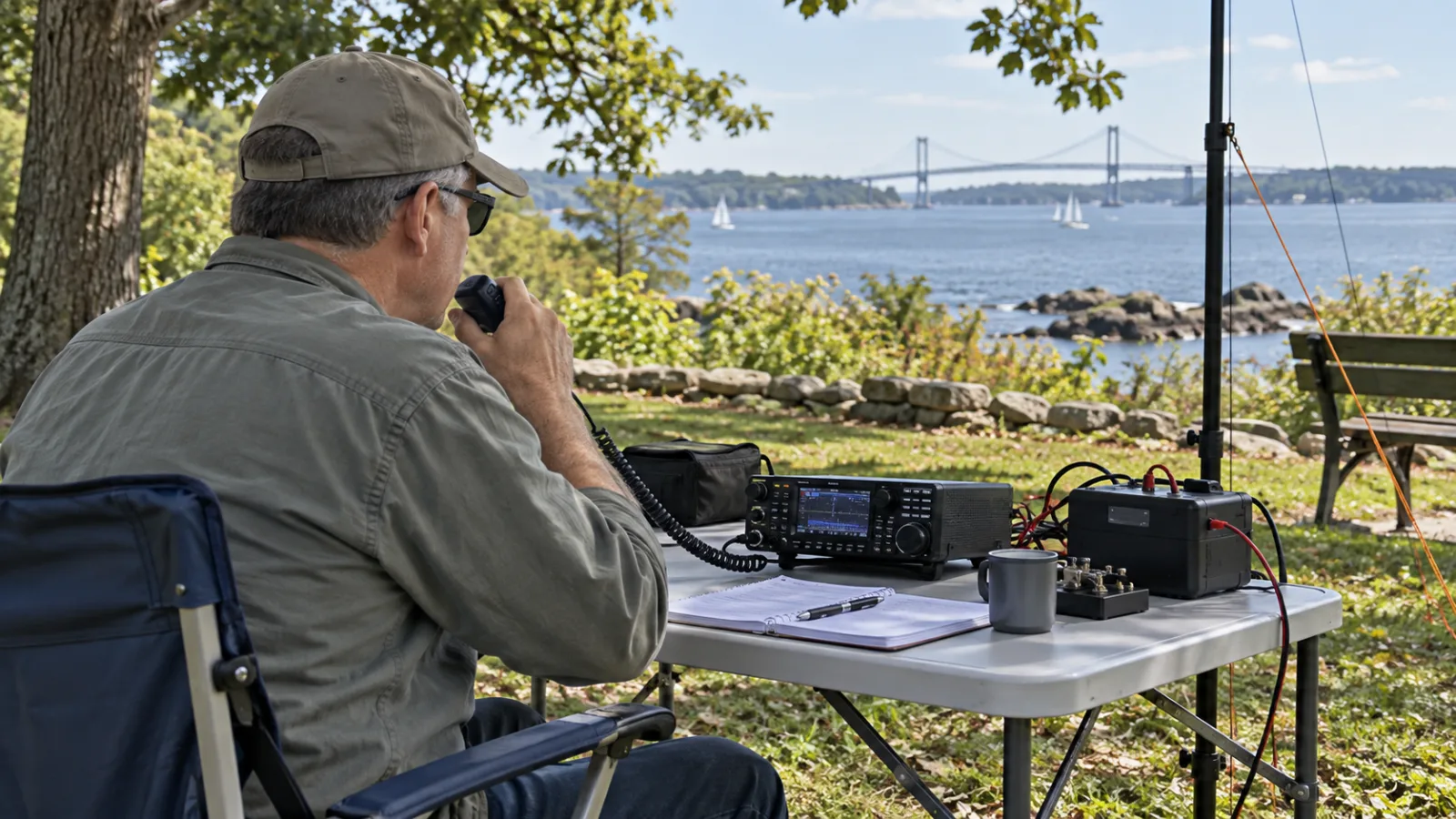
The event is being coordinated through the community-run Rhode Island POTA site. Its schedule and progress pages are useful planning tools, but the site explicitly says that it is not an official Parks on the Air property. POTA’s own documentation remains the authority for rules, accounts, spots, logs and award credit. That distinction matters: an event page can tell you where an operator plans to be, while only a valid activation and an accepted log can settle whether the activity counts.
This is a different operating challenge from a contest. There is no single exchange, no universal frequency plan and no guarantee that a published time will produce a contact. The best results will come from treating the weekend as a live coordination exercise: prepare a short list, watch current spots, keep the station simple and record enough detail to resolve mistakes later.
What is happening, and what is not
The public event page lists September 11–13, 2026 as the main weekend, with early activations beginning September 10. Amateur Radio Daily reported that the operating period starts at 0600 Eastern Daylight Time on Friday, September 11 and ends at 1800 EDT on Sunday, September 13. In UTC, that is 1000 UTC on Friday through 2200 UTC on Sunday. The Rhode Island POTA schedule uses Rhode Island time for its event-day filters, so an operator should verify the selected time zone before turning a displayed window into a station alarm.
The headline number is 61 parks. It should not be read as a promise that every park will have a continuous signal, a fixed operator or an uninterrupted three-day presence. The event page says that activation windows are estimates, that parks are not reserved and that additional activations are welcome even at parks already scheduled. A listed park can therefore have several useful opportunities, a late change or no contact at all.
That uncertainty is a feature of portable radio, not a defect in the event. Weather, access, battery capacity, family commitments, local noise and a crowded band can all change an activation plan. Hunters should use the schedule to decide what to watch, then use live POTA spots or HamAlert to decide what to call. Activators should publish a realistic plan, update it when it changes and avoid making a planned time sound like a booking.
Parks on the Air is a portable operating program. In plain terms, an activator takes a station into a qualifying park and makes contacts; a hunter contacts that station from elsewhere. POTA’s getting-started documentation says that activators and all their equipment must be within the park boundaries, that activators need a POTA account and that a valid ADIF log must be submitted after the operation. It also asks operators to follow the law, leave no trace, follow ranger instructions and be courteous in a public space.
The best strategy for hunters is a short, ranked list
A hunter can easily turn this weekend into an exhausting attempt to monitor every park at once. The better approach is to build a ranked list before the first operating window. Start with the parks needed for your own Worked All RI progress, then add parks that appear likely to have limited coverage, and finally keep a few easy alternatives for when propagation or scheduling goes against you.
The Rhode Island POTA site offers a hunter checklist and can use an imported official POTA Hunted Parks CSV to identify missing parks. That turns a vague goal into a sequence of decisions. If you need twelve parks, for example, you do not need to chase every spot; you need a method for recognizing which twelve are still missing and which ones are most likely to appear during your available hours.
For each target, record the park reference, name, likely date and time, and any planned band or mode shown in the schedule. Do not treat the planned band as fixed. It is a starting point for monitoring. A portable operator may move from 20 meters to 40 meters after the first run of contacts, may switch from SSB to CW or a digital mode, or may lose a frequency because another station begins using it.
Live spotting is the decisive layer. The Rhode Island event page directs hunters to current POTA spots for recent frequencies and modes, and its schedule warns that live activity can differ from the plan. POTA’s own hunter guide describes the spotting page as the place to see who is on the air, which park they are in and what frequency and mode they are using. The practical sequence is simple: open the live view, check the spot age, tune to the frequency, listen before transmitting and call only when the activator is actually there.
A stale spot is not proof that the station has disappeared, but it is a reason to listen carefully. A fresh spot is not proof that the frequency is clear at your location. HF conditions and local interference can differ sharply between two hunters, even when they are only a few hundred kilometres apart. If the frequency is occupied by an ongoing QSO, wait. If the activator is calling for a specific region, follow that request. The quickest way to lose a rare park is to turn a readable frequency into an undisciplined pileup.
When a station is busy, send the minimum useful call. Give your call sign once, clearly, and wait. If the activator asks for repeats, respond with the requested information rather than adding a long greeting. A short exchange is not impersonal; it is how a small portable station can give dozens of hunters a fair chance.
A three-window monitoring plan
The weekend crosses several normal day and night periods in North America. That makes a fixed band assumption especially weak. Instead, divide your listening into three kinds of window.
The first is the local daytime window. Start with bands that are commonly useful for regional and medium-distance contacts, then follow the activator’s spot rather than forcing a preferred band. The second is the evening or night window, when lower-frequency paths may become more useful but noise and regional congestion can also rise. The third is the transition around local sunrise or sunset, when a station may move bands quickly as the ionosphere changes.
This is not a propagation forecast for every park. It is a way to avoid spending an hour on one band because it worked earlier. NOAA’s Space Weather Prediction Center explains that HF signals between 1 and 30 MHz are affected by changes in ionospheric density and structure; those changes can alter the path or block communication. A POTA spot gives you operational information, while the state of the band tells you how much of that information is usable from your location.
Keep a live scratch log even if you plan to rely on the activator’s submitted log for award credit. Note the UTC date, park reference, call sign, frequency, mode and whether the contact was complete. A simple spreadsheet is enough. The purpose is not to duplicate the official record; it is to prevent a later memory error when several parks use similar call signs, the same band or a rapid sequence of spots.
For digital contacts, record the mode precisely enough to distinguish the application’s mode label. FT8, FT4, JS8 and other weak-signal modes are not interchangeable just because they all appear on a waterfall. Do not assume that a visible trace is an activator until the call sign, park reference and contact sequence make sense. If you use WSJT-X, JTDX or another decoder, keep the ordinary station discipline: decode only what is actually received and do not transmit outside the privileges and band segments permitted by your licence and jurisdiction.
The activator’s problem is logistics, not just radio
The most useful activation is usually the one that can be completed cleanly. A compact station with a charged battery, a modest antenna and a dependable logging method is more valuable than an ambitious station that takes so long to assemble that the operating window disappears.
Before leaving, confirm the park’s access information from the relevant official park or land-management source. The community event page is an operating calendar, not a substitute for admission rules, parking restrictions, opening hours, reservations, seasonal closures or local instructions. The Rhode Island State Parks website provides official park information and safety notices, while the event page itself advises operators to verify conditions and respect the park space.
Choose an antenna that fits the site and the time available. A resonant portable dipole, a simple end-fed installation with an appropriate matching arrangement or a compact vertical can all work when installed safely and within the location’s rules. The key question is not which antenna has the best reputation online. It is whether you can deploy it without creating a trip hazard, blocking a path, stressing a tree or violating a park instruction.
Keep the feed line and supports visible enough to avoid surprising other visitors. Do not attach equipment to vegetation in a way that damages it. Do not place a radial, guy line or counterpoise across a walkway. If a support must be near a public route, move the station or choose a lower antenna. A contact is never worth making a public space less safe.
Battery planning deserves the same attention as antenna planning. Estimate the radio’s receive current, transmit duty cycle, logging device, phone hotspot and any voltage-conversion losses. SSB voice can have a moderate average duty cycle, while digital modes can keep the transmitter active for much longer. Leave reserve capacity for a delayed departure, a cold battery or a second operating window. Use protected, correctly rated equipment and keep lithium batteries out of direct heat; a portable activation is not improved by running a power system beyond its safe limits.
Bring a fallback logging path. If the laptop fails, you should still be able to write down UTC time, call sign, park reference, frequency and mode. If the phone loses service, you should still know how to operate and preserve the log. If the event spot cannot be posted immediately, begin calling only when the frequency is clear and use the official POTA process as soon as the connection returns. A spot helps hunters, but it does not replace the contact record.
Frequency discipline matters more than a perfect schedule
Activate All RI does not publish one universal frequency plan in the sources available for the event. Planned bands and modes can appear in individual activation windows, but the event schedule states that those windows are estimates and directs operators to current spots for real-time information. That is the correct level of precision for a multi-operator portable weekend.
An activator should find a clear frequency according to local band use, announce the intended mode and listen again before beginning a run. A frequency that was clear thirty seconds ago may no longer be clear after a spot propagates through the network. If you are calling CQ, leave enough space around your signal for adjacent activity and keep the audio clean. If the pileup becomes difficult, slow down, ask for partial call signs or move a few kilohertz only after listening and checking local practice.
Hunters should never assume that a spot grants ownership of a frequency. The operator may have moved, another QSO may already be under way or a different station may be using the same frequency in another part of the world. Listen for the activator’s call sign and park reference. If you cannot copy the exchange, wait for a better opening instead of filling the channel with repeated calls.
Digital operators face a slightly different version of the same problem. A decoder can show a signal that is too weak, distorted or incomplete for a reliable contact. A waterfall line is evidence that energy is present, not evidence that the exchange is valid. The software’s logged contact should match the actual calls and time. Keep clocks synchronized within the requirements of the mode, but do not let an automatic log turn an uncertain decode into a claimed QSO.
Logging is where a successful weekend becomes useful
POTA’s documentation says activators must submit an ADIF log after the activation and that the log must contain the required fields described by the program rules. The exact acceptance and award process belongs to POTA, so operators should consult the current official rules before the event rather than rely on an old logging template.
At minimum, preserve an unedited station log with UTC date and time, call sign, frequency, mode and park reference. Include the operator’s own call sign and any other fields required by the software or POTA workflow. If the station uses multiple parks on a route, start a new activation record when appropriate and make the boundary and timing clear in your notes. Do not merge contacts from different locations merely because they were made during the same outing.
A paper log is a legitimate backup, but transcribe it carefully. Common errors include local time entered as UTC, a missing leading zero in a frequency, a mode label that the receiving system does not recognize and a park reference copied from a search result rather than the official reference. Before uploading, inspect the ADIF file as text or open it in a trusted logger and check the first and last contact. One bad field can make a whole troubleshooting session harder than a two-minute review.
Hunters should also keep their own notes until the activator’s log has been processed. POTA’s documentation says that the program relies on activator logs and that hunter progress is based on contacts submitted by activators. A contact missing from your account does not automatically mean that you did something wrong; the activator may not have uploaded yet, may have an error to correct or may not have copied your call sign. Your contemporaneous notes are the evidence needed for a polite, specific follow-up.
How to handle a crowded park
An event designed to cover every park will concentrate attention on the least common references. That can create a pileup even when the station is running low power. The activator can make the experience more efficient by announcing a repeatable rhythm: call sign, park reference, signal report, acknowledgement, next call. Long conversations can happen after the activation run or on a separate frequency.
Hunters can help by avoiding two habits that feel efficient but are not. The first is calling continuously after the activator has already acknowledged another station. The second is sending a full exchange before the activator has asked for it. Both increase the chance that calls overlap and the operator has to repeat a contact. Listen to the cadence and fit into it.
If you hear a partial call, wait for the operator to request it or send only the missing portion when appropriate. Do not correct another station’s call sign in the middle of an exchange unless the activator asks for help. On voice, phonetics should clarify a weak call, not become a speech. On CW and digital modes, accuracy is more useful than speed.
The organizers also invite additional activations at parks that are already scheduled. That can reduce pressure on one operator and give hunters a second chance, but only if the second station follows the same practical rules: a real location inside the park boundaries, a valid station setup, a clear log and respect for other users of the site. Duplicate coverage is not wasted coverage when it spreads the demand across different times, bands or modes.
What newcomers can learn from the weekend
A hunter does not need an elaborate portable station to participate. A valid amateur licence, a receiver or transceiver appropriate to the operator’s privileges, a way to see current spots and a quiet listening habit are enough to start. POTA’s own guide says the simplest path is to contact an activator from anywhere, follow the law and use the spotting page to find current activity.
For a newcomer, the event offers a manageable lesson in operating etiquette. Find a live spot, listen to the exchange, identify the moment when the activator is accepting calls and give your call sign once. If you are not heard, wait. If the operator asks for a repeat, answer clearly. That sequence teaches more than pressing the transmit button repeatedly.
It is also a useful introduction to the difference between a schedule and a spot. A schedule describes intention. A spot describes observed or reported activity. Neither one replaces listening. That distinction applies well beyond POTA, including contesting, special events, emergency exercises and weak-signal digital work.
A first activation is possible with simple equipment, but it should not be improvised around safety rules. Check the site, keep the antenna away from people and power lines, secure the station and follow ranger instructions. If local conditions do not permit a safe deployment, hunt from home instead. There will be another activation window; there is no good reason to turn a hobby contact into an avoidable incident.
A compact checklist for September 11–13
Before hunting, import or review your POTA hunted-parks history, rank the Rhode Island references you need, bookmark the official POTA spots page, check the Rhode Island POTA schedule in the correct time zone and prepare a UTC log. Keep the event page open for context, but use live spots for the operating decision.
Before activating, confirm access and boundaries through official local information, charge the battery, test the radio and antenna at low power, synchronize the station clock, prepare a backup log and publish only a time window you can reasonably meet. Leave room in the plan for a band change and for an unexpected delay.
During the contact, listen before transmitting, use the published mode only as a starting point, obey the band plan and licence conditions that apply to your jurisdiction, keep exchanges short when a pileup forms and write down the contact in UTC. If conditions or public use make the site unsuitable, stop and relocate or end the activation.
Afterward, inspect the log, preserve the original copy, generate a valid ADIF file and upload it through the official POTA process. Hunters should wait for processing before treating the result as final, while activators should keep their records until the upload has been accepted and any questions are resolved.
The useful takeaway
Activate All RI is best understood as a distributed operating weekend, not as a promise that one web page can make 61 parks appear on demand. The event’s value comes from the connection between a local operator with a workable portable plan and a hunter who is prepared to listen, adapt and record the contact correctly.
If you are chasing parks, narrow the problem to the references you still need and follow live activity. If you are activating, make the station reliable, publish an honest window and protect the public space around it. Keep the official POTA rules above the community schedule, and let the radio—not the headline number—decide what was actually heard and logged.
Sources and date context
This article was prepared for September 11, 2026. The Activate All RI event page and schedule were checked for the September 11–13 dates, the 61-park objective, the early-activation note, the Rhode Island time-zone guidance and the distinction between planned windows and live spots. Amateur Radio Daily was used for the announced 0600 EDT Friday start and 1800 EDT Sunday end. POTA’s official documentation was used for the hunter and activator workflow, boundary, conduct and ADIF-log requirements. NOAA’s Space Weather Prediction Center was used for the explanation of why HF paths can change with ionospheric conditions.
Related articles
Devices
Find a customer's trackers, distinguish service activation from data reception, and check the latest available position. Learn what happens when you activate a device from the hosting panel.
Kimi K3 Is a Router Test, Not a Drop-In Claude Replacement
Moonshot’s new 2.8T model gives AI teams leverage, but the real decision is cost per completed task, data policy, routing, and whether the promised weights become usable.

Slotstream makes a 104 GB local LLM a Mac SSD problem worth testing
The new MIT runtime streams Qwen3.8-Flash-Next experts from SSD, showing a clever path around memory limits — with speed, disk and license caveats.

Customers
Create customer accounts, check their website, provider, plan and currency, and manage access. Understand manual top-ups and the difference between deactivation and deletion.
Comments
Sign in to comment.
No comments yet.