Shelly Wall Display as a Matter Controller: Useful Upgrade, Not a Hub Replacement for Every Home
Shelly's Wall Display firmware 2.8.0 makes some panels Matter controllers and Matter devices. The useful part is local room control; the catch is Thread, wiring, and platform expectations.

Shelly's new Wall Display Matter update is easy to misread. The headline sounds like a small wall screen has become a universal smart home hub. That is close enough to be tempting and far enough from the full truth to cause bad purchases.
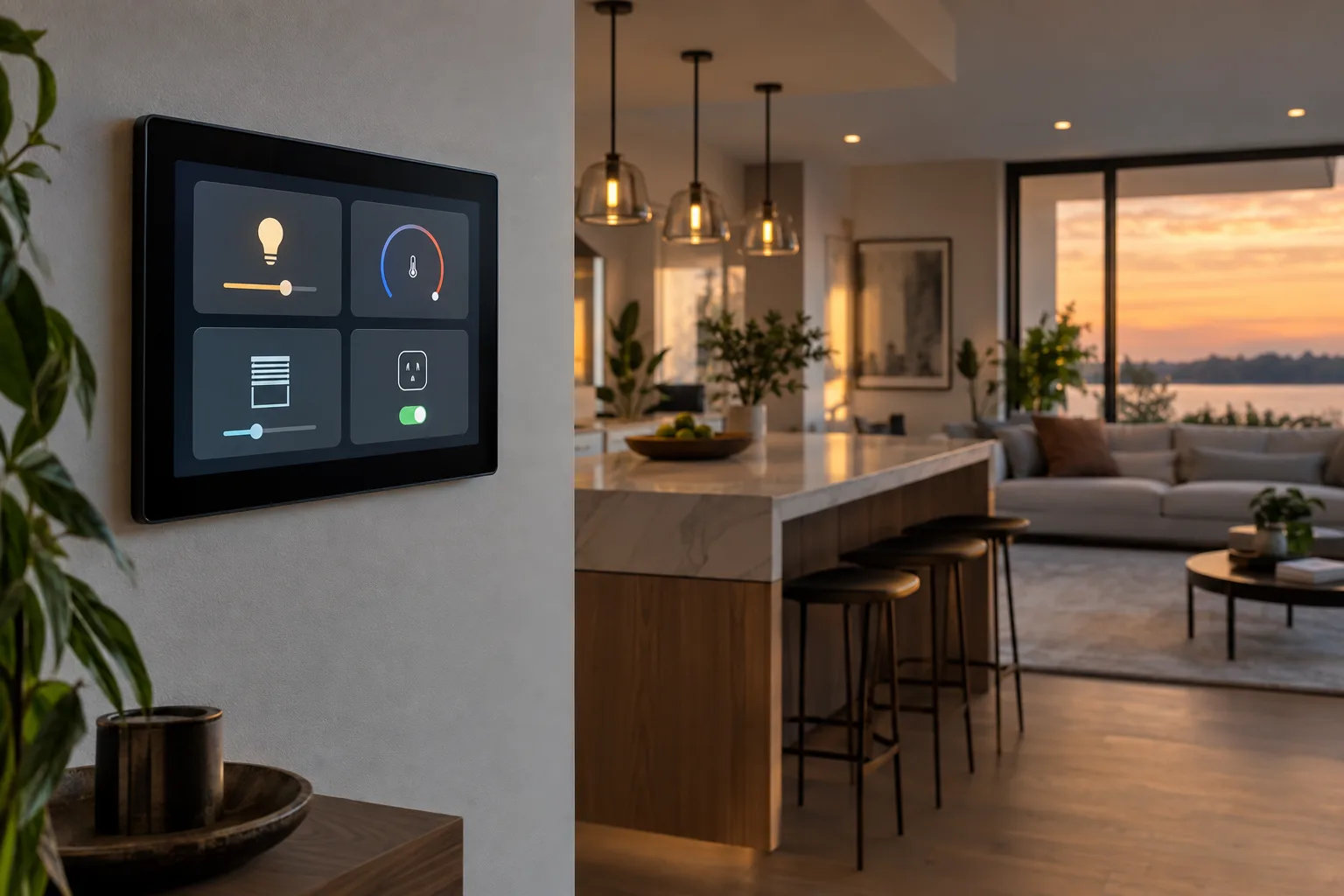
With firmware 2.8.0, Shelly says several newer Wall Display models can act as both a Matter controller and a Matter device. In plain terms, the panel can add and control supported Matter lights, plugs, sensors, fans, thermostats, covers, blinds and shades from different manufacturers. At the same time, the panel can expose its own relay, dimmer and thermostat functions to Apple Home, Google Home, Amazon Alexa, SmartThings or Home Assistant. That is a meaningful step for a wall controller. It is also not a magic replacement for every hub, app or radio in the house.
The practical angle is this: a wall panel is most useful when it reduces everyday friction in one room. It should make lights, shades, climate and a few scenes obvious to anyone standing there. Shelly's update can help with that, especially in homes already using Shelly relays or looking for a fixed control point that does not depend on somebody's phone. But buyers should check the hardware model, the device mix, Thread requirements, wiring reality and backup control plan before treating the panel as the new center of the whole smart home.
What Shelly actually announced
Shelly announced the Wall Display Matter update around IFA 2026. The official media-kit page says firmware 2.8.0 brings two Matter roles to Wall Display X1i, X2i, XL, U1, S1, S2 and XT. These models can become Matter controllers, meaning they can commission and operate supported Matter devices. They can also become Matter devices, meaning other Matter ecosystems can add the panel's own functions.
Older hardware is more limited. Shelly says the first-generation Wall Display and Wall Display X2 can control Matter devices that are shared from a newer panel, but they do not receive the full controller-and-device role. That distinction matters if you are buying second-hand hardware or if you already have an older display installed. The update is not simply a universal software gift for every Shelly screen.
Shelly also says Thread devices still need a Thread Border Router. This is the sentence that prevents the update from becoming a simple hub replacement story. Matter can run over Wi-Fi, Ethernet and Thread. A Wall Display that can commission Matter devices is not automatically the radio bridge for low-power Thread sensors and locks. If the device you want to add says Matter over Thread, your home still needs a border router such as a compatible HomePod, Apple TV, Nest Hub, Nest Wifi Pro, Home Assistant Thread setup, or another supported device.
There is another timing detail. Shelly's announcement says Shelly App control, historical data and cloud scenes for Matter devices are planned for Premium users later in September. That means some of the neatest remote-app conveniences are separate from the local Matter control story. For some homes that is fine. For others, especially those trying to avoid another subscription-shaped corner of the smart home, it is worth noticing before the panel goes on the wall.
Why the two Matter roles are useful
Matter terminology can make normal decisions sound more complicated than they are. A Matter controller is the thing that adds and manages Matter devices for an ecosystem. The Connectivity Standards Alliance explains that controllers are often built into smart speakers, displays, routers, TVs and hubs. A Matter device is the product being added, such as a light, lock, sensor or thermostat.
Shelly's interesting move is putting both roles in the same wall panel. The controller role lets the panel bring third-party Matter devices onto its own screen. The device role lets the rest of your home see the panel's local hardware. In a hallway, kitchen or living room, that can clean up a common annoyance: the switch on the wall controls one circuit, but the room now contains lamps, shades, a fan, a thermostat and sensors from several brands.
Used well, the panel becomes a room console. Someone can walk up and change a scene without knowing which app owns which bulb. The thermostat tile can show the room temperature. A relay or dimmer can still handle the physical circuit. A shade or plug can be reachable from the same glass surface. That is the kind of smart home improvement that matters because guests, children, landlords, partners and tired adults do not want a lecture about ecosystems before turning on a light.
The reverse direction is just as important. If the Wall Display is added to Apple Home, Google Home, Alexa, SmartThings or Home Assistant as a Matter device, the rest of the system can use the panel's exposed functions. That means you are not forced to choose between Shelly's screen and your household's existing app. In theory, the panel can be both the thing on the wall and one component in the larger automation setup.
The catch: Matter controller does not mean every-radio hub
The smart-home market often uses hub as a fuzzy word. In Matter, it helps to separate three jobs. A controller manages Matter devices. A Thread Border Router connects Thread devices to the IP network used by the rest of the home. A bridge translates older ecosystems, such as some Zigbee product families, into Matter so they can appear in Matter-capable apps. One box can do more than one of those jobs, but the jobs are not the same.
Shelly's Wall Display update addresses the controller and device roles. It does not remove the Thread border-router requirement. If your plan is to add a Matter-over-Wi-Fi plug, a Wi-Fi light or another supported Wi-Fi Matter device, the panel may be enough for that particular local setup. If your plan is to add Thread sensors, Thread locks or Thread thermostats, you still need Thread infrastructure.
Home Assistant's own Matter and Thread documentation is a useful reality check here. It notes that Thread devices need a border router, and that Thread border routers route packets between the Thread mesh and the local network. The border router does not itself control devices; control happens at the application layer through Matter or another protocol. Home Assistant also warns that homes can end up with separate Thread networks from different vendors if credentials are not shared or joined correctly.
That is where a lot of Matter frustration still lives. The logo on the box does not tell you enough. You need to know whether the device is Wi-Fi Matter or Thread Matter, which controller you will use first, whether your phone can commission it cleanly, whether your border router is close enough, and whether your main platform can share the device afterward. Shelly's update adds another control surface, but it does not erase that setup work.
Where the Wall Display makes the most sense
The strongest use case is a room that already has a wall switch position in the right place and a reason for fixed control. A kitchen with ceiling lights, under-cabinet lighting, a blind, a ventilation scene and a thermostat is a better candidate than a bedroom where a cheap button beside the bed would do. A living room with several lighting layers is a better candidate than a storage room with one lamp.
It also fits households where phone-only control has failed socially. The smart home can be technically impressive and still annoying if the person in the room cannot operate it without asking the installer. A wall screen gives the home a public interface. Matter support can make that screen less brand-bound, so the panel is not just a Shelly remote for Shelly devices.
Another reasonable use case is a Shelly-heavy home that wants a cleaner way to bring in a small number of Matter accessories. If your relays, dimmers and sensors already live in the Shelly world, a Wall Display can become a natural local dashboard. The Matter update means you can consider supported devices from other manufacturers without giving up the wall interface.
Home Assistant users may see a different appeal. Shelly devices already have a Home Assistant integration, and the Wall Display line has supported local web and dashboard-style uses. The Matter update gives another path for exposing selected functions or pulling supported Matter devices into a panel. But it should be treated as one integration path among several, not automatically the cleanest one for every device. Native integrations, MQTT, local APIs and Matter each have different strengths.
Where it may disappoint
It may disappoint anyone expecting a single purchase to rationalize a messy smart home. Matter improves interoperability, but it does not make all device features portable. A Matter light may expose basic on, off, brightness, color temperature or color controls, while special effects still live in the manufacturer's app. A thermostat may expose the useful everyday controls but keep deeper scheduling, calibration or energy features elsewhere. Cameras remain especially fragmented across ecosystems.
It may also disappoint renters or anyone uncomfortable with in-wall electrical work. Shelly's own Wall Display product page describes replacing a light switch and connecting live, neutral, switch input and output terminals. It also says installation should be handled by a qualified electrician. That is not a small detail. A wall panel can be elegant, but mains wiring, local electrical code, box depth, neutral availability and load ratings decide whether it belongs in a given location.
There is a simpler path for many homes: leave the wiring alone and add a battery scene button, a tabletop display, a smart speaker, or a phone widget. Those options are less polished, but they can be safer and easier to reverse. A fixed in-wall controller makes sense when it will be used often enough to justify the installation, not merely because the software update is interesting.
It may also disappoint people who want a fully offline smart home but still rely on app-specific cloud features. Shelly's local web interface documentation says the Wall Display can be configured through a browser on the same Wi-Fi network without internet or Shelly Cloud. That is good. But remote access, historical data, cloud scenes and some premium features are a separate question. Before buying, decide which functions must work if the internet is down.
A buying checklist before you update or install
Start with the exact model. The full Matter controller-and-device update is for Wall Display X1i, X2i, XL, U1, S1, S2 and XT. If the listing simply says Wall Display or Wall Display X2, assume it is more limited until the seller proves otherwise. Model names are too easy to blur in marketplace listings.
Then list the devices you expect the panel to control. Split them into Wi-Fi Matter, Thread Matter, Shelly-native, Zigbee through a bridge, cloud-only devices and non-smart loads on the panel's relay or dimmer. If most of your target devices are Thread, budget for Thread coverage. If most are Zigbee behind a Philips Hue, IKEA Dirigera, Aqara or other bridge, check how that bridge exposes them to Matter and whether the features you need survive the trip.
Check what the household will use as the main app. If Apple Home is the family interface, confirm which HomePod or Apple TV acts as the home hub and whether the Wall Display's exposed functions are enough. If Google Home is the family interface, confirm border-router and controller support in your specific hardware. If Home Assistant is the main system, decide whether Matter is the right path or whether the Shelly integration gives better control and diagnostics.
Think about commissioning order. Matter's multi-admin design allows devices to be shared across ecosystems, but real homes still run into phone, Bluetooth, mDNS, IPv6, router and border-router issues. Add one device, test it, share it if needed, and only then move to the next. A wall panel installed before the network is stable can become a very expensive troubleshooting screen.
Finally, decide what happens when the screen is unavailable. A reliable room should still have a physical fallback for essential lighting. If the Wall Display controls a relay, make sure the underlying switch behavior is acceptable. If it mostly triggers scenes, make sure there is another way to operate the same lights and shades. Smart-home convenience should not remove the obvious control path from a room.
Firmware updates deserve a slower rhythm
A Matter controller on the wall is security-sensitive. It helps admit devices to the home and may expose controls to other ecosystems. Shelly's announcement says the panel checks Matter device certificates against a revoked-certificate register published by the Connectivity Standards Alliance during setup. It also notes that the register is only as current as the last firmware update. That creates a familiar trade-off: updates fix bugs and carry security data, but major smart-home updates can also disturb working rooms.
For a newly installed panel, update before you build the room around it. For an existing panel controlling important lights or heat, read the release notes, update one non-critical panel first if you have several, and avoid doing it right before guests arrive or before leaving home. That sounds boring because it is. It is also how smart homes stop becoming evening projects.
Forum history around wall displays in general shows why caution is reasonable. Users have previously discussed failed firmware checks, Home Assistant dashboard loading issues and local-network oddities. Those older threads are not evidence that firmware 2.8.0 has those specific problems. They are a reminder that a wall controller sits at the intersection of firmware, Wi-Fi, local discovery, certificates, dashboards and household expectations. Test the path you personally depend on.
Privacy and cloud dependency
The best part of this update is local control. Matter is designed for local communication, and Shelly says commissioning, control and automation of Matter devices happen on the local network on the panel itself, with cloud available for users who want remote app access, history and cross-home scenes. That is the right direction for household devices that should not need a distant server to respond across the room.
Still, local does not automatically mean private in every practical sense. A wall panel can know which room is occupied, which scenes are used, what temperature is requested, which devices are paired, and when people interact with it. If cloud features are enabled, understand which data leaves the home and which features require an account or subscription. If the panel includes camera tiles or audio features in a broader setup, treat those as separate privacy decisions.
For many households, the reasonable setting is not absolutist. Use local control for the essentials. Enable cloud services only for features you actually use. Keep firmware current. Do not expose the device's local web interface beyond the home network. Put smart-home devices on a well-managed Wi-Fi network, and make sure multicast and local discovery are not broken by overzealous router settings.
Home Assistant users should avoid duplicate control paths
Home Assistant households are often tempted to connect everything every possible way. That can be useful during testing and maddening afterward. A Shelly Wall Display might appear through the Shelly integration, through Matter, through a dashboard shown on the panel, and through devices it controls or shares. Before long, one button appears three times and nobody remembers which path drives the real automation.
A cleaner approach is to assign jobs. Use Home Assistant as the overall automation brain if that is already your architecture. Use the Wall Display as a room interface and local controller for the devices where that makes sense. Avoid creating the same scene separately in Shelly, Home Assistant, Apple Home and Google Home unless you have a clear reason. Duplicate scenes drift. One gets renamed, one changes brightness, one forgets the shade, and the wall screen gets blamed for a design problem.
The 2026.9 Home Assistant release also adds a Matter network map and more activity detail. That is useful context because Matter troubleshooting is moving from blind faith toward visible network and event information. If you run Home Assistant, use those diagnostic views before assuming a flaky Matter device is the Wall Display's fault. Sometimes the problem is the border router. Sometimes it is multicast. Sometimes it is a device firmware issue. Sometimes the automation fired exactly as written, just not as intended.
A practical installation plan
If you already own a compatible Wall Display, the low-risk route is to update, add one simple Wi-Fi Matter device, and watch how it behaves for a week. A plug or lamp is a better first test than a door lock or heating control. Check response time, local behavior when the internet is unavailable, visibility in your main ecosystem, and whether family members actually use the panel.
If you are buying a panel, pick the room before you pick the dream. Verify the switch box, neutral wire, power requirements, size, orientation and local electrical rules. Ask whether the panel will replace a switch people already trust. If so, decide how the physical load behaves when software is restarting. A display that is beautiful but confusing at the front door is worse than a plain switch.
If you are planning Thread devices, solve Thread first. Place border routers where they improve coverage, not just where they look tidy. Avoid building separate vendor Thread islands if your platform offers a way to share credentials or join networks. Use a small number of test devices before buying a drawer full of sensors. The promised mesh only helps if the network is actually one useful mesh.
If you are trying to reduce apps, be realistic about what Matter carries. Keep manufacturer apps installed for firmware updates and advanced settings when needed, but do not make them the daily interface unless they add real value. The whole point of a wall panel is to make common actions boringly reachable.
The verdict
Shelly's firmware 2.8.0 update is a useful sign of where wall controls are going. The better smart home is not just voice assistants, phone apps and invisible automations. It also needs fixed, understandable controls in the rooms where people live. A wall display that can control Matter devices and also appear as a Matter device is more flexible than a brand-locked panel.
But it is not a universal replacement for a Matter hub, a Thread Border Router, a Zigbee bridge, a careful wiring plan or a sane automation design. The update is most compelling for homes that already want an in-wall Shelly control point and have a clear room-level use for it. It is least compelling as an impulse purchase meant to make a messy multi-platform home suddenly simple.
Buy it for a room, not for a slogan. Confirm the model. Respect the wiring. Keep physical fallbacks. Treat Thread as its own infrastructure. Then the Wall Display's new Matter role can be genuinely useful instead of becoming another screen that promises simplicity while quietly adding one more thing to troubleshoot.
Related articles
Shelly Presence Gen4 Is a Room Trial, Not a Matter Shortcut
Shelly’s Presence Gen4 brings mmWave occupancy sensing, Matter over Wi‑Fi, Zigbee, and ten configurable zones to a small USB-powered device. The useful buying question is not whether it says Matter, but whether your room, network, and automation platform can use its presence data reliably.
Do not throw out Zigbee yet: what Matter over Thread tests mean at home
New practical tests and user reports show Zigbee can still feel faster for lights and sensors, while Matter over Thread is a future-facing choice that needs careful setup.
Will your smart home survive when the app disappears?
Wemo’s cloud shutdown is a practical warning for anyone buying smart plugs, bulbs, switches or appliances: the safest smart home is the one whose basic controls do not depend on one vendor server.

Android 17 may make bloatware harder to remove. Check this before your next phone
A reported Android 17 change weakens a long-running non-root debloating trick. For phone buyers, the practical question is no longer just specs — it is how much software control the device leaves you.
Comments
Sign in to comment.
No comments yet.