Home Assistant 2026.11 Changes How Devices Are Named: What to Audit After Updating
Home Assistant 2026.11 keeps entity IDs and automations intact while changing displayed names, child-device structure, custom-card behavior, and template guidance. This practical audit explains what households should check before assuming everything migrated cleanly.
What Home Assistant 2026.11 actually changes
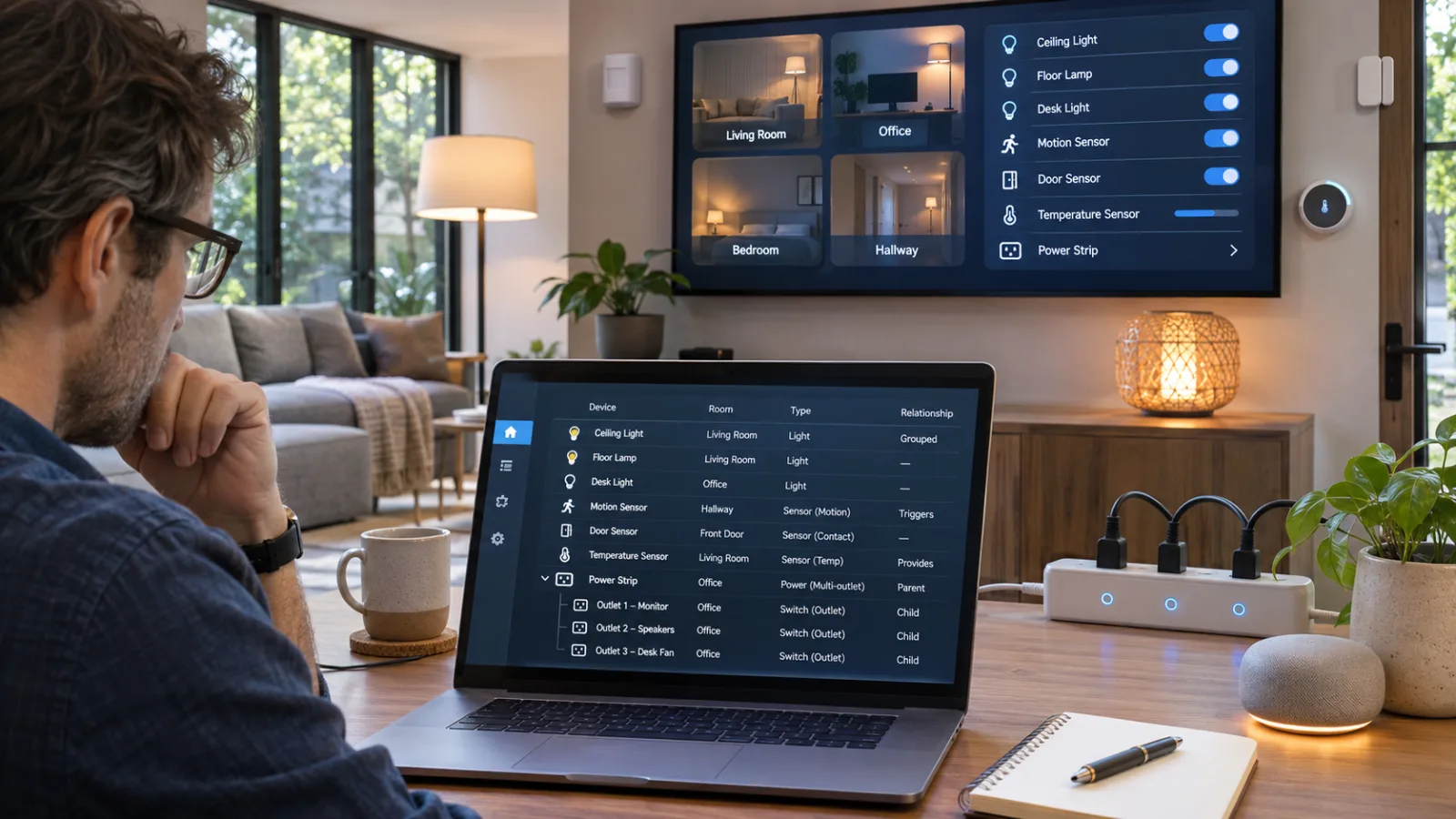
Home Assistant 2026.11 changes how devices and entities are presented and organized, but it is not a wholesale rewrite of the identifiers that existing automations use. That distinction is the starting point for any post-update audit. A household can see different labels in dashboards, settings, and device pages while automations, scripts, scenes, and dashboards that target existing entity IDs continue to refer to the same entities. The update is therefore best understood first as a display and organization change, then as a reason to inspect the places where human-readable names are used directly.
The terminology matters. An area describes a location in the home. A device represents a connected product. An entity represents one capability or data point exposed by that product, such as a light, switch, temperature reading, or power sensor. The entity ID is the configuration-facing identifier used by automations and other Home Assistant references. The entity name, device name, area name, and older friendly-name presentation are human-facing labels. Home Assistant’s newer approach uses those relationships to provide more context instead of forcing every item to carry its location and device information in one undifferentiated name. The official 2026.11 naming announcement presents this as a move toward names shaped by their context.
That context is what users are most likely to notice after updating. A dashboard or settings screen may show an entity together with its device or area, making it easier to distinguish similar items in a larger installation. In another view, the added context may feel repetitive because the room or device is already obvious from the surrounding card layout. Both outcomes can be normal. A changed display string does not, by itself, prove that the entity was renamed at the configuration level or that an automation lost its target. Home Assistant’s documentation makes the boundary explicit: changing an entity’s name does not change its entity ID, while changing the entity ID is a separate operation that can require references in automations or scripts to be updated. The entity-customization documentation also recommends assigning devices to areas so Home Assistant can use that structure in pickers, dialogs, and tables.
The release also makes multi-part products easier to represent as a hierarchy. A supported product can have a parent device and child devices beneath it. A power strip is the useful example: the strip can appear as the parent, while its individual outlets appear as sub-devices with their own entities, such as outlet-level power data. This reflects the physical structure more closely, but it can make the device registry look different after the update. What appears to be a duplicate may instead be a newly visible part of an existing product. The documentation notes that the integration decides whether a device has sub-devices; users cannot create or alter that relationship themselves. Home Assistant’s parent-device guidance describes how the parent and its sub-devices are shown together.
This new structure does not mean every integration presents components in the same way immediately. The release announcement identifies child-device support for Matter and ZHA as still in progress. A home using either integration may therefore have a less complete parent-and-child view than a home whose integration already models all of a multi-part product. That difference should be treated as an integration-coverage question before it is treated as evidence of a failed migration. The naming model can be visible in the general interface even while a particular integration is still catching up with the device relationships it needs to expose.
The practical first pass is simple: compare the labels you now see with the entity IDs used by a few important automations, note any products that gained child entries, and identify screens where names became ambiguous or repetitive. Then test the physical behavior of the most important devices. Home Assistant 2026.11 changes the vocabulary people see first—especially through contextual names and child-device organization—but the meaningful audit is to separate those visible changes from the entity references and integration behavior that determine whether the home still operates correctly.
The compatibility boundary: what should keep working
Home Assistant 2026.11 changes the names people see more than it changes the identifiers the system uses underneath. An entity ID such as light.kitchen_ceiling remains the stable reference used by automations, scripts, scenes, and dashboard configuration. A displayed entity name, device name, area label, or card label is a separate layer that can become more contextual without requiring every reference to be rewritten.
That is the first compatibility check after updating. An automation that targets an existing entity ID should continue to resolve to that entity, and a script or scene built around those IDs should not suddenly stop because the interface presents a different name. The same applies to dashboards whose cards explicitly target those entities. If a card now shows “Kitchen ceiling” instead of the wording you remember, that visual change alone is not evidence that the card has lost its target. Check the entity ID before changing YAML or rebuilding an automation.
The distinction matters because Home Assistant now exposes more naming context in places where users previously saw a flatter label. An entity can be understood in relation to its device and area, while a multi-part product may be represented with child devices. A power strip, for example, may present separate child devices or component-level entries for its outlets when the integration supports that model. Those entries can look duplicated when compared with an older view of the device registry, even though the underlying entities and their IDs remain the references used by existing automations. The official announcement presents this as part of the naming and organization work, not as a requirement to recreate every automation. (Home Assistant: Naming things in Home Assistant, shaped by your feedback)
There is an important limit to that reassurance: child-device support is not uniform across integrations. The announcement notes that Matter and ZHA support is still in progress, so similar multi-component products may appear differently depending on how they are integrated. One device may be shown with a parent and child structure, while another may retain a flatter representation. That inconsistency is a reason to inspect the affected device, not a reason to assume that entity IDs have been regenerated.
Voice control has a separate compatibility cushion. Existing names remain available as aliases for voice integrations, so households do not need to relearn every spoken command immediately because Home Assistant now recommends more contextual names. This is useful for entities exposed to Assist, Alexa, or Google Assistant. Still, aliases are not a substitute for checking what has actually been exposed. If the visible grouping, area assignment, or device structure changes, a voice assistant may present the entity differently even when the familiar command remains valid.
The most likely false alarm is a changed display string. A dashboard card, settings page, voice selector, or device list may show a name that is longer, more contextual, or based on the entity rather than the device. Users can read that as a broken reference because the text no longer matches an old screenshot or notification. Treat the text and the identifier as two separate test results: “Does the interface call it what I expect?” and “Does the automation still point to the intended entity?” are related questions, but they are not the same question.
Custom cards add another layer of uncertainty. Cards that explicitly use an entity ID have a clear target, while cards or templates that derive labels from naming fields may display something different after the release. A custom card can therefore still control the correct light, switch, or sensor while its heading, subtitle, or automatically generated label changes. If a card looks wrong, inspect its configuration and determine whether it is reading an explicit name, a device name, or a friendly-name-style value. Do not infer an entity failure from a cosmetic label change; confirm the card’s entity and test the control.
The same caution applies to integrations that have not yet adopted the child-device model consistently. One screen may show a parent device and its components, while another continues to show separate entities without the same hierarchy. That can make registry searches return entries that appear redundant or make an automatically generated dashboard label differ from the name shown in device settings. Compare the entity ID, area, and actual state or control behavior. If those match the intended hardware, the difference is organizational or presentational. If they do not, the item belongs on the audit list for that integration.
A compact post-update test is enough to separate compatibility from appearance. Pick one important automation, one dashboard card, and one voice command. Confirm that the automation still names the expected entity ID, that the card controls the expected device, and that the spoken command reaches the intended entity. Then inspect any multi-component device whose registry entry looks duplicated and note whether its integration has child-device support.
The safe zone is therefore the existing entity-ID layer, with old voice names retained as aliases. The visible risk is confusion: renamed strings, reorganized device entries, custom-card labels derived from different fields, and uneven child-device support can all look like breakage. Keeping those categories separate turns the first inspection into a targeted compatibility check rather than an emergency rebuild.
The four checks that matter after the update
Start with the parts of the installation where names are treated as data rather than decoration. The first check is the dashboard, especially custom cards. Home Assistant 2026.11 can change the text shown by a card while leaving the entity ID it controls intact. A custom card that reads friendly_name may therefore display a different label from a built-in card, or change again after you rename the device or entity. Open the dashboards used most often and compare both the visible label and the action target. If a card becomes ambiguous, give it an explicit name instead of renaming entities simply to improve one view. Home Assistant’s card-naming documentation supports fixed text as well as separate entity, device, area, and floor components.
This is particularly important on dashboards with repeated sensors, switches, or lights. A card can remain fully functional while its label becomes too long, repeats the room, or no longer distinguishes two similar devices. Check custom cards that use templates or integration-specific attributes, then correct the presentation at the card level when that is all that is wrong. The documentation also recommends assigning devices to areas and using the card name to adjust what is displayed, rather than putting every piece of location context into the entity name. That keeps the underlying organization usable in settings, pickers, and other dashboards as well as in the view being repaired. Home Assistant’s entity-customization guidance explains this separation.
The second check is generated text: templates, notifications, logs, and messages shown to household members. Search YAML and UI-created templates for direct uses of friendly_name. Home Assistant keeps that attribute for compatibility, but the 2026.11 announcement says it is being phased out as the preferred naming source. Use entity_name() when the message identifies a specific function or data point, device_name() when it describes the physical product, and area_name() when the relevant context is the room. The template-function reference defines these functions and the objects they resolve.
Classify the sentence before changing the template. “Power usage is high” is an entity-level message; “the coffee machine is offline” is about a device; “the kitchen is too warm” is about an area. Render each changed template with a real entity and read the result as someone in the household would hear or see it. A template can evaluate successfully while producing a duplicated room name or a phrase that no longer distinguishes two similar devices. The useful test is therefore not only whether the code runs, but whether the resulting notification remains clear after Home Assistant adds contextual names around the object.
The third check is voice exposure. Review the entities exposed to Assist, Alexa, or Google Assistant and test the names people actually use. Existing exposed entities retain their old names as aliases, so a command should not be considered broken merely because the dashboard now shows a different contextual label. Treat that alias as a compatibility aid, however, and still look for collisions: two lights with the same spoken name, a parent device and child outlet that sound alike, or a renamed entity that is clear on screen but awkward aloud. Home Assistant’s voice-alias documentation describes aliases as a way to support multiple names for the same entity.
Test both the intended command and a nearby alternative. Ask the assistant to control the device, then check that a similarly named light, switch, or outlet was not selected. Include locks, alarms, garage controls, and climate equipment in the manual review because a successful voice response does not prove that the correct target was chosen. Check room and device aliases as well as entity names, and make sure only the entities that should be voice-accessible are exposed.
The fourth check is multi-component hardware. A supported power strip may now appear as a parent device with separate child devices for its sockets. Compare the parent with each child, identify the main entity, and verify that every outlet has the correct name and area. A child can be named for its actual function—such as “Kettle” or “Desk lamp”—instead of preserving a technical label such as “Socket 3.” The release announcement says support for child devices is available for Z-Wave, MQTT, ESPHome, some Tuya devices, and other integrations, while Matter and ZHA support is still in progress. Expect the organization to vary until more integrations adopt the model.
For a small-room audit, imagine a home office with one power strip serving a desk lamp, monitor, and charger. Name the physical device for what it is, assign it to the office area, and mark the entity that best represents the strip as its main entity. Give each outlet a distinct function-based name, then inspect the child devices or related entities created by the integration. Use an explicit card name if the default repeats the room or device awkwardly. In a notification, use device_name() for the strip as a whole, entity_name() for one outlet, and area_name() for a message about the office. Finally, expose only the outlets that should be reachable by voice and test that switching the lamp does not affect the monitor.
Work room by room and keep entity IDs unchanged unless there is a separate reason to edit them. The migration is intended to preserve configurations that target those IDs; this audit is about making the names shown, generated, spoken, and attached to child devices agree with the physical layout. Screenshots or exports of critical dashboards can make a gradual cleanup easier to reverse, while a small scope makes any confusing label or voice result easier to trace.
Who should update now, and who should stage the change
For a standard Home Assistant OS installation with ordinary dashboards and supported integrations, updating is reasonable as soon as you have time to verify the home. Make a backup first, choose a controlled window, and check the rooms that matter most afterward. Test lights, climate controls, locks, alarms, and the dashboards used every day. If they behave as expected, there is no need to rename the entire installation. Home Assistant’s own guidance treats naming cleanup as optional: existing names can remain when they are already clear enough.
Stage the update if names are deeply embedded in the interface. Custom cards, hand-built dashboards, YAML templates, mobile notifications, and voice routines can all display names differently from the standard interface. Before updating, save a backup and capture screenshots or exports of critical dashboards. Keep a short list of the commands and notifications that people rely on. This gives you a reference after the update and helps separate a changed label from a broken entity. A different heading on a card is not, by itself, evidence that an automation or device has failed.
YAML-heavy installations deserve a more deliberate review. Templates that present names should move toward the dedicated helpers entity_name(), device_name(), and area_name() where appropriate. That does not mean rewriting every working automation. Leave stable entity-ID references alone, and review the presentation layer selectively: notifications, wall displays, persistent messages, and voice-facing responses are the places where an outdated naming approach is most likely to be noticed. The documentation also makes the important distinction that changing an entity’s name does not change its entity ID, while changing the ID itself can require updates to automations and scripts. (Home Assistant entity customization)
The integration mix should influence how cautiously you proceed. Home Assistant can represent some multi-part products as a parent device with child devices—for example, a power strip whose outlets appear separately—but that structure is determined by the integration. Matter and ZHA child-device support is still in progress, so a household that depends heavily on either should not assume that every component will appear in the same way after the update. Z-Wave, MQTT, and ESPHome users should likewise verify their actual devices rather than extrapolating from another integration. Check that every outlet, sensor, and control remains assigned to the intended room and dashboard. (Naming announcement)
| Installation profile | Approach |
|---|---|
| Standard OS setup | Back up, update, then verify room by room. |
| Custom cards or dashboards | Stage the update and inspect saved screenshots or exports. |
| YAML-heavy templates and notifications | Review name-related templates and change only what needs changing. |
| Matter or ZHA-heavy home | Use a controlled window and verify child-device representation. |
| Safety-critical locks, alarms, or climate automations | Update only when someone can perform manual tests. |
Keep the final verification practical. Test a light from the dashboard and by voice if voice control is used. Check a thermostat in its room view and in the automation that depends on it. Confirm that locks and alarms are assigned to the expected areas and respond correctly to manual control. For a multi-outlet or multi-component product, test each component separately rather than treating a healthy parent device as proof that every child works. Also review entities exposed to Assist, Alexa, or Google Assistant. Older names remain available as voice aliases, but a new contextual display name can still make a spoken command unclear.
The decision is therefore less about whether to perform a complete naming cleanup and more about whether you have time to verify the installation. Ordinary households can update with a backup and a room-by-room check. Customized or safety-sensitive homes should stage the change, preserve references for critical dashboards, and test the devices people depend on most. If a label is awkward, rename it deliberately; if the entity ID and automation still work, leave that stable foundation in place.
Related articles
Wi-Fi smart plugs for heaters, boilers and electric blankets: convenience with electrical limits
A smart plug can be useful for lamps and fans, but heaters, boilers and electric blankets turn convenience into a power-electrics decision.
Do Not Build the Smart Home on One Cloud Speaker
Fresh Google Home problems are a reminder to design smart homes with voice as a convenience, local logic for important routines, and physical fallback for the things people use every day.

Amazon’s Alexa Tablets bring Google Play to Fire’s successor—but the price changes the bargain
Amazon’s new Alexa Tablets solve the Fire range’s biggest software limitation by adding full Android and Google Play. They also cost enough that storage, accessories, subscriptions, support, and competing tablets now deserve a careful comparison.
Should You Buy Amazon’s New Alexa Tablets? Google Play Fixes the Fire Problem, but the 12 Pro Changes the Price Question
Amazon’s new Alexa Tablets finally bring full Android and Google Play to its tablets. That makes the lineup far more usable than Fire tablets, but the best model is no longer a casual-budget purchase.
Comments
Sign in to comment.
No comments yet.