Home Assistant 2026.7 makes automations feel less like homework
Home Assistant’s July release makes automations easier to start, but the useful smart home still needs backups, testing and honest Matter troubleshooting.

A lot of smart homes are not very smart. They are remote controls with better icons.
The owner buys connected lights, a leak sensor, a thermostat, a door sensor, maybe a robot vacuum. Then every small action still happens by hand: open one app for the lights, another for the thermostat, another for the camera, another for the plug. The dashboard looks modern, but the home is still waiting for someone to tap a button.
Home Assistant 2026.7 is interesting because it goes after that problem directly. The July 1 release is titled "Automations that speak your language", and the biggest change is not a new dashboard skin. Purpose-specific triggers and conditions have left Labs and become the default way to start building automations. Instead of asking a beginner to pick a state trigger, understand entity states, compare attributes and choose the right technical primitive, the editor starts closer to a household sentence: when the temperature drops below a threshold, turn on heat; when outdoor motion is detected, turn on a light; when a battery is low, remind someone to replace it.
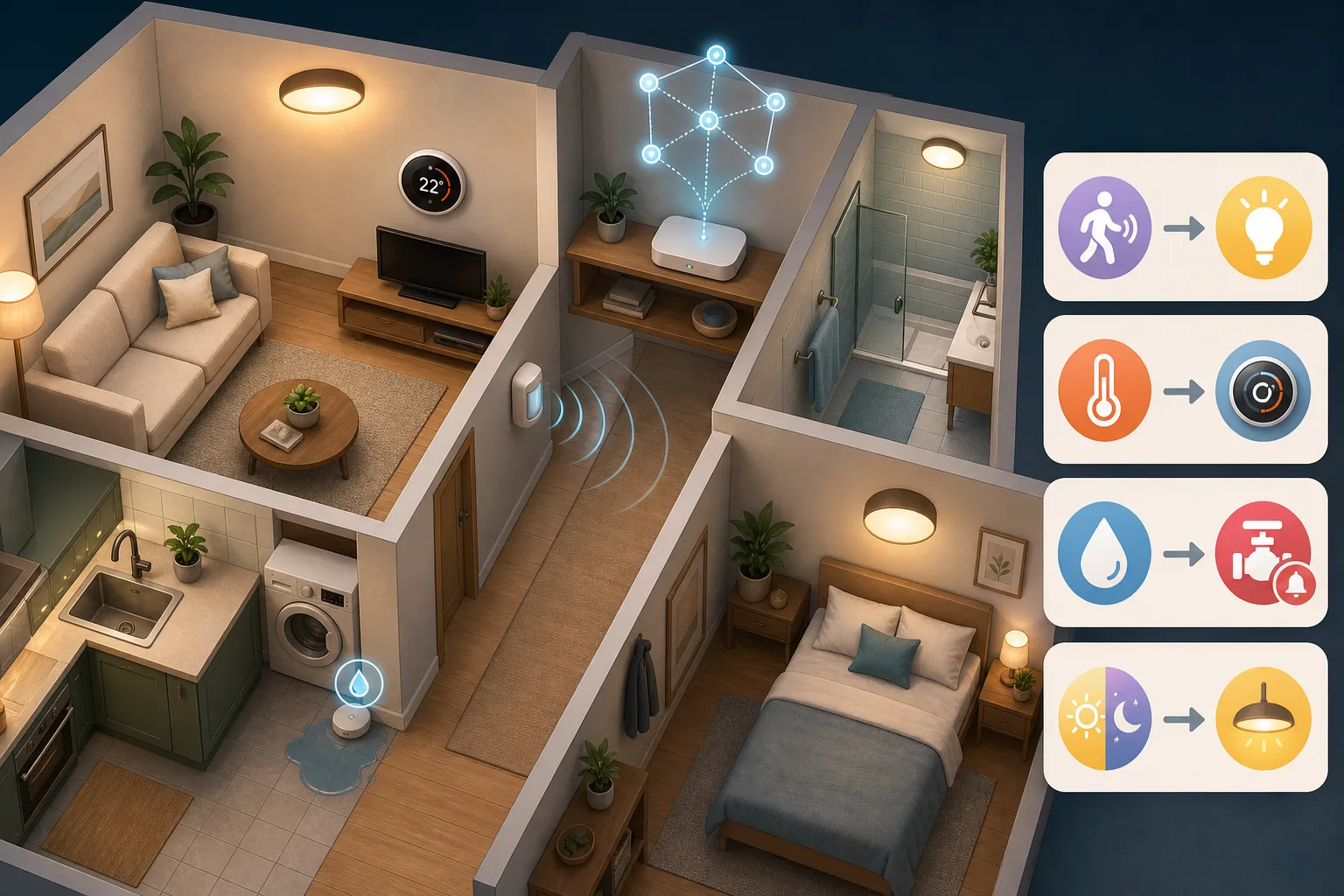
That sounds like a small interface change until you remember what makes a smart home useful. It is not the number of gadgets. It is whether the home can handle boring, repeated moments without turning every resident into the system administrator.
The release also lands next to a second Home Assistant story: the Matter stack is moving to matter.js through Matter Server app 9.0. Home Assistant says the change brings faster startup and recovery, more reliable OTA updates, Matter 1.5.1 support and better visualization of Thread and Wi-Fi networks. That matters because the smart-home promise is still messy at the edges. Devices from different brands can work together, but troubleshooting them often feels like debugging a small network that happens to control your lights.
So the useful reading of Home Assistant 2026.7 is not "now smart homes are easy." They are not. The better reading is this: Home Assistant is trying to hide complexity where it should not burden normal users, while showing it more clearly where it helps fix real devices.
Automations are the point, not the dashboard
Dashboards are useful. They show status, expose switches and make a home feel controllable. But a dashboard is still a remote control. If the best version of your smart home is a prettier control panel, the system has not done much work for you.
Automations are where the value starts. Motion in the hallway turns on a low light at night. The bathroom fan runs after humidity rises and stops when the room dries out. A leak sensor near the washing machine sends an urgent notification and, if you have the hardware, closes a valve. A thermostat reacts to occupancy and temperature rather than a rigid schedule. The house notices that everyone left and switches off forgotten lights and nonessential plugs.
Those are not futuristic scenes. They are the ordinary use cases that make connected devices worth owning. They are also the use cases that Home Assistant has long been good at, if you were willing to learn the system’s vocabulary.
That vocabulary is powerful but unfriendly. Entities, states, attributes, device triggers, numeric state triggers, templates, conditions, helpers, areas, scenes and YAML are not bad ideas. They are the machinery. But a person who only wants "turn on the entry light when the outdoor sensor sees motion after sunset" should not have to start by learning the machinery.
The new purpose-specific flow changes the starting point. The user begins with intent. The editor then maps that intent to the right underlying trigger or condition. The house still has entities and states underneath; Home Assistant has not become a toy. But the first step is less like programming a controller and more like describing a useful household rule.
That is the right direction for a practical smart home. A good automation editor should not force every household member to think like the person who installed the hub.
What changed in 2026.7
Home Assistant had tested purpose-specific triggers and conditions in Labs before. In 2026.7 they become the new default.
The official release notes use a simple phrase: start with what you want, not how it works. That is the whole product shift. A temperature crossing a threshold should feel like a temperature event, not a numeric state puzzle. A low battery should feel like a low-battery condition, not a sensor-value guessing game. An automation tied to a room should not require the user to manually chase one device and one entity at a time if the intent is room-level behavior.
The change also respects the old audience. Existing automations keep working. Generic triggers, conditions, templates and YAML remain. The release notes say plainly that YAML is not going anywhere. That matters because Home Assistant has two very different groups to serve.
One group wants fewer traps. These users do not want to copy YAML snippets from forum posts and hope the entity names line up. They want to build a small number of reliable automations: motion, temperature, leak, presence, battery and time of day.
The other group wants control. These users have spent years building detailed automations that use templates, helpers, edge cases and device-specific behavior. If Home Assistant had treated simplification as a replacement for power-user tools, it would have created a backlash. In 2026.7 the better framing is additive: the default path gets friendlier, while the escape hatches stay open.
There are other release changes too: rebuilt activity and logbook timeline, update-all behavior, dedicated panels for infrared and radio frequency devices, an overhauled ZHA Zigbee device-management experience, time format selection, Raspberry Pi firmware update flow, ten new integrations and patch releases 2026.7.1 and 2026.7.2. Some of those matter to specific setups. The automation editor matters to almost everyone who is trying to move from "connected devices" to a home that actually reacts.
Why this could bring normal people closer to Home Assistant
Home Assistant has always had an awkward public image. It is the best answer for many people who care about local control, privacy and flexibility. It is also famous for making newcomers feel as if they have accidentally joined a hobbyist infrastructure project.
That reputation is not completely fair, but it did not appear from nowhere. A newcomer can install Home Assistant Green, add integrations and see devices appear quickly. The intimidating part often arrives later, when the first useful automation needs to be built. One wrong entity, one confusing state value, one integration-specific quirk and the whole thing feels like homework.
Purpose-specific automation blocks can change the emotional first experience. If someone can build three useful rules in the first evening, Home Assistant stops looking like a science project. It becomes a home system.
That matters for households, not only for individual enthusiasts. A smart home should survive the person who built it. If only one resident understands the automations, the system becomes fragile. When the automation editor uses household concepts instead of internal plumbing, another family member has a better chance of understanding why the bedroom heater turns on, why the hallway light stays dim at night, or why the leak sensor sends an alert.
It also reduces copy-paste automation culture. Forum examples and YAML snippets are valuable, but they can teach people to paste before they understand. A guided editor that starts from intent makes it easier to build a smaller set of automations that match the actual home.
That is healthier. A smart home with five well-understood automations is better than one with fifty copied rules nobody wants to touch.
The complexity did not disappear
The community reaction to 2026.7 is exactly what you would expect from a big Home Assistant release: excitement, relief and bug reports in the same thread.
The official Home Assistant Community release discussion includes praise for the interface changes, but also reports from early upgraders. One user found that an old ZHA quirks file prevented ZHA from starting until the quirk was removed and devices were re-paired. Another said Alexa Devices still would not connect. Another reported a Tesla Powerwall 3 setup failing with a 502 Bad Gateway error. Others asked about removed or missing purpose-specific triggers, including person-related behavior.
GitHub tells the same story in a more technical form. The home-assistant/core repository showed about 89,400 stars and more than 3,300 open issues during this check, with active pushes on July 15. Issue #175890, "ZHA automation is not working in 2026.07+", was open with 23 comments. Issue #173125, asking to roll back entity ID recreation with area ID as prefix, had 189 comments. Issue #175371 about Tesla Powerwall 3 credentials after 2026.7 was also open. PR #175895, which fixed a ZHA device trigger cache problem with quirks, had been merged.
None of that makes the release bad. It is a reminder that Home Assistant is not just an app. It is an operating layer for a live home. It touches Zigbee and Z-Wave radios, Matter controllers, cloud integrations, local APIs, sensors, lights, locks, cameras, thermostats, batteries, backups, add-ons and dashboards. A release can make automations easier and still require careful upgrades.
That is the practical line to hold. If your Home Assistant instance controls only a few lamps, updating on release day is low risk. If it controls heating, locks, leak protection, a security routine or a household that gets annoyed when lights stop working, an update is an operation. Back up first. Read the breaking changes. Update during a safe window. Test the important automations after the restart.
The smart home may be domestic, but the maintenance habit is closer to small infrastructure.
Matter.js is the second half of the story
Matter was supposed to reduce the brand zoo problem. Buy a device, connect it to your preferred ecosystem, stop caring which logo is on the box. That promise is real, but it is not complete.
A Matter device still depends on firmware quality, border routers, Thread network shape, Wi-Fi reliability, controllers, commissioning flows and the exact features the device exposes. When something fails, the user needs more than a standard. They need a way to see what is happening.
Home Assistant’s June Matter post explains why the move to matter.js matters. The old Matter Server app was built with Python and the official C++ Matter SDK. Home Assistant says matter.js became the better fit for its open-source ambitions and is now the foundation for Matter Server app 9.0. The post claims faster startup and recovery, more reliable over-the-air updates, Matter 1.5.1 support, and a clearer view of Thread and Wi-Fi networks. It also says Matter runs in 38% of Home Assistant instances and ranks twelfth among integrations at the time of the post.
That 38% number should not be treated as a permanent market statistic, but it shows why the project is investing here. Matter is no longer a side experiment for Home Assistant users. It is a common enough integration that better diagnostics affect many homes.
The network visualization piece is especially practical. A person with a flaky Thread sensor does not want a speech about standards. They want to know whether the device is on the expected network, whether the border router is reachable, whether the mesh shape is bad, whether the controller recovered after a restart and whether the failure is the device, the radio path or the automation that depends on it.
Matter.js does not magically fix every Matter or Thread problem. It cannot make bad firmware good. It cannot turn a weak mesh into a strong one by itself. But a faster, clearer, more recoverable Matter layer helps Home Assistant become a better troubleshooting tool, not just another controller in the pile.
A smarter home starts with fewer rules
The easiest mistake after a friendlier automation editor is to build too much.
A new Home Assistant user should not start with fifty automations. Start with three to five that remove real friction. Pick scenarios where the right behavior is obvious and the failure mode is safe.
A good first set might look like this. At night, hallway motion turns on a dim light for two minutes. If a leak sensor detects water, send a notification to every adult and turn off a water valve if one exists. If a sensor battery is low, create a reminder before it dies. If the bedroom temperature falls below a threshold in the evening, warm the room. When everyone leaves, turn off lights and selected plugs, but do not touch the fridge, router or anything critical.
Those rules are boring. That is why they are good. The best smart-home automation is not a demo; it is the thing nobody notices because it quietly prevented an irritation.
Use the new 2026.7 editor to express those rules in household language first. Then check the details. Which device reports motion? Which area is targeted? What happens if the sensor is unavailable? Should the automation run only after sunset? Should it avoid waking someone at 3 a.m.? Is there a physical switch or manual fallback?
That last question matters. A smart home should never make basic living harder. Lights should still be usable from a wall switch. Heating should still have a manual path. Door locks, alarms and water shutoffs should not depend on a fragile chain you cannot explain while tired.
If you are upgrading, treat it like maintenance
For existing Home Assistant users, 2026.7 is worth installing, but not blindly.
Make a backup first and know where it is stored. If you use Home Assistant OS or supervised installs, use the built-in backup tools. If you run Home Assistant in Docker, a VM, Proxmox or another custom setup, make sure the backup includes configuration, add-ons or containers, storage and any external services your automations depend on.
Read the release notes and the backward-incompatible changes. Do not skim only the headline feature. If you use ZHA, Matter, a Powerwall integration, voice assistants, infrared or radio-frequency devices, or custom components, look for reports from other users before updating the system that controls your evening routine.
Pick a safe window. Updating at midnight before a trip is not brave. It is just annoying future-you. Update when you can test lights, heating, sensors, locks, cameras and leak alarms.
After the update, test automations by category. Motion and lights. Temperature and heating or cooling. Doors and presence. Water leak alerts. Battery notifications. Critical notifications to phones. Matter and Thread devices. Zigbee or Z-Wave devices. Anything that would cause a real household problem if it silently stopped.
If you use Matter or Thread, do not update every layer at once unless you have time to troubleshoot. Hub firmware, border router updates, Home Assistant Core, Matter Server app, device firmware and app updates can interact in ways that are hard to untangle. Change less, observe more.
Who should try Home Assistant after 2026.7
If you have avoided Home Assistant because automations looked too technical, 2026.7 is a good moment to take another look. The project is still not as simple as Apple Home, Google Home, Alexa or SmartThings on day one. But it offers something those ecosystems rarely offer at the same depth: local control, broad integration coverage and the ability to make the home behave according to your rules rather than a platform’s product plan.
It is a good fit if you are tired of separate apps, willing to spend an evening setting up a hub, and interested in a home that keeps working even when a vendor changes a cloud service. It is also a good fit if you want to mix old and new devices, or if you are already buying Matter, Zigbee, Z-Wave or Wi-Fi devices and want one place to coordinate them.
It is less suitable if you want a zero-maintenance consumer appliance. Home Assistant is easier than it used to be, but it is still a system. You will read release notes. You will make backups. You will occasionally diagnose a device. You may still touch YAML if you want unusual behavior. The 2026.7 release lowers the entry step; it does not remove the staircase.
For many homes, that trade-off is worth it. For some, a simpler platform with fewer choices will be less stressful.
The useful verdict
Home Assistant 2026.7 is not a magic button that makes a home smart. It is a meaningful product move toward the way people actually think about their homes.
People do not think "numeric state trigger for entity climate.bedroom attribute current_temperature." They think "if the bedroom gets cold in the evening, warm it up." They do not think "device trigger cache and ZHA quirk resolution." They think "the motion sensor should turn on the porch light." A smart-home system should be able to translate between those worlds.
The best thing about 2026.7 is that it does not pretend the technical world is gone. YAML stays. Existing automations keep working. Matter diagnostics are getting more visible, not less. Community reports and GitHub issues still show the rough edges of running a local smart home.
That honesty is useful. Smart homes do not become better by hiding every detail. They become better when the detail appears at the right moment. Household intent should be simple. Troubleshooting should be clear. Power users should keep control. Everyone else should be able to build a rule without learning the whole machine first.
That is why this release matters. It moves Home Assistant a little closer to the smart home people thought they were buying in the first place: not a collection of apps, not a wall of YAML, but a home that handles the boring moments and still lets you open the hood when something breaks.
Related articles
Matter got better. Your router can still ruin the smart home
Home Assistant’s 2026 Matter upgrade is real progress, but pairing failures show why buyers should check controllers, Thread border routers, IPv6 and multicast before filling a home with new devices.
Do Not Build the Smart Home on One Cloud Speaker
Fresh Google Home problems are a reminder to design smart homes with voice as a convenience, local logic for important routines, and physical fallback for the things people use every day.
Wi-Fi smart plugs for heaters, boilers and electric blankets: convenience with electrical limits
A smart plug can be useful for lamps and fans, but heaters, boilers and electric blankets turn convenience into a power-electrics decision.
Home Assistant 2026.10 Adds Easier AI Connections: The Security Checks to Make First
Home Assistant 2026.10 makes its MCP connection easier to discover and configure. That convenience also raises a practical question: which parts of your home should an AI client be allowed to see or control?
Comments
Sign in to comment.
No comments yet.